
AI task management explained: Features, tools, and adoption tips

Table of Contents:
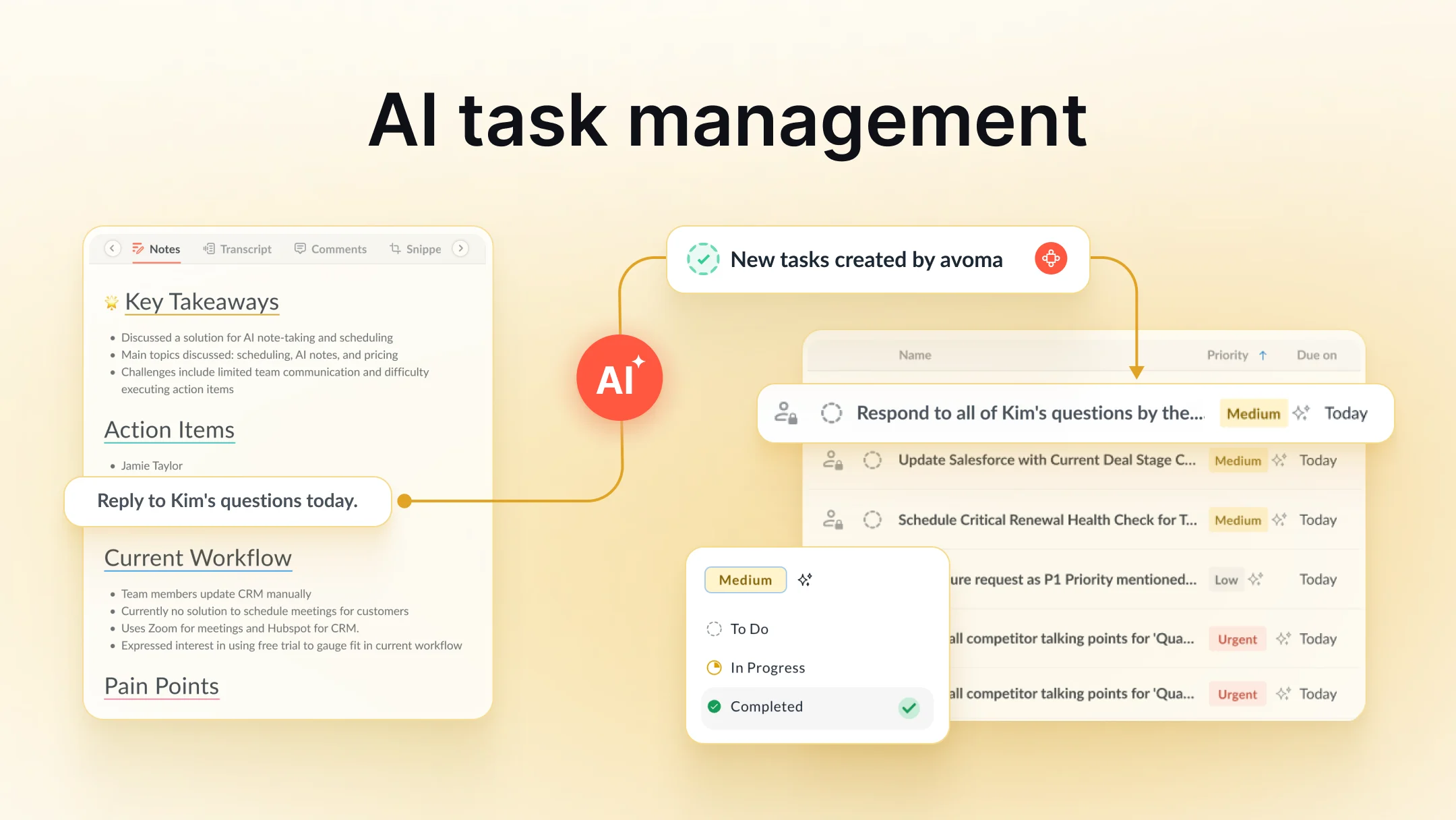
Everyone has a system: color-coded calendars, Kanban boards, Slack reminders, Notion dashboards. And yet, work still slips through. That’s because most task management is brittle. It depends on humans remembering, updating, prioritizing, and re-prioritizing constantly. When team velocity picks up, so does the admin overhead.
That’s where AI task management can help. It stabilizes the workflows your team already relies on. It handles the noise right from recurring updates and shifting deadlines to capacity changes. Humans can focus on momentum-driving work.
What is AI task management: Definition, how it works, and key differences
AI task management uses machine learning to automatically capture, prioritize, schedule, and update tasks based on real-time context. So teams spend less time managing work and more time doing it.
Instead of manually entering every task, chasing deadlines, or triaging priorities, AI task managers predict, organize, and adjust work in real time. These tools don’t just store your to-dos, they think alongside you. They analyze context, detect blockers, learn patterns, and even draft tasks from conversations or documents.

Core capabilities of AI task managers
Core capabilities typically include:
- Intelligent prioritization: Tasks are ranked based on urgency, dependencies, effort, and past behavior.
- Automated task creation: Tasks are generated from emails, Slack, meetings, or CRM updates.
- AI task scheduling: Suggestions update dynamically based on workload, availability, and deadlines.
- Natural-language input: Type “follow up with Sarah about the Q1 deck next Thursday” and it gets scheduled, not just stored.
- Real-time updates: Tasks shift when plans shift. No more stale boards.
Traditional task tools vs. AI task management
Traditional task tools assume you're both the project manager and the executor. AI flips that. It offloads coordination and gives teams more room to think, decide, and build.
Let’s look at what happens when teams adopt this new model.
Benefits of AI task management for teams
When teams use AI to manage tasks, a few things change fast:
- Reduces admin work: Task creation, updates, and deadline shifts happen automatically in the background.
- Prioritizes based on context: Tasks are ranked using urgency, dependencies, and historical patterns, not just due dates.
- Adjusts plans in real time: When inputs change, schedules and priorities update automatically.
- Balances workload: Assignments reflect current capacity and availability across the team.
- Connects fragmented tools: AI links updates from email, Slack, docs, and boards into a single view.
- Streamlines coordination: Task status stays visible, tightening handoffs and shortening feedback loops.
AI task management use cases by team (Sales, Marketing, CS, Product)
Across teams, usage usually clusters around a simple loop: capture work automatically, curate priorities quickly, and lastly execute with fewer handoffs.
Here’s how that plays out by function:
Sales teams
- Tasks are auto-generated from call notes, CRM changes, or pipeline movement.
- AI prioritizes follow-ups based on deal size, stage, or urgency.
- Common actions (sending a follow-up email, booking a call) are pre-filled so reps just review and send.
Marketing teams
- Campaign and asset tasks are pulled in from planning meetings or brief docs.
- Approval queues surface automatically based on dependencies.
- AI flags timeline risks early by detecting blockers in content workflows.
Customer success teams
- Onboarding steps are pulled directly from kickoff calls and customer goals.
- Renewal and risk tasks are prioritized based on ARR, sentiment, or timeline.
- Follow-ups (“share QBR deck,” “schedule check-in”) are pre-drafted and queued.
Engineering and product teams
- Action items from sprint reviews or standups are extracted and added to backlogs.
- Task urgency is ranked based on blockers, dependencies, or past sprint velocity.
- Suggested updates (e.g., Jira status changes, GitHub links) are added inline.
Executive and ops teams
- Action items across meetings are centralized for easy morning review.
- Strategic tasks are sorted by initiative impact, owner, and timing.
- Routine communications (“share OKR update,” “request async brief”) are prewritten and surfaced.
This flow : create → curate → complete, reduces task fatigue and shortens the time between decision and execution.
How to choose an AI task management tool
Start by mapping the problem you're trying to solve, then evaluate tools on how well they support that motion.
Step 1: Identify your task management bottlenecks
- Too much admin? Look for tools that auto-create tasks from meetings, Slack, or CRM.
- Poor prioritization? You’ll need AI that scores urgency, impact, or customer value.
- Workload imbalance? Look for systems that visualize workload trends and load signals (based on activity, deadlines, and task volume) so teams can rebalance early.
Step 2: Evaluate AI task manager capabilities
- Integrations: Does it plug into your existing tools (Google Meet, Zoom, Slack, CRM, ClickUp)?
- Collaboration: Can teammates assign, comment, and complete tasks without switching context?
- Analytics: Can you track completion rates, time saved, or missed follow-ups over time?
- Natural language handling: Can you type or say “remind me to review the proposal next Friday” and have it show up correctly scheduled?
Step 3: Plan adoption and trust
- Transparency: Will teammates understand why certain tasks are prioritized or created?
- Onboarding: Is it simple enough to roll out with one team in a week or two?
- Trust signals: Can users audit or adjust what AI suggests, especially early on?
Step 4: Pilot an AI task manager before rollout
Run a test, not a tour:
- Pick one workflow.
- Use the tool for two weeks with a small team.
- Measure how many tasks were auto-created, prioritized correctly, or completed faster.
You’ll learn more from one pilot than any product demo.
Now, let’s talk about where these tools fall short and what to watch out for.
Limitations and risks of AI task management
AI can reduce friction, but it’s not infallible. There are still limits, especially if the surrounding workflows aren’t solid.
- Over-automation creates noise: Too many auto-created tasks can clog the system fast. If every meeting or message generates an action item, teams tend to ignore the list. AI needs constraint and curation.
- AI prioritization can miss nuance: Not every urgent task flagged by AI is actually important. Scoring is only as good as the inputs and can miss context like stakeholder dynamics.
- Messy data reduces accuracy: If your tools, notes, or CRM are chaotic, AI has nothing clean to work with.
- Adoption stalls without trust: Teams used to manual control may resist automation. If the AI feels opaque, people won’t trust it and won’t use it.
- ROI depends on team size: Very small teams may find AI adds complexity without proportional gains. Manual systems can be faster when workflows are simple.
These aren’t deal-breakers, but they’re worth knowing upfront. The goal isn’t blind automation. It’s better workflows with less drag.
Examples of AI task management tools in 2026
Which tools are defining the AI task management space in 2026? Here’s a quick breakdown of what’s out there and who they’re best suited for.
Note: Avoma is not a dedicated task manager; it offers AI task management as part of its broader AI meeting assistant platform.
These tools aren't interchangeable. A tool that works well for a product organization might overwhelm a sales team, or vice versa.
When evaluating, match the tool to your team's natural rhythms:
- Meetings or async?
- Structured projects or ad hoc work?
- Heavy collaboration or independent execution?
Implementation playbook for AI task management
AI task management works best when it’s tied to a clear need rather than being rolled out everywhere at once.
Start with one use case:
- Capture action items from sales calls
- Prioritize follow-ups
- Summarize tasks from weekly standups
Test it with a small team for a few weeks to gauge its effectiveness. Measure what improves, including task completion, fewer missed steps, and less time spent updating tools.
If it works, expand from there. Keep what’s useful. Ignore what’s not.
The win isn’t automation for its own sake; it’s fewer dropped balls with less manual care-and-feeding.
Frequently Asked Questions
AI task management is the use of machine learning to run the “busywork layer” of task coordination for you. Instead of you manually writing every task, choosing priorities, and constantly re-planning, the system pulls tasks from real work (meetings, Slack, email, CRM), ranks them using context, and keeps schedules current as things change. The goal isn’t to replace judgment—it’s to keep your task system accurate without constant human upkeep.
It helps most when task volume is high and coordination is fragile. If people keep forgetting follow-ups, deadlines move weekly, handoffs slip, or backlog grooming eats hours, AI can stabilize the system. It reduces the gap between “work happening” and “work captured,” so teams don’t lose momentum to admin.
They typically extract tasks from the places work already shows up—call notes, meeting transcripts, Slack or Teams threads, email chains, CRM events, docs, and project tools like Jira or ClickUp. The AI looks for action-language (“I’ll send,” “we need to review,” “follow up next week”) and turns it into tasks, so you don’t rely on someone remembering to write it down later.
AI prioritization blends a few signals: deadlines, dependencies, effort, who is asking, what similar tasks led to in the past, and what’s blocking other work. Some tools also learn your behavior—what you tend to do first, what you postpone, and what creates downstream risk. You still override priorities, but you start from a ranked draft instead of a blank list.
It shouldn’t if implemented well. The best model is “AI proposes, humans approve.” Early on, teams review what the AI captures and adjust priorities so trust builds gradually. Over time, people typically let AI handle the mechanical parts while keeping final say on what matters and when it should happen.
Sales is a natural fit because follow-ups are frequent and costly to miss. AI can generate tasks from call notes or CRM changes, prioritize outreach based on deal size and stage, and pre-draft common actions like recap emails or meeting requests. Reps spend less time logging work and more time moving deals.
Marketing workflows have tons of dependencies—briefs, drafts, approvals, launches. AI helps by pulling tasks out of planning meetings or docs, surfacing approvals automatically when dependencies are met, and flagging timeline risk if something stalls. Instead of chasing status across tools, the team gets a single, updated view of what’s actually moving.
CS teams juggle onboarding steps, renewals, escalations, and relationship work that lives across calls, emails, and health dashboards. AI can turn kickoff conversations into onboarding tasks, prioritize renewal or risk actions by ARR or sentiment signals, and queue follow-ups like QBR scheduling. This reduces the chance of silent churn caused by missed next steps.
Start with the bottleneck you’re trying to fix. If admin overload is the pain, prioritize tools that capture tasks from conversations and update them automatically. If prioritization is the issue, look for strong scoring and dependency awareness. If workload imbalance is killing delivery, pick tools that visualize capacity and reassign intelligently. Then check integrations, transparency of AI decisions, and how easily a small team can pilot it.




What's stopping you from turning every conversation into actionable insights?


