
Avoma Insider — February 2026 Product Updates

Table of Contents:
Revenue teams sit on a lot of signals. It just doesn’t show up when you need it.
Follow-ups live in meeting notes and inbox threads. Pipeline risk hides behind dashboards. Coaching feedback gets delayed because typing it takes too long. By the time you’re reviewing deals, the moment to act has already passed.
Avoma’s February updates bring clarity to the day-to-day. This release introduces AI Tasks to capture and organize follow-ups in one place, expands Ask Avoma to answer pipeline and revenue questions instantly, and adds voice comments on mobile for faster coaching. You’ll also get multi-column sorting and adaptive shared pipeline views to keep pipeline reviews focused and consistent.
Here’s what’s new.
Auto create, curate, and complete your follow-ups with AI Tasks
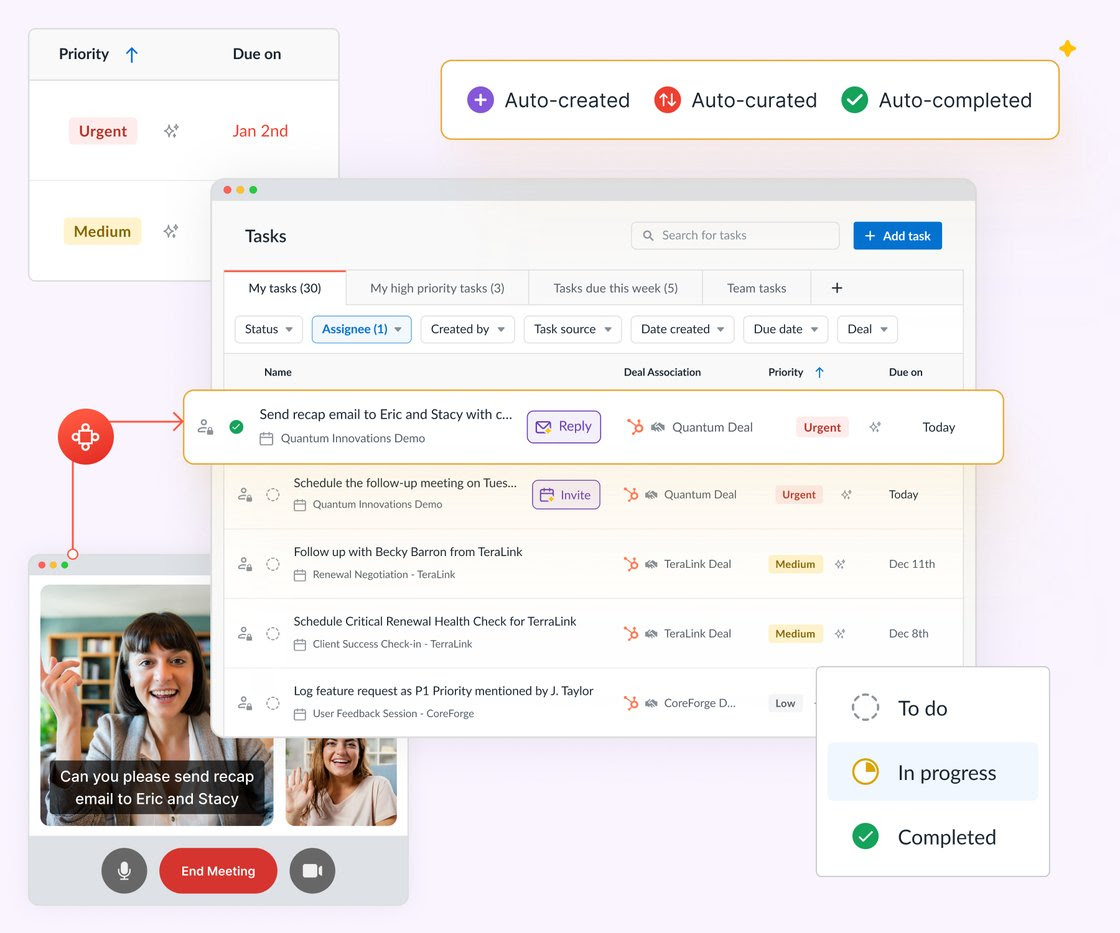
Meet AI Tasks: a dedicated task management workspace inside Avoma that automatically captures follow-ups and action items from your meetings and emails — and organizes them in one place.
Instead of manually tracking next steps across tools, AI Tasks pulls commitments directly from conversations and surfaces what needs attention. It helps you focus on the tasks that matter most, especially when meetings stack up.
For reps, that means fewer dropped follow-ups at the end of the month.
For managers, it means better visibility into execution between pipeline reviews.
Try AI Tasks today. It is free for 60 days for existing customers.
Ask Avoma now answers revenue and pipeline questions
Revenue conversations shouldn’t start with “Let me pull a report.”
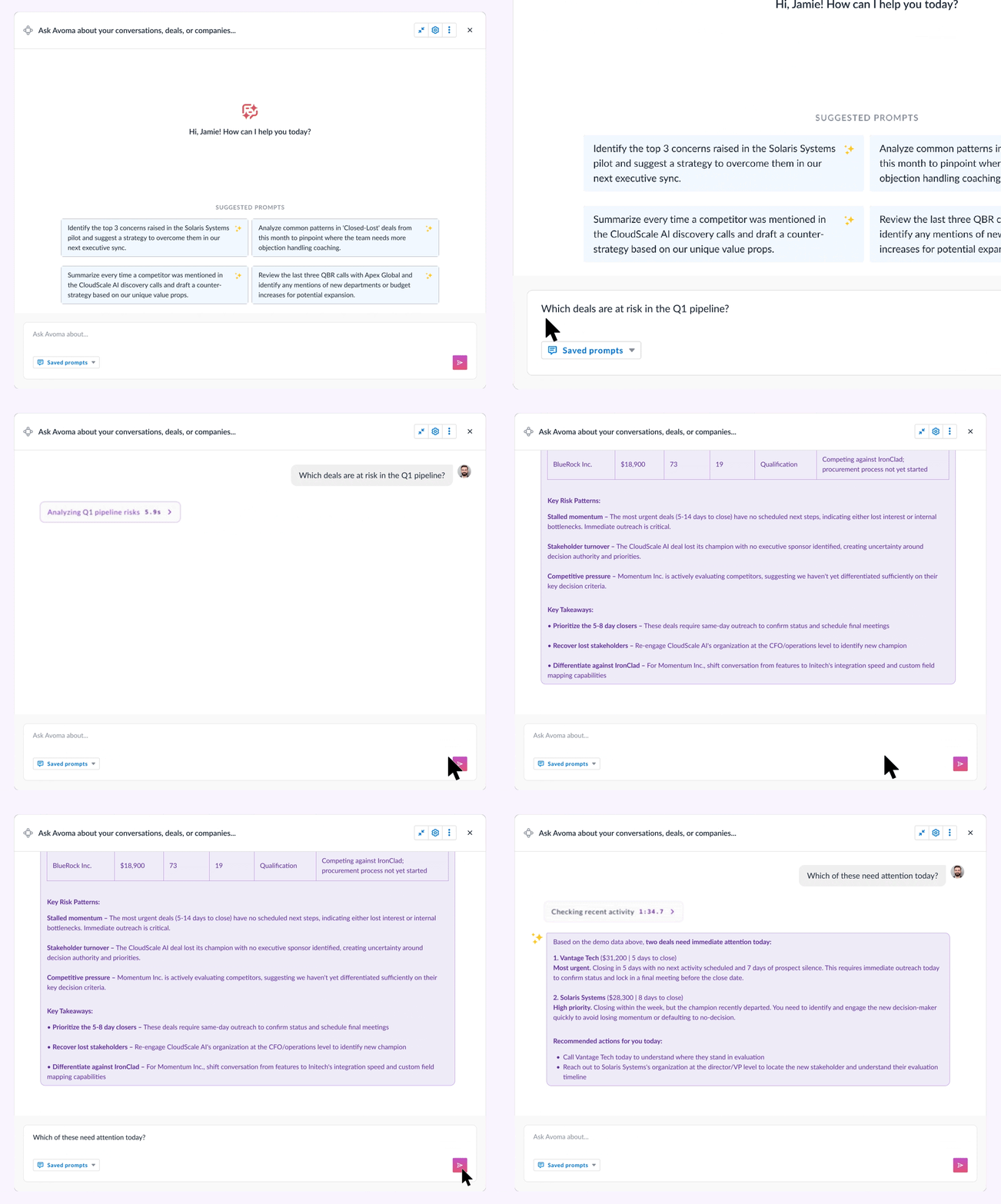
Ask Avoma now answers direct questions about deal health, pipeline risk, and revenue performance — instantly.
It analyzes deal board data, CRM fields, meetings, and activity together, so you get responses grounded in both numbers and real customer interactions.
Try asking:
- What deals should I be worried about going into the end of the month?
- Who are our top performing reps this quarter, and what are they doing differently?
- Are we on track to hit our revenue target this quarter?
Instead of scanning dashboards, you get clear, data-backed answers in seconds.
- For sales leaders, that changes forecast prep.
- For RevOps, it reduces ad-hoc reporting.
- For reps, it brings visibility into what’s driving performance.
Leave coaching feedback by voice on mobile
Coaching rarely happens at a desk.
You’re reviewing calls between meetings. Listening on a commute. Traveling between customer visits. Typing detailed feedback in those moments slows things down.
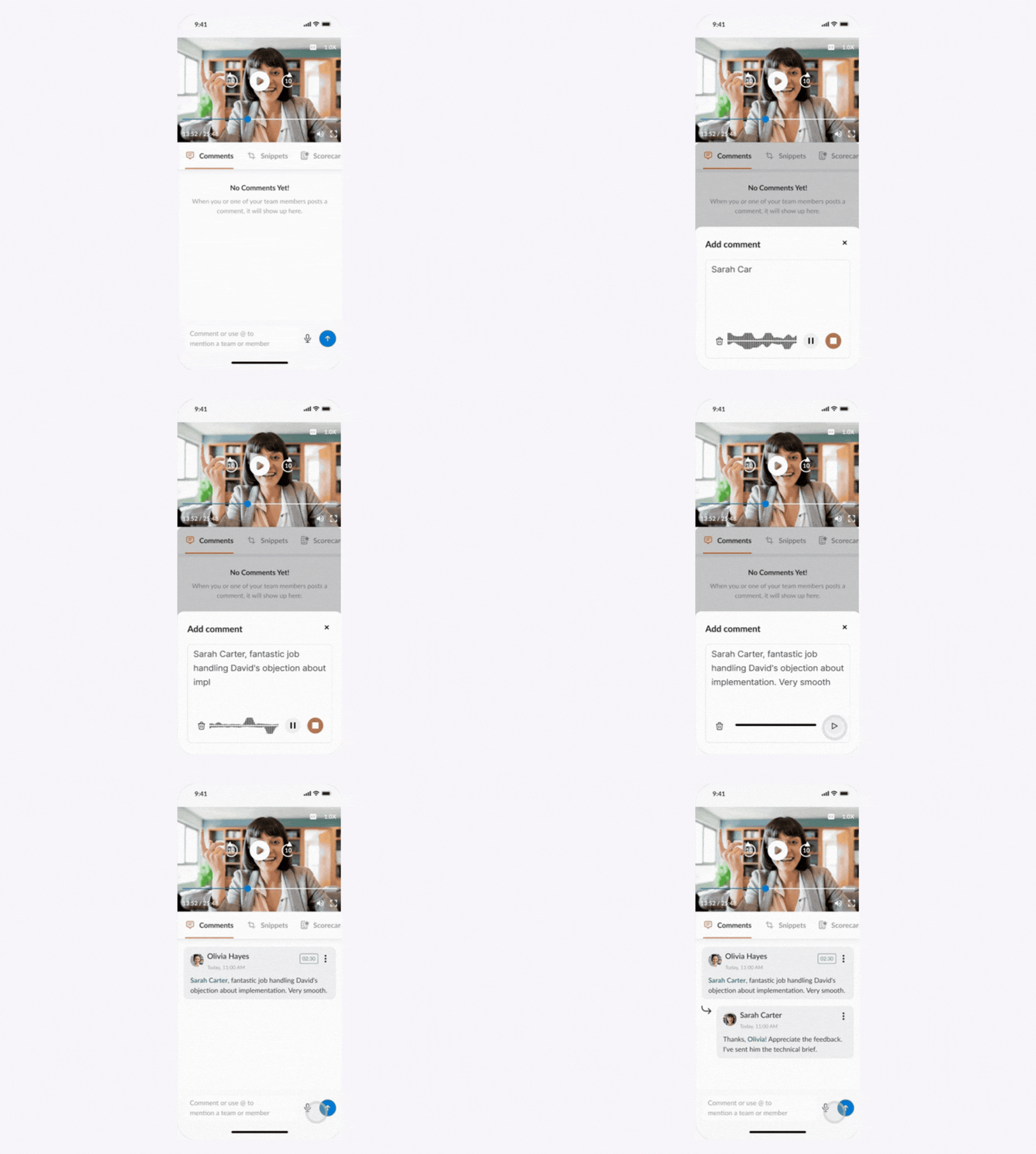
Now you can record coaching comments by voice in the Avoma mobile app. Your feedback is automatically transcribed and timestamped within the meeting.
That means:
- Faster coaching in the moment
- Clear context tied to specific parts of the conversation
Avoma mobile app is available on iOS and Android.
Multi-column sorting for sharper pipeline reviews
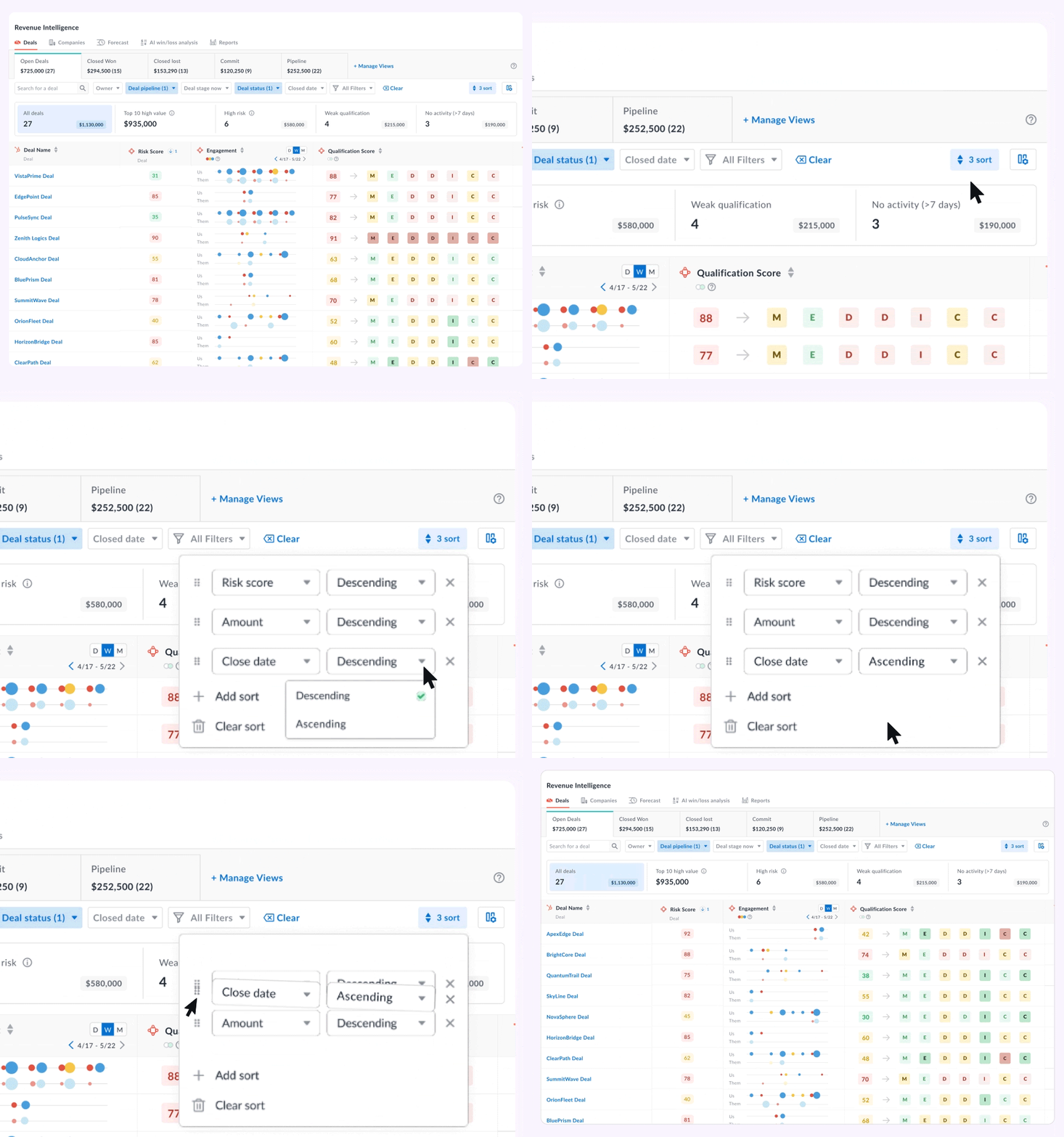
Sorting by one field only tells part of the story.
Now you can sort revenue dashboards by multiple fields at once — so urgency, risk, and value show up together.
For example, try sorting by:
- Close date (ascending)
- Risk score (descending)
- Qualification score (descending)
- Deal amount (descending)
This setup brings forward the deals that are closing soon, carry meaningful value, and show risk signals. Instead of reviewing everything, you start with what requires intervention.
One shared pipeline view that adapts to every user
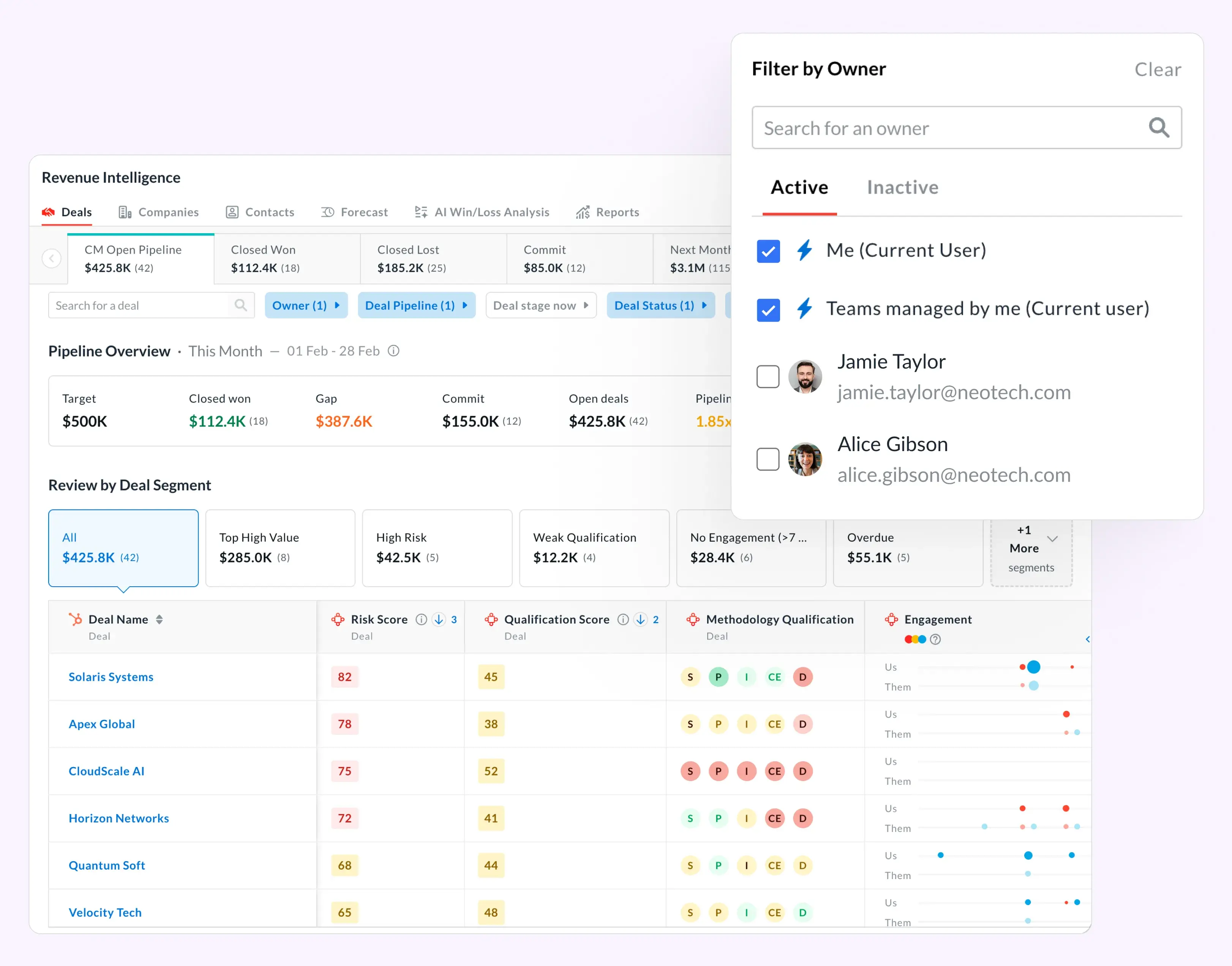
Pipeline reviews get messy when everyone builds their own filters.
You can now create one shared pipeline view that automatically adjusts depending on who’s viewing it.
New owner filters include:
- Me — shows only the current user’s deals and activities
- Teams managed by me — shows deals owned by direct and indirect reports
Admins can save this view for shared use, creating one standardized structure across the team.
If you want to see these workflows on your own calls and deals, schedule a demo and our product experts will walk you through our platform.
Frequently Asked Questions


Dive into Our Latest
Avoma Insights.

What's stopping you from turning every conversation into actionable insights?


