
Introducing AI Tasks: Automate to-dos from meetings and emails

Table of Contents:
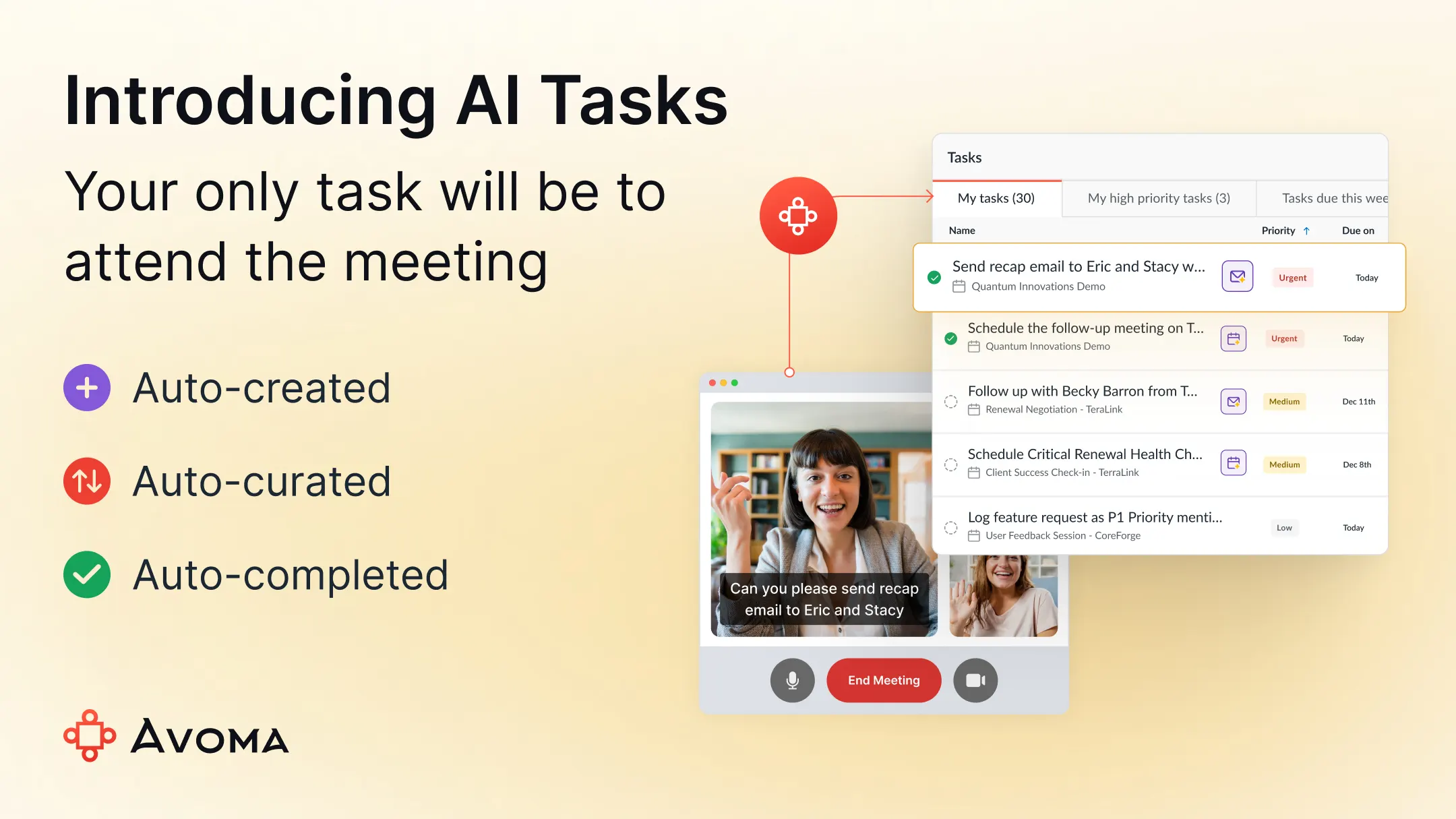
You leave a meeting knowing exactly what needs to happen next. Then the next meeting starts. Action items live in your head, follow-ups wait in your inbox, and tasks pile up faster than you can organize them.
AI Tasks by Avoma takes over that follow-up work by automatically creating, curating, and completing tasks from your meetings and emails.
What is AI Tasks by Avoma?
AI Tasks is Avoma’s AI-powered task management feature that turns meetings and emails into follow-through, without manual work.
After meetings, follow-up work usually becomes manual. Teams try to remember action items, key details get missed, priorities become unclear, and follow-ups get delayed as the next meeting starts. This is where traditional project management tools fall short for meeting-driven work.
AI Tasks captures decisions, commitments, and requests from your meetings and emails and turns them into prioritized follow-up work.
This is especially valuable for customer-facing and operational roles. Sales, Customer Success, RevOps, executives, and operators spend their days in back-to-back conversations. Their outcomes depend on fast and accurate follow-through.
When actions from meetings are missed or delayed, follow-up work becomes inconsistent. For teams whose work is driven by meetings and handoffs, tasks need to be captured and prioritized as decisions are made. When that does not happen, sales follow-ups slip, customer commitments go untracked, and handoffs across teams break down.
If you want a deeper breakdown of how AI task management works for you and your team, read our AI task management guide.
How AI Tasks works
AI Tasks handles follow-up work across three stages: create, curate, and complete.
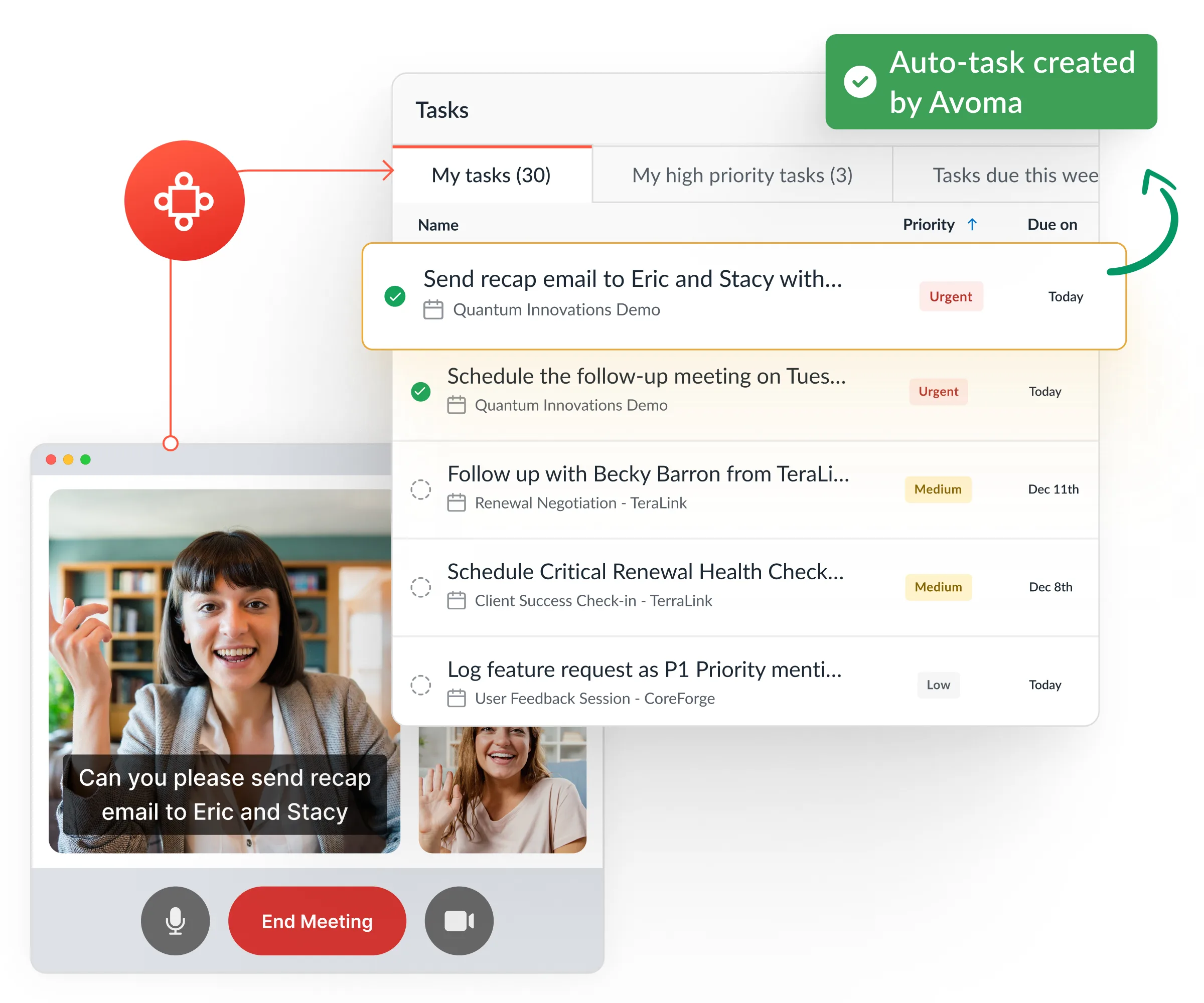
Auto-creates
AI Tasks detects action items as they come up in meetings and emails. Tasks are created automatically in the background, without note-taking or manual entry.
You leave the meeting with tasks captured and ready to act on.
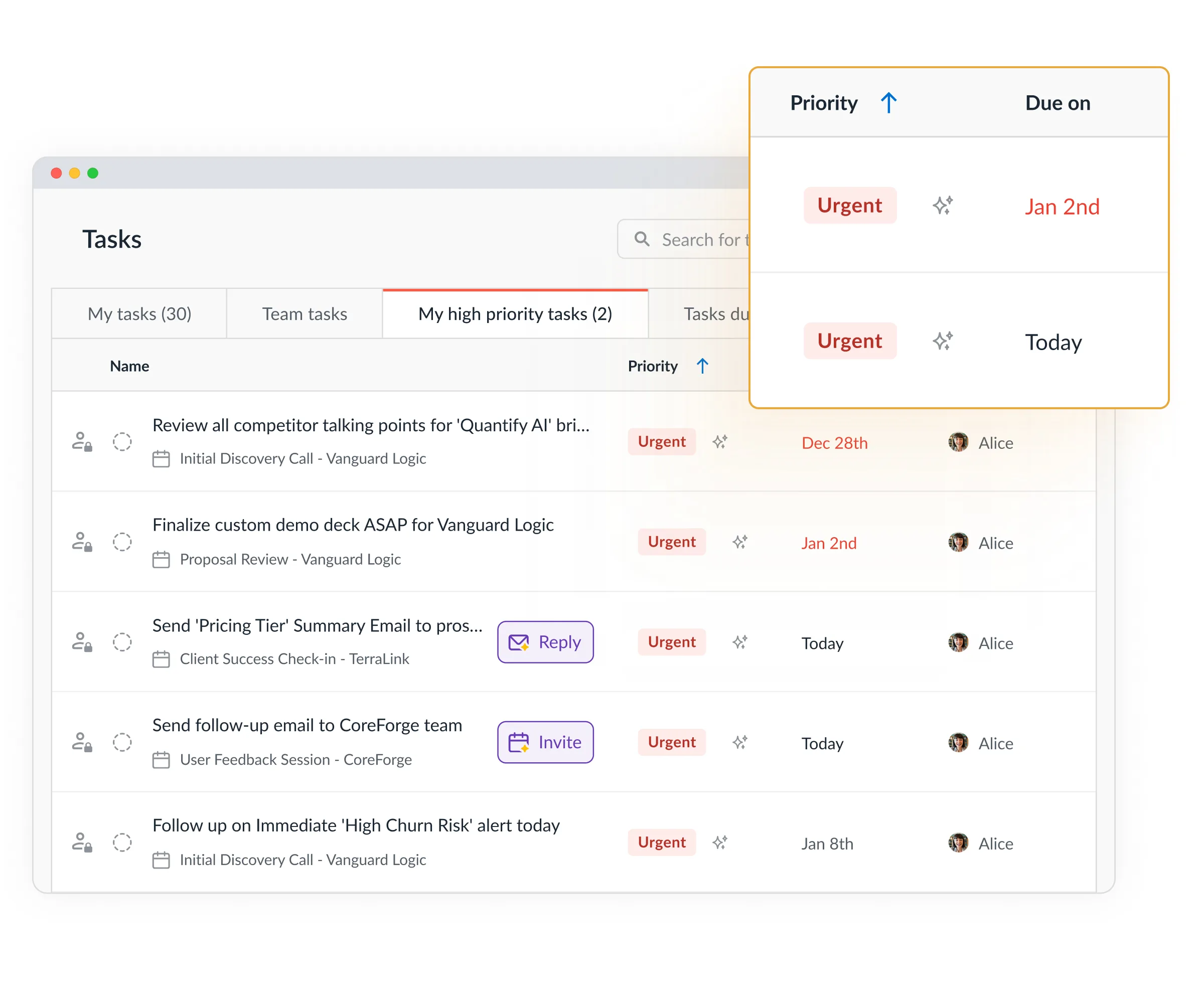
Auto-curates
AI Tasks evaluates urgency, sentiment, and conversation context to understand importance. Tasks are surfaced in the right order as AI-generated task lists, so you always know what to work on first.
You see priorities, not a long list.
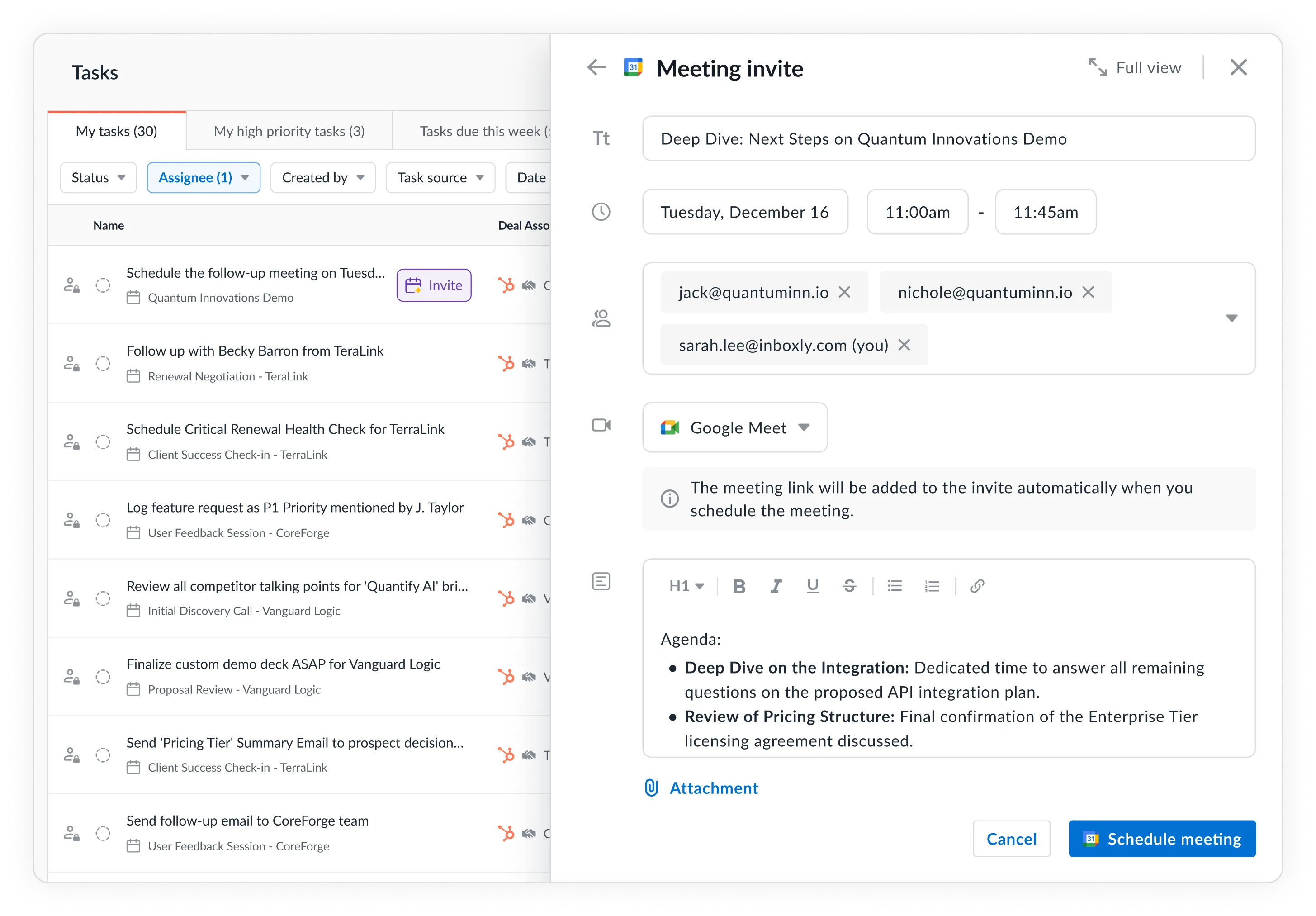
Auto-completes
AI Tasks keeps work moving by drafting follow-up emails, meeting invites, and recaps based on meeting context. It tracks follow-through signals and updates task status automatically.
You just hit send as the workflow is set.
Benefits of AI Tasks by Avoma
AI Tasks is built to remove the friction that shows up after meetings and emails. Instead of relying on memory, manual task entry, or constant re-prioritization, teams get consistent outcomes from their follow-up work.
Here are the key benefits teams experience when using AI Tasks.
Improve focus during conversations
With Auto create, tasks are captured as they are discussed in meetings and emails.
You no longer need to write down action items or translate notes into tasks. Every relevant task is recorded automatically, which gives you a complete view of your responsibilities without manual work.
This makes it easier to stay focused on the conversation without worrying about capturing next steps or follow-up work.
Spend less time organizing work
With Auto curate, you do not have to sort or triage your own task list.
AI Tasks organizes your work based on urgency, context, and impact, so the most important actions are surfaced first.
Unlike traditional task management software and static workflow templates built for long-term project planning, AI Tasks adjusts priorities in real-time based on live conversations and changing commitments.
You no longer need manual task categorization or constant re-prioritization to keep your work organized.
Accelerate tasks with less manual work
With Auto complete, follow-up work keeps moving without additional manual effort.
Tasks that usually slow teams down, such as recaps, follow-up emails, status updates, meeting invites, progress automatically. This reduces follow-up backlogs and keeps work moving between meetings.
The result is more consistent execution and more time spent on meaningful work instead of task maintenance.
How different teams use AI Tasks
AI Tasks fits teams whose work depends on meetings and follow-through. It works across sales calls, customer meetings, internal syncs, and stakeholder reviews.
Sales reps and Account Executives
- Never miss a follow-up from customer calls
- Focus on deals instead of task admin
- Keep CRM activity logged and tracked without manual intervention
SDRs
- Move faster after discovery and qualification calls
- See clear priorities between meetings
- Reduce dropped handoffs
Customer Success and Support teams
- Track commitments made to customers
- Ensure follow-through after reviews and escalations
- Reduce reliance on manual notes
RevOps and operations teams
- Drive consistent follow-through across teams
- Get more accurate CRM data without relying on rep input
- Close gaps between meetings and execution
Get more done after every meeting
AI Tasks helps teams stay on top of follow-up work after meetings. By turning conversations into clear priorities and completed follow-ups, work moves forward consistently. You spend less time organizing tasks and more time acting on them.
Your only task is to attend the meeting.
If you use Avoma, you can try AI Tasks for free for 60 days. Just reach out to your CSM and they will walk you through it.
Frequently Asked Questions
AI Tasks is Avoma’s AI-powered task management feature that automatically creates, curates, and completes tasks from meetings and emails. It turns decisions and next steps discussed in conversations into actionable work without manual task entry.
AI Tasks analyzes meeting transcripts and email context to detect clear commitments, requests, and next steps. It looks for intent, responsibility, and action language, not casual mentions, so only meaningful follow-up work becomes a task.
No. AI Tasks creates tasks automatically in the background from meetings and emails. Users do not need to write tasks, copy action items from notes, or log work after meetings.You can manually create or edit them if needed.
Traditional task tools rely on users to remember and log action items after their meeting. AI Tasks capture decisions and context as they are discussed in meetings or written in emails and then handles follow-up automatically, reducing manual work and missed actions.
AI Tasks evaluates urgency, sentiment, timing, and conversation context to determine priority. Tasks are surfaced in the right order so users know what to work on next without manually sorting or tagging tasks.
Yes. AI Tasks uses speaker roles, language cues, and conversation context to assign task ownership automatically. Ownership can be changed at any time if needed.
Yes. AI Tasks drafts follow-up emails, summaries, and schedules and sends meeting invites based on meeting context. It tracks follow-through signals and updates task status automatically, reducing the need for manual updates.
Yes. AI Tasks works across sales calls, customer reviews, internal syncs, and stakeholder meetings. Any meeting or email with clear next steps can generate tasks and follow-up workflows.




What's stopping you from turning every conversation into actionable insights?


