Meeting recording software

Record meetings and get transcripts, AI notes, and CRM updates in minutes

Avoma's meeting recording software joins your calls, generates notes using custom templates, auto-scores conversations for coaching, and syncs structured data to your CRM.

Saves 15 minutes per meeting
Works with
Trusted by 1,000+ revenue teams
4.8/5 on
500+ reviews

What your team loses without meeting recording software

Cross Icon

Unrecorded calls mean lost deal context

When calls are not recorded, details exist only in the rep's memory. CRM fields stay empty or get filled with partial summaries hours later.
Cross Icon

Managers review less than 1% of sales calls

Reps run 4 to 5 calls a day. Manual reviews only cover a few, so managers coach from a random sample instead of the conversations that need attention.
Cross Icon

Meeting notes scattered across tools

Notes are spread across CRMs, docs, Slack, and personal files. No standard format, no single source of truth.
Cross Icon

Coaching insights don’t scale

Managers can’t review every call, so coaching is based on a few calls and their outcomes. As a result, high-performing calls aren’t replicated, and overall team performance suffers

Meeting recording software that works while your team talks

Auto-record

Record calls without manual setup

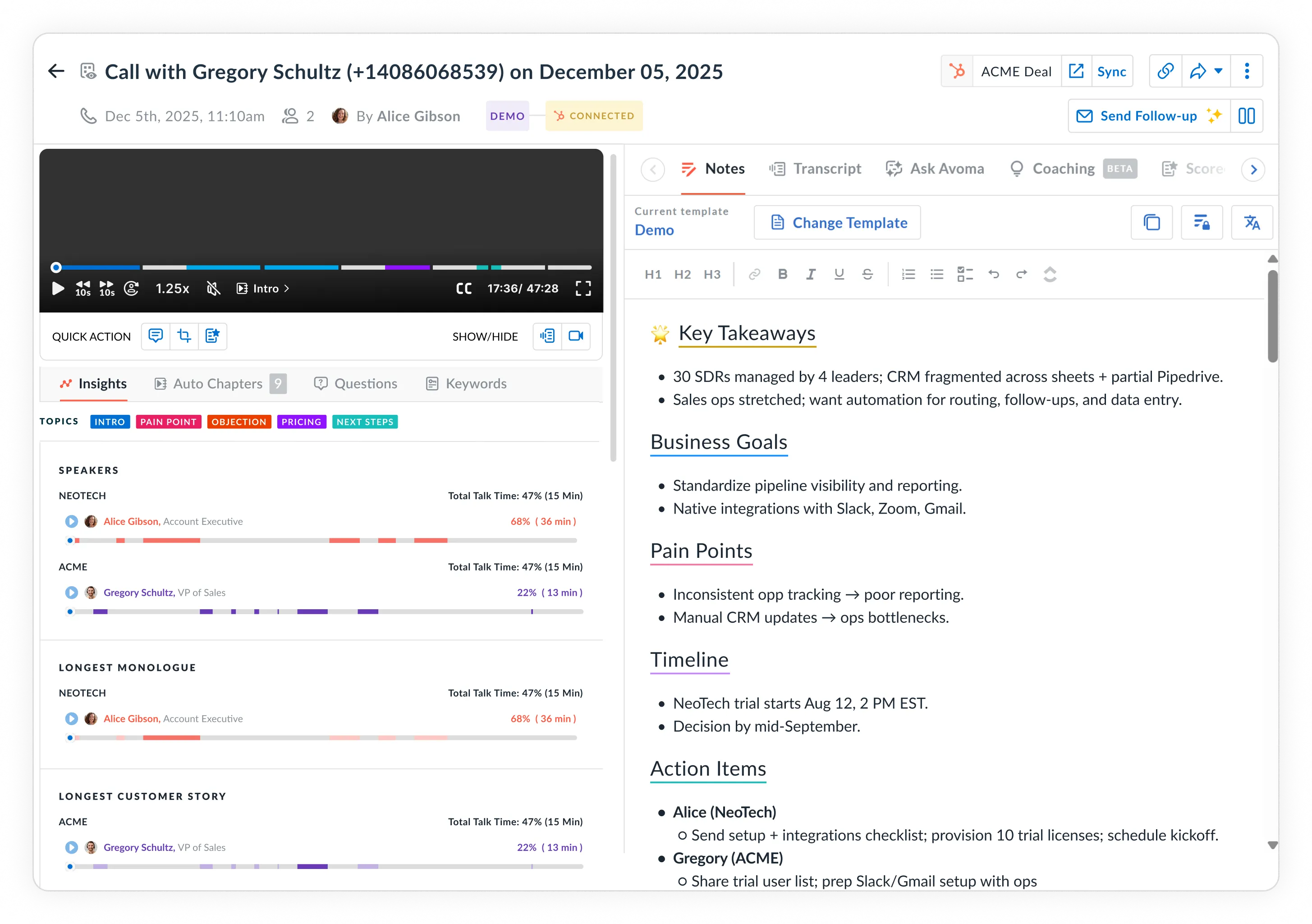
Avoma connects to your calendar and automatically records meetings based on your rules. Internal 1:1s stay private. External calls get recorded with participant consent.

  • Native Zoom recording integration, Microsoft Teams transcription, and Google Meet recording tool support via cloud recording or the Avoma bot
  • Record unscheduled calls by pasting a conference link into Avoma
  • Set recording rules per meeting type, team, or calendar event
Transcription

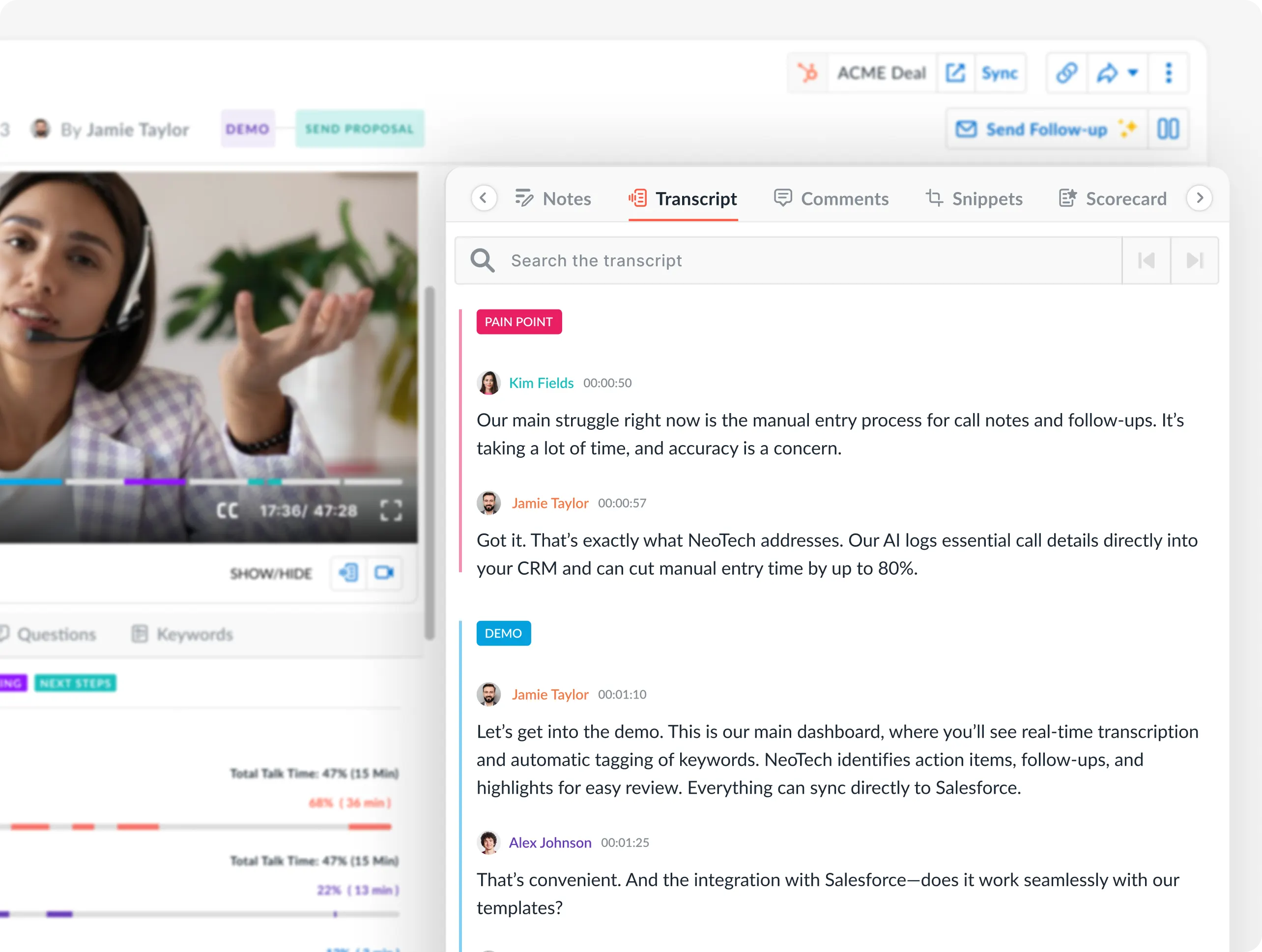
Real-time transcripts in 75+ languages with speaker labels

Avoma's real-time transcription software transcribes calls live with timestamped text. Speaker identification software tags each participant so you know who said what.

  • Live captions for meetings so reps can follow along without taking notes
  • Each speaker labeled with timestamps for quick navigation
  • Download transcripts in .vtt or .txt, or use the audio to text converter for uploaded files
AI notes

AI-generated notes by meeting type in 2 minutes

Avoma generates AI meeting notes within 2 minutes of your call ending. Notes follow custom templates per meeting type, with objections, next steps, and competitor mentions auto-categorized and synced to your CRM.

  • Custom note templates for each meeting type
  • AI auto-fills CRM properties like MEDDIC, SPICED, and custom fields after each call
  • AI meeting notes sync as structured data, not raw text
Smart Chapters

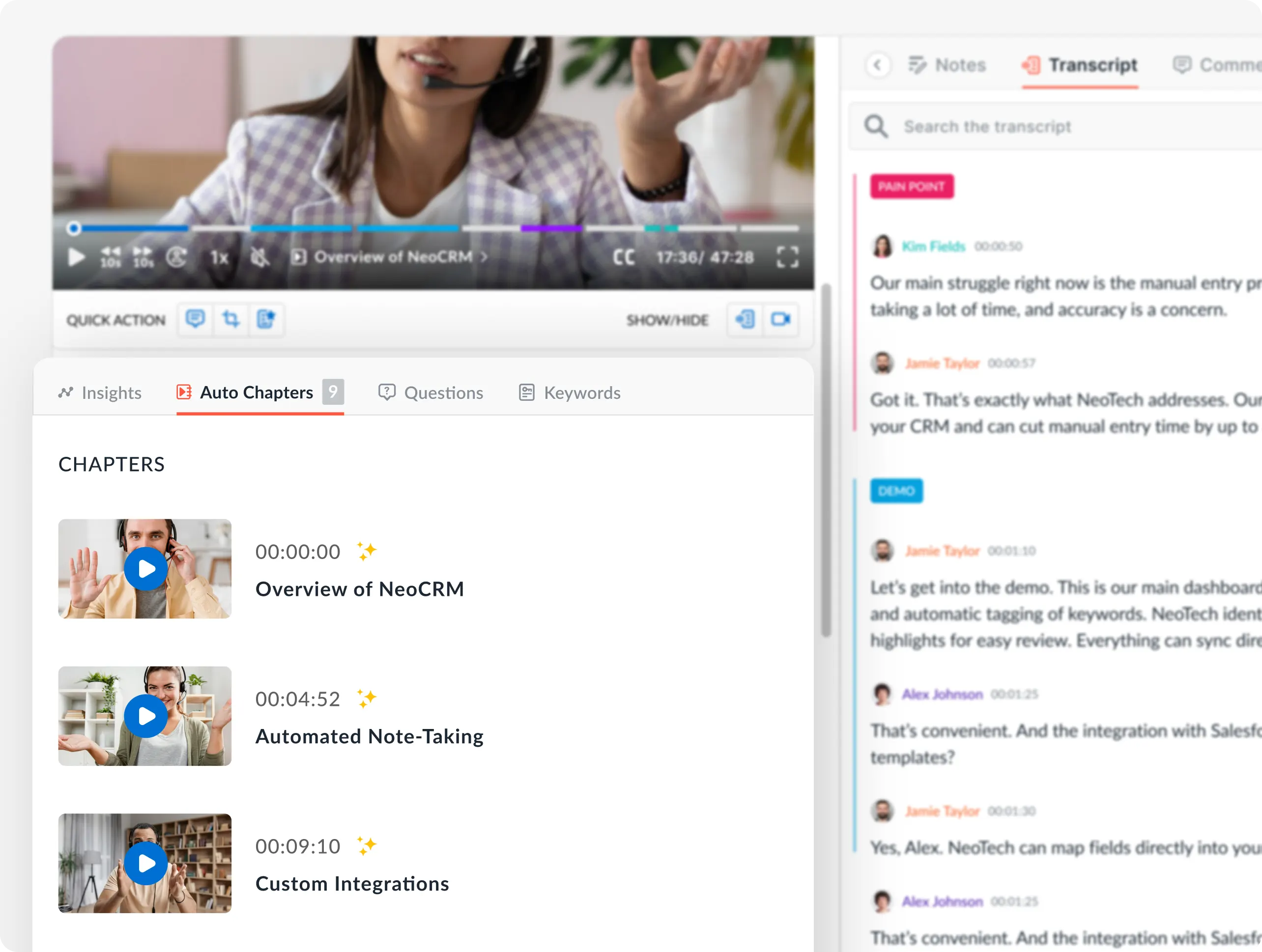
Jump to pricing, objections, or next steps instantly

Avoma's meeting summarization tool breaks recordings into AI-generated chapters organized by topic. Click into the pricing discussion, the objection, or the action items and play from there.

  • AI-generated chapters for topics like budget, timeline, competition, and follow-ups
  • Keyword search across recordings and transcripts to find specific moments in seconds
  • Create and share recording snippets via Slack meeting notes integration or email
CRM sync

Keep your CRM current without reps touching it

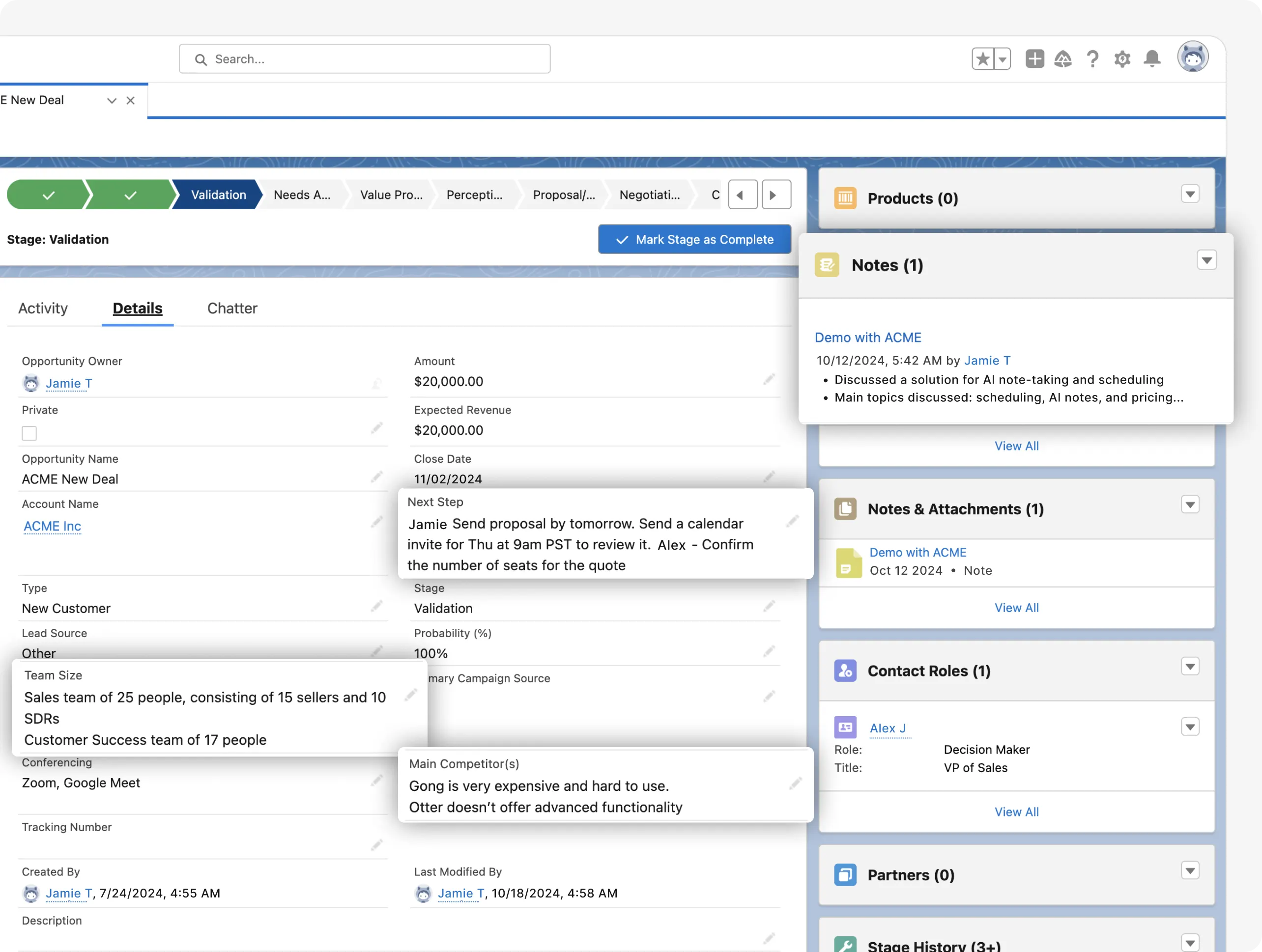
Avoma links recordings, transcripts, and AI notes to the right deal, contact, and opportunity automatically. AI fills methodology fields like MEDDIC, BANT, and SPICED.

  • Two-way sync with Salesforce and HubSpot, including custom objects and fields
  • AI auto-fills methodology fields and custom CRM properties after each call
  • CRM call recording integration links recordings and transcripts to CRM records for full deal context
4+hrs

Saved weekly per rep on note-taking, follow-ups, and CRM data entry

60+

Languages and dialects supported for transcription and AI notes

95%

Transcription and speaker identification accuracy

1,350+

Verified G2 reviews from customer-facing teams

Start recording your meetings under a minute

1
Connect your calendar

Link your Google Calendar or Outlook to Avoma. Avoma's AI meeting assistant joins your scheduled calls on Zoom, Microsoft Teams, or Google Meet and starts recording with participant consent.

2
Avoma captures the full conversation

Avoma records, transcribes, and identifies speakers in real time. Within two minutes of the call ending, you get a video meeting recording, timestamped transcript, AI notes organized by topic, and extracted action items.

3
Search, share, and act

Search cloud meeting recordings by keyword or speaker. Share snippets on Slack. Review coaching moments from the recording. Transcripts sync to your CRM instantly

Try it free

What teams like about our meeting recording software

Avoma has been a game-changer for my daily workflow. The automatic transcription and AI-generated summaries save me a huge amount of time after meetings
Oğuzhan T.
Design Engineer
The AI-powered transcription and meeting summaries ensure that customer insights are captured and actionable next steps are clear for everyone.
Claire W.
Head of CX Operations
The automatic recording transcription features are very accurate, saving us time and ensuring nothing gets lost in conversation.
Amrit D
Customer Success Manager

Frequently asked questions

Further reading

No items found.
CTA Circles imageCTA Circles image

What's stopping you from turning every conversation into actionable insights?

Get started today.

It just takes a minute to set up your account.
No credit card is required. Try all features of Avoma for free.

<script type="application/ld+json">
{
 "@context": "https://schema.org",
 "@type": "FAQPage",
 "mainEntity": [
   {
     "@type": "Question",
     "name": "What is meeting recording software?",
     "acceptedAnswer": {
       "@type": "Answer",
       "text": "Meeting recording software captures the audio and video of virtual calls so teams can replay, search, and share conversations after they end. Basic tools stop at the recording file. Avoma records the call, transcribes it in real time with speaker labels, generates structured AI notes within 2 minutes, and syncs notes, transcripts, and recordings to your CRM automatically."
     }
   },
   {
     "@type": "Question",
     "name": "How do I automatically record Zoom, Teams, or Google Meet calls?",
     "acceptedAnswer": {
       "@type": "Answer",
       "text": "Connect your calendar to Avoma and set your recording preferences. Avoma's AI meeting assistant joins scheduled calls on Zoom, Microsoft Teams, or Google Meet and starts recording with participant consent. You can use native Zoom recording integration, Microsoft Teams transcription, or the Avoma bot depending on your platform. Unscheduled calls can be recorded by pasting a conference link into Avoma."
     }
   },
   {
     "@type": "Question",
     "name": "Is it legal to record meetings without consent?",
     "acceptedAnswer": {
       "@type": "Answer",
       "text": "Recording laws vary by region. In the US, some states require one-party consent while others require all-party consent. Avoma handles this by gathering consent from all participants before recording starts. You configure consent settings by meeting type, team, or participant domain. For organizations in regulated industries, Avoma supports meeting compliance recording with retention policies, role-based access controls, and audit-ready logs."
     }
   },
   {
     "@type": "Question",
     "name": "What happens to my recordings after the meeting ends?",
     "acceptedAnswer": {
       "@type": "Answer",
       "text": "Within 2 minutes of the call ending, Avoma delivers a timestamped transcript with speaker identification, structured AI meeting notes organized by topic, and extracted action items with owners. Notes and transcripts sync to your CRM automatically. Recordings are stored in Avoma's searchable archive where you can search by keyword, speaker, or topic across your full conversation history."
     }
   },
   {
     "@type": "Question",
     "name": "Can meeting recording software replace manual note-taking?",
     "acceptedAnswer": {
       "@type": "Answer",
       "text": "Yes. Avoma records the call, transcribes it, and generates structured notes using custom templates for each meeting type. Reps stay focused on the conversation instead of typing. Notes include objections, next steps, competitor mentions, and budget signals, auto-categorized and synced to your CRM. Teams using Avoma save 4+ hours per week on note-taking and CRM updates."
     }
   },
   {
     "@type": "Question",
     "name": "Does Avoma work with my CRM?",
     "acceptedAnswer": {
       "@type": "Answer",
       "text": "Avoma offers two-way sync with Salesforce and HubSpot. Recordings, transcripts, and AI notes link to the right deal, contact, and opportunity. AI auto-fills custom CRM fields from the conversation, including methodology trackers like MEDDIC, BANT, and SPICED. This CRM call recording integration eliminates manual data entry and keeps pipeline data current after each call."
     }
   },
   {
     "@type": "Question",
     "name": "How is Avoma different from the built-in recorder in Zoom or Teams?",
     "acceptedAnswer": {
       "@type": "Answer",
       "text": "The built-in recorder in Zoom or Teams gives you a video file and a basic transcript. Avoma adds AI meeting notes organized by meeting type, automatic CRM field updates, AI call scoring for coaching, conversation analytics, action item extraction, and a searchable archive across your entire organization. It replaces the manual work that starts after the recording ends."
     }
   },
   {
     "@type": "Question",
     "name": "Is meeting recording software secure enough for regulated industries?",
     "acceptedAnswer": {
       "@type": "Answer",
       "text": "Avoma uses encryption for data in transit and at rest, controlled access management, and SSO support. Teams in financial services, healthcare, and SaaS use Avoma for HIPAA and GDPR compliant recording workflows. Admins configure privacy rules by meeting type, team, or participant domain. Avoma gathers participant consent before recording begins on all calls."
     }
   }
 ]
}
</script>
