Automated meeting folllow-up

Stop losing deals to late follow-ups

Avoma's meeting follow-up software uses the call transcript to draft a follow-up email, extract action items with owners, and sync them to your CRM.

Saves 15 minutes per meeting
Works with
Trusted by 1,000+ revenue teams
4.8/5 on
500+ reviews

Great calls with no follow-up still lose deals

Cross Icon

Reps skip the recap and move to the next call

Back-to-back calls leave no time for follow-ups. Without a recap, prospects lose context and move on to other vendors.
Cross Icon

Follow-up quality varies by rep

Some reps send detailed recaps, others send two vague lines. When meeting follow-up quality is inconsistent, so is your buyer experience.
Cross Icon

Managers can't tell if follow-ups went out

Without a system tracking who sent what after each call, managers rely on rep self-reporting. Deals slip because no one caught the gap in time.
Cross Icon

CRM stays blank after calls

Reps delay CRM updates until pipeline data goes stale. CRM follow-up logging breaks the moment it depends on manual input.

Automate your workflow from call to follow-up

Follow-up emails

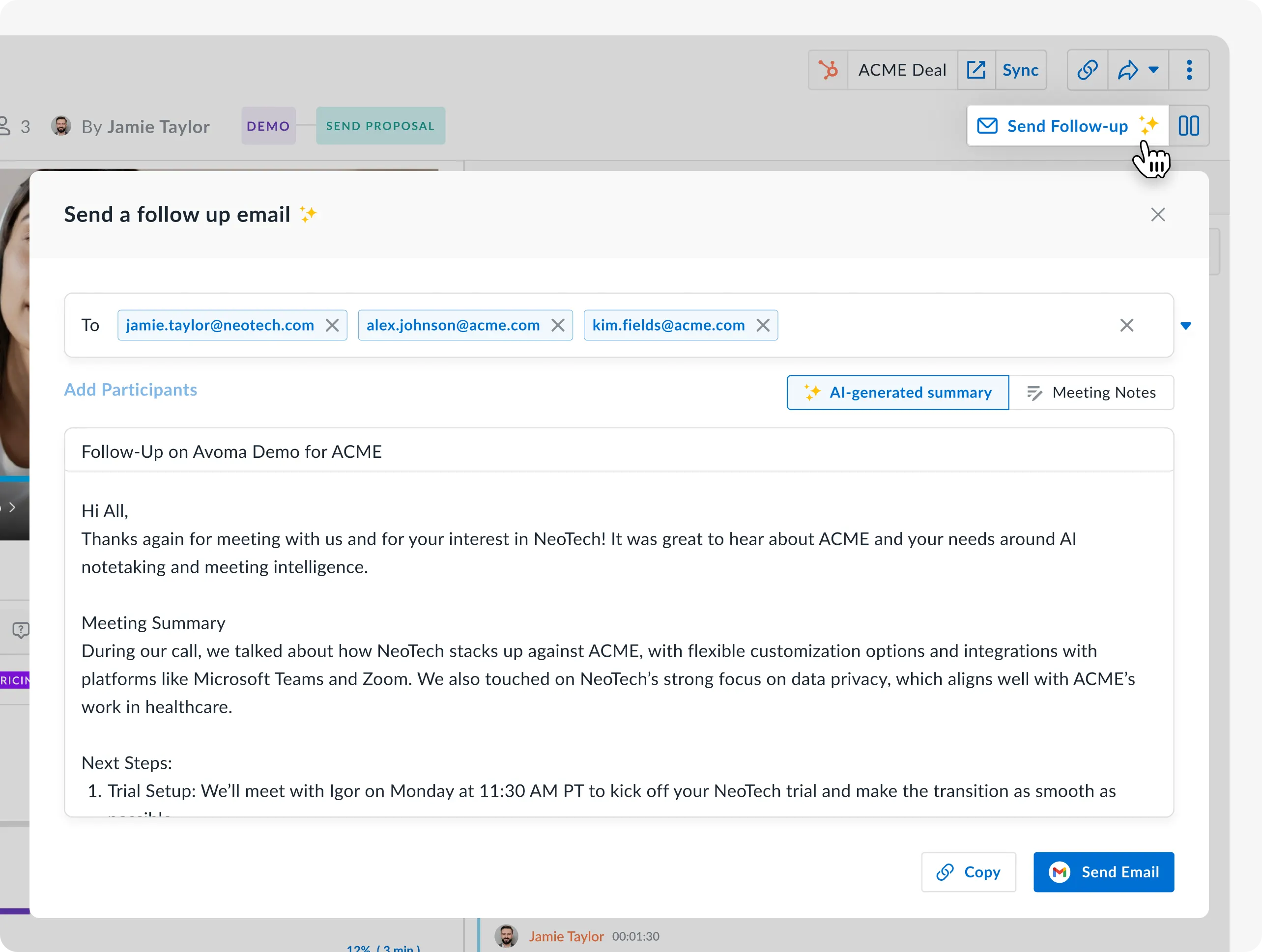
Draft and send follow-up emails grounded in calls

Avoma drafts a follow-up email after meeting using the transcript, decisions, and next steps. Review, edit, and send through Gmail or Outlook. The email logs to your CRM automatically.

  • Drafts ready within minutes of the call ending
  • References specific commitments from the transcript
  • Auto-logs to Salesforce or HubSpot against the contact and deal
Action items

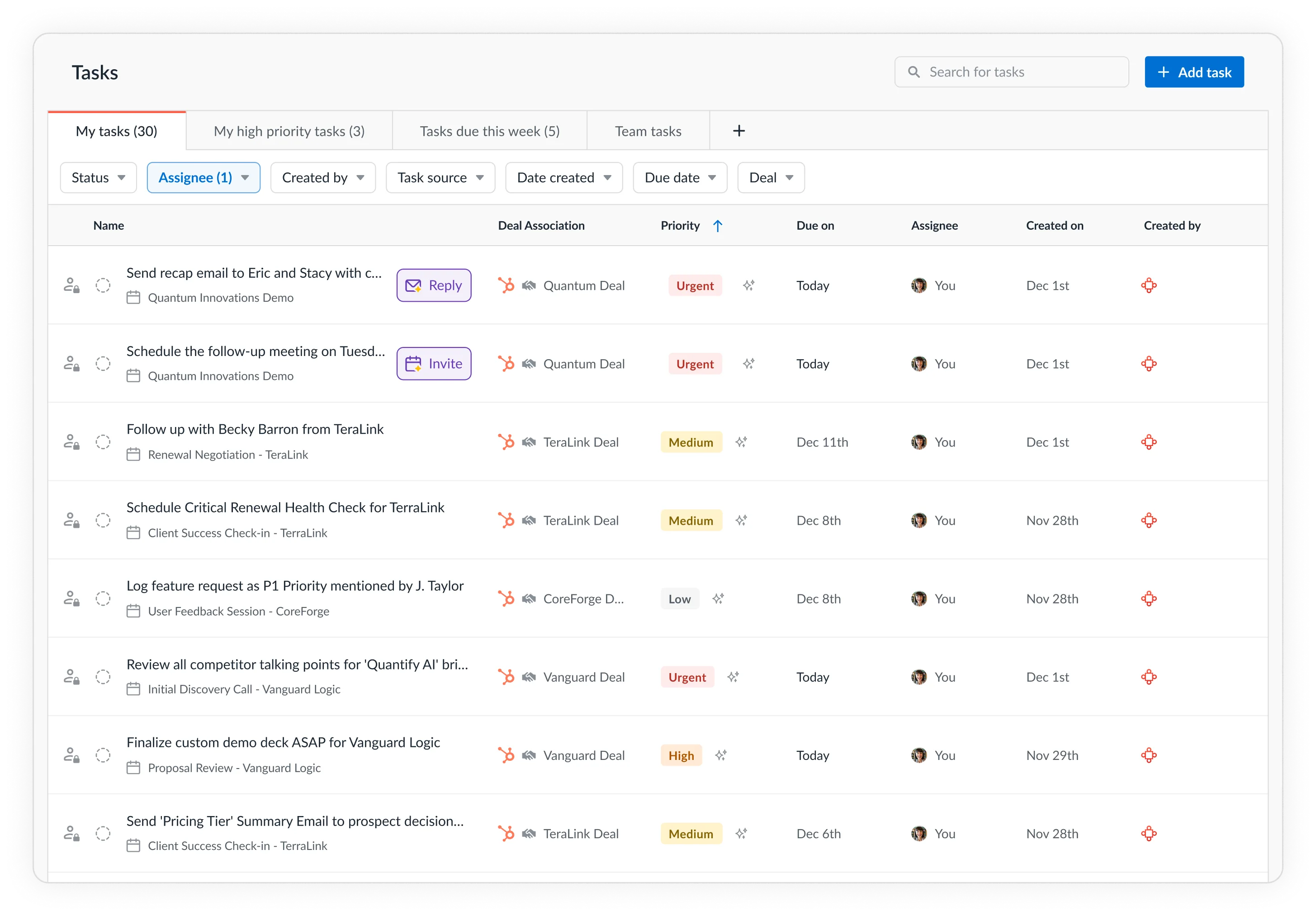
Capture commitments with an owner attached

AI detects commitments during the conversation and compiles them into a structured action item list with owners. Push tasks to Asana, ClickUp, or Jira through Zapier.

  • Time-stamped to the exact moment in the recording
  • Each item tagged with the speaker who made the commitment
  • Visible across the team in Avoma's AI Tasks dashboard
CRM sync

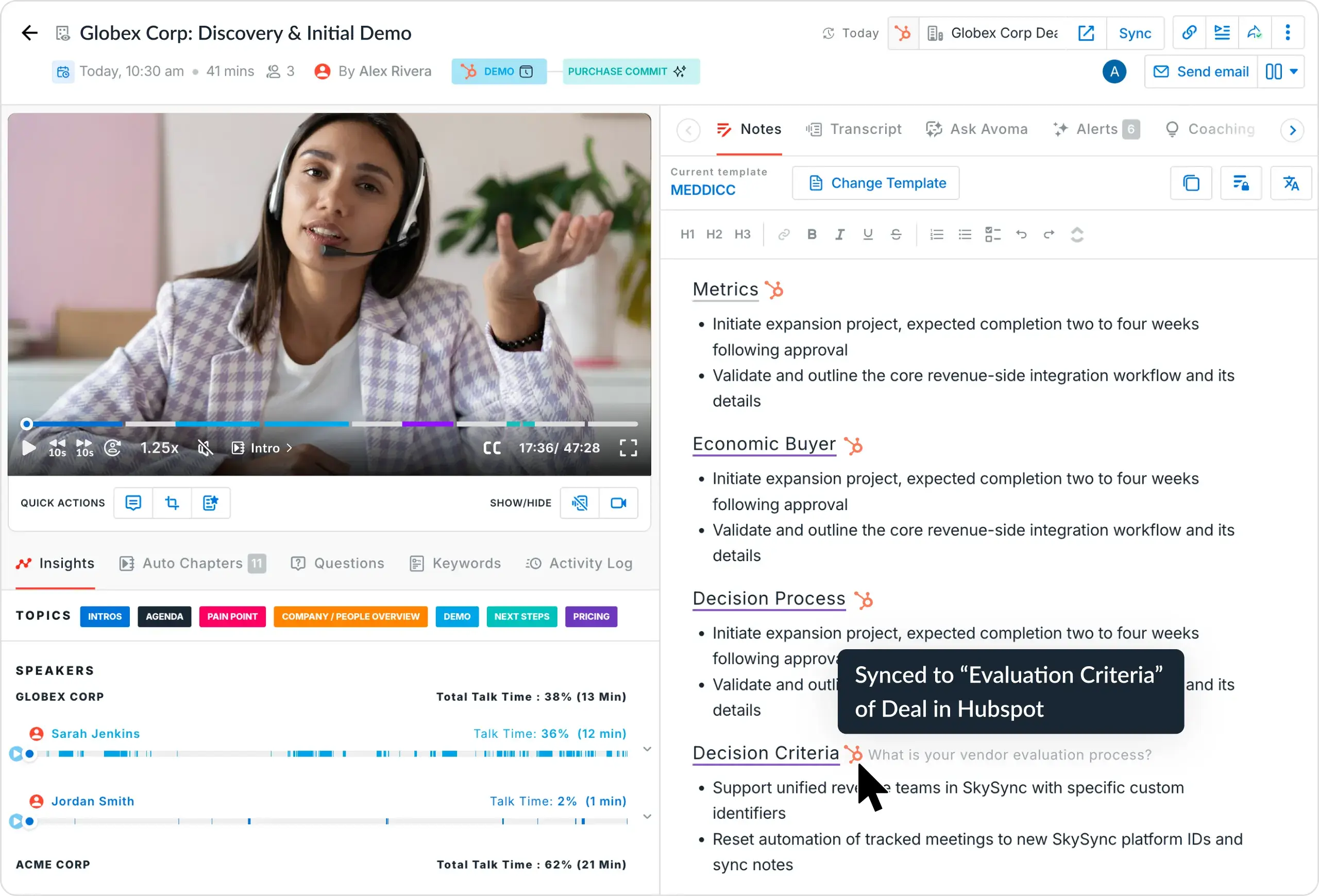
Push meeting data to your CRM without switching tabs

Meeting notes, summaries, action items, and custom field data sync to your CRM in real time. Control field mapping while, CRM automation runs in the background.

  • Bi-directional sync keeps CRM and Avoma aligned
  • AI fills methodology fields like MEDDIC, SPICED, and NEAT
  • Works with Salesforce, HubSpot, Pipedrive, and more
Instant Recaps

Send meeting context to your teams

Send a structured meeting recap to stakeholders who missed the call via email or Slack with one click.

  • Includes summary, decisions, and assigned next steps
  • Share to Slack, email, or Notion
  • Cuts internal recap requests and redundant sync meetings
Slack & Teams alerts

Bring follow-ups to chats

When a meeting ends, Avoma pushes takeaways, decisions, and action items to the right Slack channel or Microsoft Teams. No manual posting, no chasing updates.

  • Post meeting outcomes to Slack channels automatically
  • Send deal updates and next steps to Teams channels
  • Set custom alerts for risk signals or overdue tasks

4+hrs

Saved weekly per rep on note-taking, follow-ups, and CRM data entry

60+

Languages and dialects supported for transcription and AI notes

95%

Transcription and speaker identification accuracy

1,350+

Verified G2 reviews from customer-facing teams

Three steps to a completed follow-up

1
Record and transcribe

Avoma joins your Zoom, Meet, or Teams call and automatically captures the conversation in real time.

2
AI identifies action items and drafts the follow-up

Avoma's AI detects commitments like "I'll send the proposal by Friday," extracts them as tasks with owners, and drafts a ready-to-send follow-up email. This is the same connected workflow that makes Avoma a complete AI meeting assistant.

3
Tasks sync and the follow-up sends

Action items push to your CRM and project tools. The follow-up email sends through your email client and logs to the deal record.

Try it free

What teams like about Avoma's AI-powered follow ups

I also like how it provides actionable insights and highlights key points, which helps with better follow-ups and team alignment.
Oguzhan
Design Engineer
Avoma is most helpful for capturing meeting notes, summaries, and action items automatically, which saves time and reduces the chance of missing important details
Miles H
Solutions Engineer
What's not to like? Works seamlessly with zoom, transcribes, and even creates meeting notes/follow-up notes.
Haley K
Customer Marketing Manager

Frequently asked questions

CTA Circles imageCTA Circles image

What's stopping you from turning every conversation into actionable insights?

Get started today.

It just takes a minute to set up your account.
No credit card is required. Try all features of Avoma for free.