
How to build an AI customer knowledge base with Avoma MCP

Table of Contents:
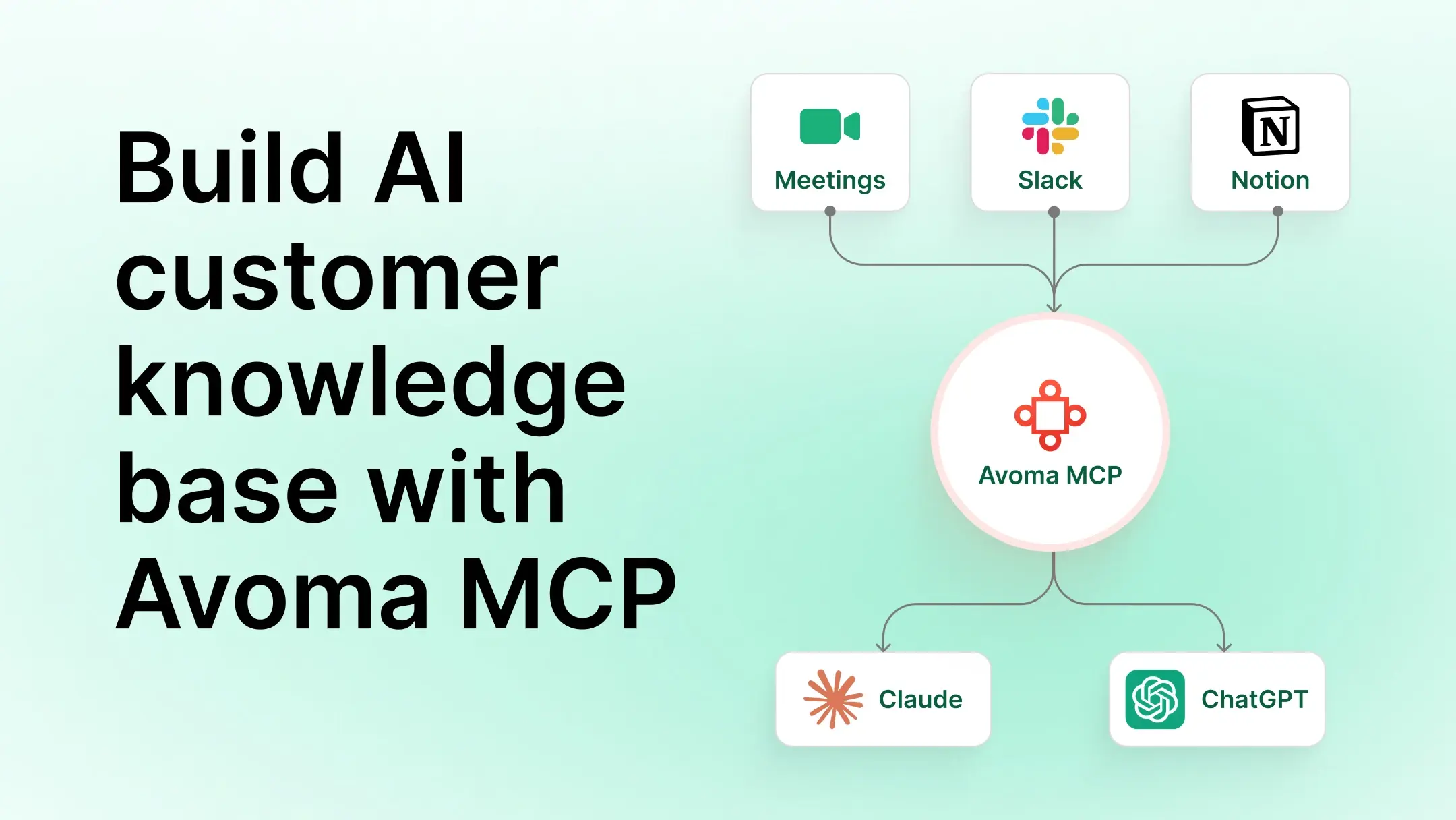
Customer knowledge is scattered across tools. Renewal context sits in last quarter's call recording. Escalation history lives in a Slack thread that never made it into Notion. Product requests surface in meeting notes that no one transferred to the roadmap tracker.
By the time a CSM, product manager, or executive needs that context, they're searching three tools and still missing half the picture. This guide explains how to build an AI customer knowledge base using Avoma MCP. It covers how to connect meeting transcripts, Slack, and Notion to Claude or ChatGPT, and the run AI workflows.
Key takeaway
- Customer knowledge is scattered across meeting transcripts, Slack channels, and Notion docs. An AI customer knowledge base connects these systems so teams can query all of them at once.
- Once Avoma MCP is connected, Claude and ChatGPT can access meeting transcripts, AI-generated notes, and conversation intelligence directly.
- Traditional knowledge bases require manual documentation and become outdated. MCP-powered setups retrieve information from source systems when queried.
- Product, Support, and Leadership teams can generate prioritization reports, customer escalation documents, and voice of customer analysis with a single prompt.
- Connecting Avoma MCP, Slack, and Notion to Claude or ChatGPT requires no custom integrations.
What is an AI customer knowledge base?
An AI customer knowledge base is a connected layer that allows AI assistants to retrieve information from multiple tools at once. Instead of storing all knowledge in a single repository, it uses connectors to fetch data from different systems.
When a team member asks Claude or ChatGPT a question about a customer account, the AI assistant pulls relevant information from meeting transcripts in Avoma, conversations in Slack, and documentation in Notion, all in one response.
An AI customer knowledge base works differently from a documentation library. A documentation library requires teams to manually capture, format, and maintain information. An AI customer knowledge base retrieves information on demand from tools already in use.
Where traditional knowledge bases fall short
Most knowledge management tools solve create a place to store information after it has been manually documented. The problem is that most customer knowledge never gets documented.
When a CSM takes a renewal call and learns that a customer is evaluating a competitor, that insight rarely makes it into Notion. When a support engineer resolves an escalation through a Slack thread, the resolution rarely gets added to the knowledge base. The information exists, but it stays locked in the tool where it originated.
MCP shifts knowledge management from storing information in a central repository to retrieving knowledge directly from the systems where it already exists.
How Avoma MCP connects meeting data to your knowledge base
Most knowledge bases contain internal documentation, product plans, and process guides. They miss the layer where customer knowledge is richest. That layer is the meetings.
The Avoma MCP server adds that layer. Once connected, Claude and ChatGPT can access conversation intelligence, AI-generated meeting notes, transcripts, action items, and historical meeting context across accounts.
This means AI assistants can answer questions like "What did Acme's VP say about the integration issue last month?" or "Which customers raised pricing concerns this quarter?"
Avoma MCP is live for Claude and ChatGPT.
Sources that power an AI customer knowledge base
Each connected system adds a different layer of customer knowledge to your AI assistant's context.
How to build an AI customer knowledge base with Avoma MCP
Step 1: Connect Avoma MCP to Claude or ChatGPT
Avoma MCP works with both Claude Desktop and ChatGPT. To connect, generate an API key in Avoma's settings and add it to your MCP client configuration. Operations or Enablement teams can complete this setup without developer involvement.
For Claude Desktop, add Avoma's MCP endpoint and API key to the Claude Desktop configuration file. For ChatGPT, workspace admins set up the Avoma connector through the connectors section in ChatGPT settings using OAuth authentication. Avoma's help documentation includes a step-by-step walkthrough.
Step 2: Connect Slack
Slack has a native MCP server and connectors available for both Claude and ChatGPT. Once connected, the AI assistant can search messages, channel histories, and shared customer channels.
Shared customer Slack channels are where support teams communicate directly with accounts. Escalation context and resolution history accumulate there. That context rarely gets documented anywhere else, and connecting Slack surfaces it when an AI assistant needs it.
Step 3: Connect Notion
Notion's MCP server gives Claude and ChatGPT access to pages, databases, and linked documents. Connect it to workspaces that contain product roadmaps, customer request trackers, and feature planning documents.
Once connected, the AI assistant can cross-reference customer requests from Avoma meetings with internal prioritization decisions in Notion. Teams can see where customer needs stand relative to roadmap planning.
Step 4: Query knowledge across systems
With all three sources connected, Claude or ChatGPT can retrieve information across Avoma, Slack, and Notion in a single query. There is no need to switch tools, search one by one, or copy context across systems. The prompts in the following sections show how Product, Support, and Leadership teams use this setup in practice.
Feature request management for Product teams
Product teams spend significant time correlating customer requests from calls, support threads, and roadmap planning documents. A connected knowledge base compresses that work into a single prompt.
Review the following sources for Acme:

Customer meetings from Avoma for the past six months
Messages from #acme-support and #acme-shared in Slack
"Customer Requests" database and "Product Roadmap Q3" page in Notion

Identify:

Product requests raised by Acme
The business problem behind each request
Related Slack conversations from Acme's channels
Whether the request appears in the current roadmap
Return a prioritization table with a one-sentence recommendation per request: build, defer, or decline.
Customer escalation intelligence for Support teams
When a customer escalates, support teams spend hours pulling context from multiple systems before they can respond. A connected knowledge base reduces that search time to a single prompt.
Acme has escalated an issue. Review the following:

Meeting transcripts and AI-generated notes from Avoma for all Acme meetings in the past six months
Messages from #acme-support and #acme-shared in Slack
"Customer Requests" database and "Known Issues" page in Notion

Return a customer context report that includes:

History of the issue
Commitments made during meetings
Related Slack conversations
Existing feature requests from Acme
Recommended next steps
Voice of customer for Leadership teams
Leadership teams lack a clear view of which customer themes recur across accounts. The data exists, but it lives in too many places to consolidate without hours of effort.
Leadership team prompt
Analyze the following sources for Acme across the past two quarters:

Meeting transcripts from Avoma
Messages from #acme-support and #acme-shared in Slack
"Customer Requests" database and "Product Roadmap Q3" page in Notion

Return an executive report that answers:

What challenges Acme raises most frequently
Which requests are unaddressed in the current roadmap
Which themes from Acme should inform strategic planning

Support each finding with a direct reference to the source.
Build a smarter AI customer knowledge base with Avoma MCP
Customer knowledge does not live in a single system. Meeting transcripts contain customer requirements, feedback, risks, and priorities. Slack captures ongoing discussions and support interactions. Notion documents internal decisions and planning.
Connecting Avoma MCP to Claude or ChatGPT alongside Slack and Notion turns fragmented customer information into a searchable AI customer knowledge base. Teams get answers on demand, without copying data between tools or updating a separate repository.
To see how this works with your meeting data, sign up for a free demo with Avoma.
Frequently Asked Questions
No. MCP allows information to remain in its source system. Claude or ChatGPT accesses meeting transcripts through Avoma MCP and pulls Slack and Notion through their respective connectors at the same time. Data does not need to be migrated or duplicated.
No. Teams can connect Avoma MCP to Claude or ChatGPT by generating an API key in Avoma's settings. The setup requires no developer involvement. For ChatGPT, workspace admins complete the setup through the connectors section using OAuth authentication.
Yes. Avoma MCP follows the same security model as Avoma's API. API keys and admin permissions control access. Teams decide what the AI assistant can access, and revoking the API key removes access immediately.




What's stopping you from turning every conversation into actionable insights?


