
Avoma Insider -July 2026 Product Updates

Table of Contents:
Two questions come up again and again in conversations with prospects and customers recently. Can the AI do something with what it knows, not just summarize it? And can I control what data it uses, without asking IT to wire it up first?
We answered both of these questions and more in July’s updates. AI email templates draft follow-ups for any meeting type, and Ask Avoma offers better answers with selected sources.
Here are the latest product updates we shipped.
AI email templates draft the follow-up for any meeting type
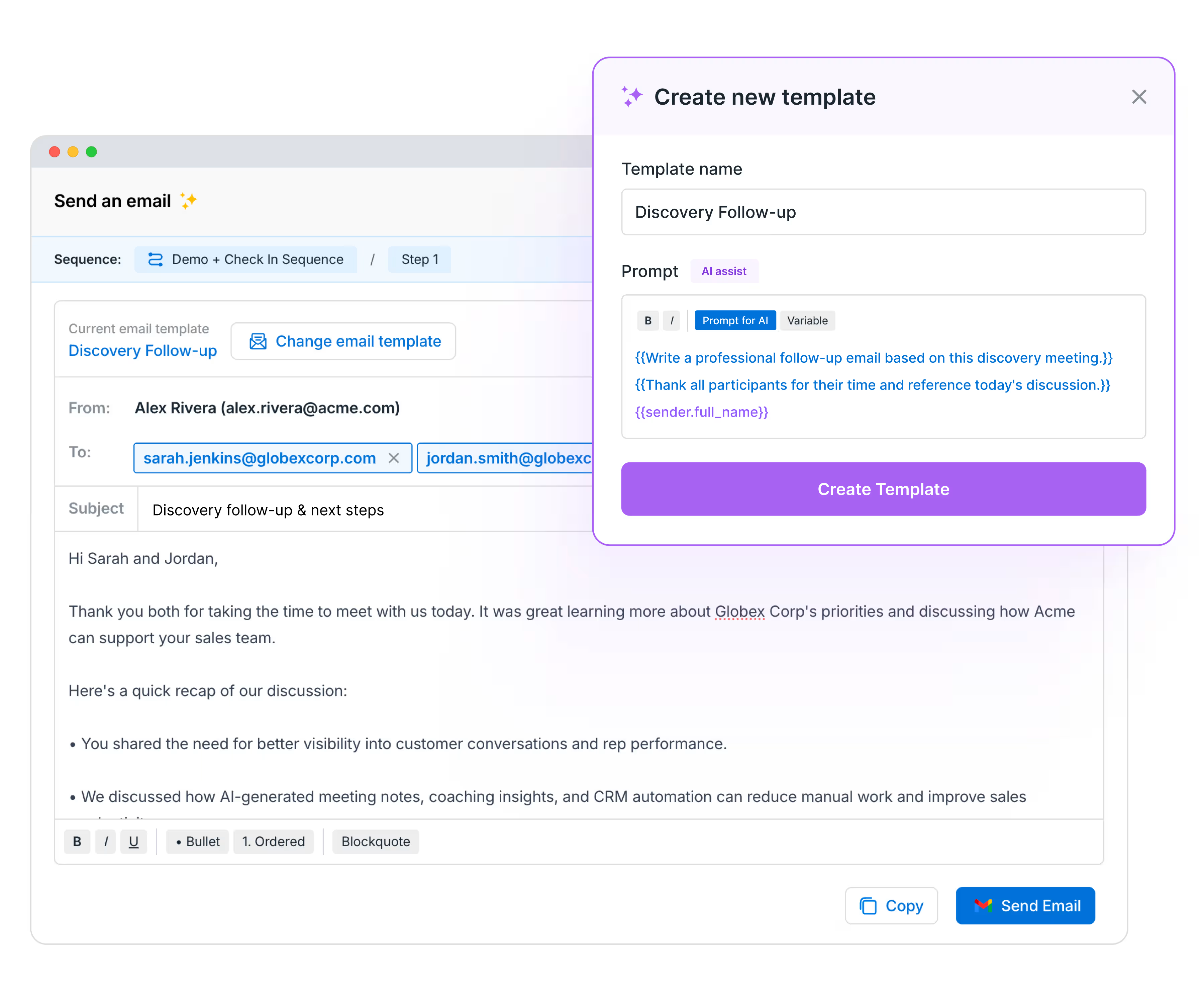
Avoma’s deal-won analysis found that 40% of closed-won deals cited follow-up as a key factor, and a slow or generic follow-up works against that number.
Add your prompt inside double curly braces, and Avoma fills it in with context from the conversation. Pre-built templates cover common scenarios, including Discovery Recap, Demo Recap, Pricing Recap, No-show and Nudge, and Revive a Dead Lead. Avoma surfaces the right template based on the meeting’s purpose, and you can regenerate with a different one at any time.
How to use it: Create and organize templates from Settings → Organization → Email Templates. Inside a meeting, click Send Email → Change email template → Choose your template.
Choose a specific source to get better output from Ask Avoma

Point Ask Avoma at specific meetings, deals, companies, and documents, and it builds its answer from them.
- Select or type @ to add sources: point Ask Avoma at specific deals, companies, team members, meetings, playlists, and more.
- Attach docs: upload your own files alongside your Avoma data.
- Search the web: combine external information with your internal data in one prompt.
Avoma MCP connects to Claude and ChatGPT with a more secure setup
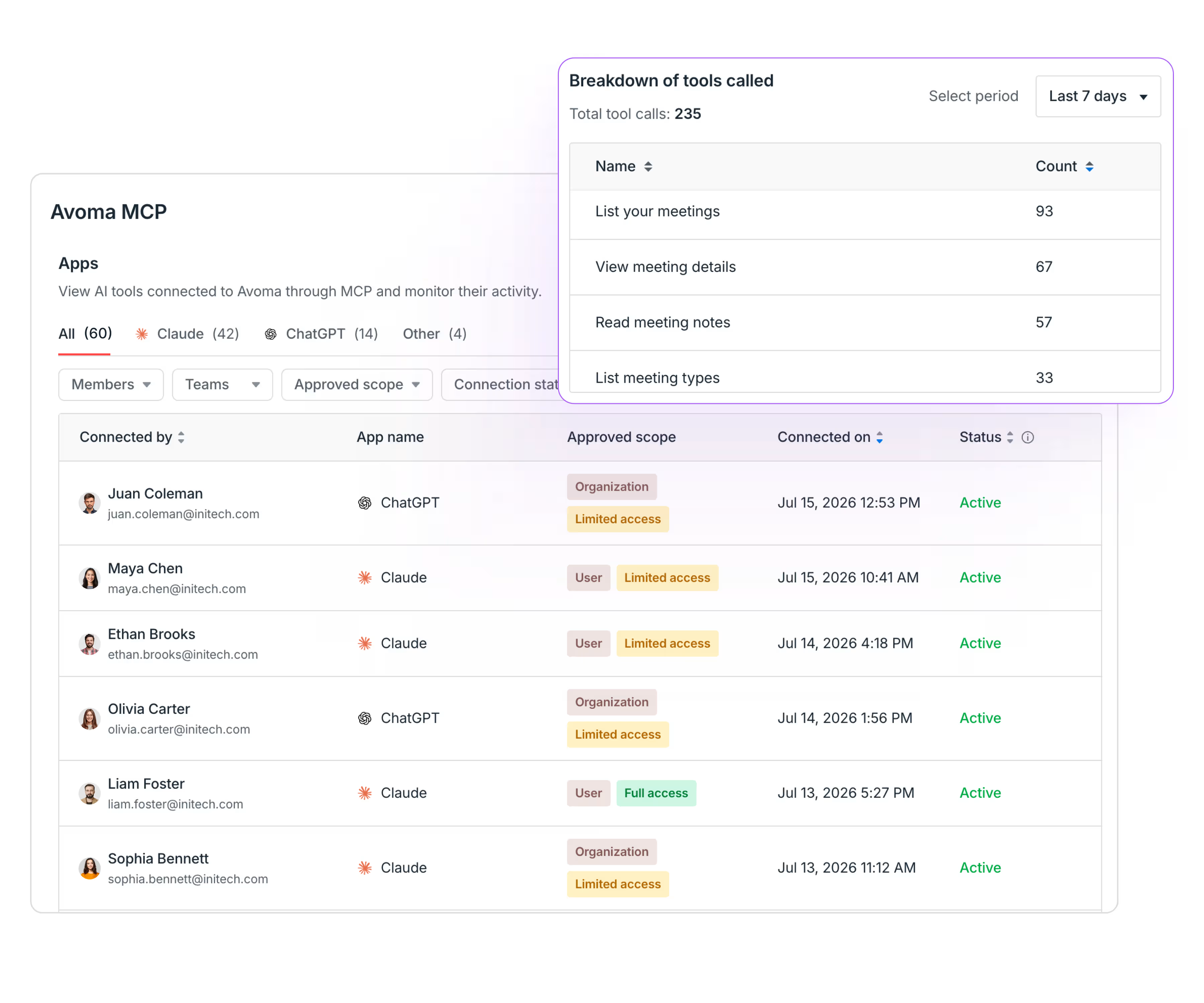
Connecting your team’s AI tools to Avoma used to mean scripts, API keys, and limited visibility. Avoma MCP now connects through a secure OAuth flow in your browser, bringing your conversation data into the AI tools your team already uses.
- OAuth setup: connect securely from your browser, with no scripts or installs. Works on web and mobile.
- Org-wide visibility: the new MCP dashboard in Settings shows all connections, who has access, what access, and whether it is active.
- Usage tracking: see total tool calls and the tools used most for any time period.
Pipeline Walk compares any two snapshots, deal by deal

Pick a start date and an end date, and Pipeline Walk sorts all deals that moved between them into New, Pulled, Increased, Decreased, Pushed, Won, or Lost, then shows the closing pipeline value at the end of the period.
- Independent walk period: pick any comparison window, month, quarter, year, or a custom length. The start and end dates become your two snapshots.
- Historical drill-down: click any segment to see what changed, deal by deal, including pushed close dates and reduced amounts.
How to use it: Under Revenue Insights, go to Reports → Pipeline Walk and set your walk period.
Pipeline Trend tracks pipeline health by stage over time

Pipeline Trend shows how many deals are at a given stage, how they move through the funnel, and how much revenue is at a given step.
- Pipeline summary: target, open pipeline, and coverage ratio, plus value, deal count, and progress for a stage within the selected time frame.
- Stacked bar chart: see how deals and revenue distribute across stages, with historical snapshots to compare week over week or month over month.
- Interactive drill-down: click a stage at any snapshot to see what changed, old versus new amount, close date, forecast category, and more.
- Forecast overlays: toggle forecast submissions on the chart to compare pipeline against what is committed.
Forecast overlays place Pipeline Trend alongside a team’s forecasting process, whether it runs top-down or bottom-up, and connect to Avoma’s broader revenue intelligence view of a deal.
How to use it: Under Revenue Insights, go to Reports → Pipeline Trend
Missed last month? Catch up on the June 2026 updates.
If your team wants to see any of these features live, talk to your Avoma CSM for a walkthrough. You can also schedule a demo and our product experts will walk you through the platform.
Frequently Asked Questions


Dive into Our Latest
Avoma Insights.


What's stopping you from turning every conversation into actionable insights?


