
Don't call customer meetings "Sync". Here are meeting title examples for sales and CS

Table of Contents:
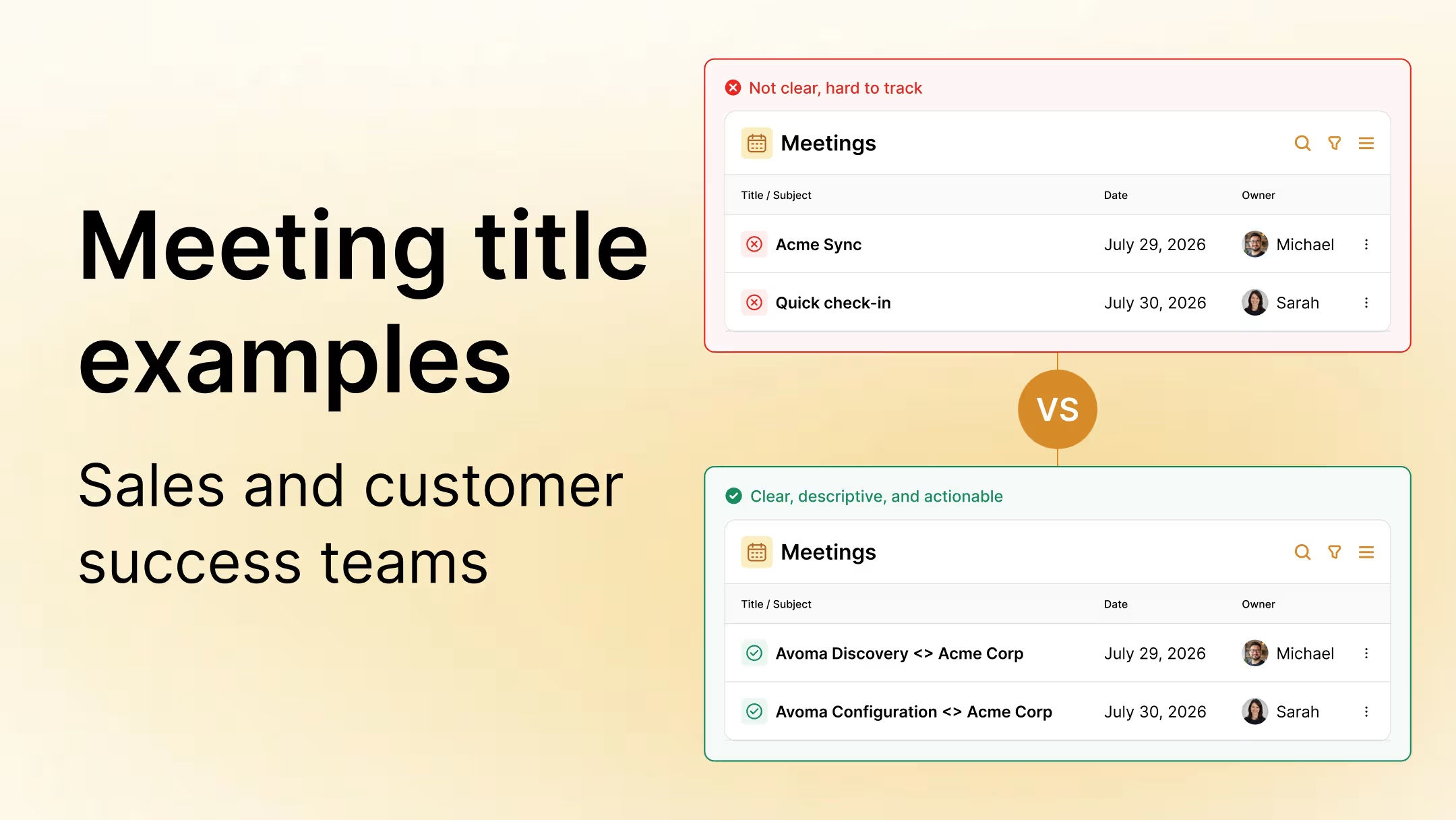
A while back, our CEO was looking through customer meetings and noticed invites titled "Sync", "Avoma <> Acme" and even invites with no real name at all. Whoever opened them had no idea what the call was about.
He then pushed our sales and CS teams to adopt one simple habit - Give every meeting a title that tells people why they're there.
To make sure it stuck, he insisted to set this up in Avoma's own scheduling tool (more on that later in the article), so the title format is set once at the link level and applied to every booking, instead of depending on someone remembering it each time.
This guide is the working version of that practice. It covers a full set of meeting title examples for every stage of the sales and the customer success lifecycle, organized by meeting type, plus the naming logic behind them and a simple template you can apply to your own calendar today.
TLDR
- A meeting title should tell the customer what the meeting is about on its own, without needing to open the invite.
- Internal team meetings can be fun and creative. Customer-facing meetings can't. This guide covers the second kind.
- You'll find title examples for all 9 sales meeting types (discovery through contract review) and all 13 customer success meeting types (onboarding through renewal).
- Inconsistent titles are a communication problem and also, they break meeting-type reporting in your CRM.
- A simple template, [Your Company name] [Meeting Type] <> [Customer Company Name], fixes most of this in one pass. Your company name leads, the customer company name comes last.
What makes a good meeting title?
A good meeting title does three things.
It names the meeting type. "Sync" tells the customer nothing. "Avoma Discovery <> Acme Corp" tells them what to expect and why they were asked to show up.
The title alone should be enough for the customer to understand why the meeting is happening, even if they never open the agenda. The agenda adds detail on top of that. The title is the floor. The agenda is the ceiling.
It matches a type your team tracks. If the title reflects a defined meeting type, that meeting becomes reportable later: how many discovery calls did you run this month, how many contract reviews are pending. If the title is a placeholder, that data does not exist.
It puts your company name first, the meeting type right after it, and the customer company name last.
Our CEO flagged this directly after reviewing a batch of real invites. When the prospect's own company name comes first, or the purpose keyword gets tacked on at the end, it stops being clear whose discovery, trial, or training the meeting actually is. "Acme Corp Discovery" could mean Acme is running its own discovery process. "Avoma Discovery <> Acme Corp" can only mean one thing.
If a title only makes sense to the person who sent it, that's a placeholder someone forgot to fix.
Meeting title best practices
A few habits keep the format working once the basics are in place.
- Put your company name first, with the meeting type right behind it. Calendar apps often truncate long event names, and whatever comes first in the title is what a customer sees even if the rest gets cut off.
- Keep it to a handful of words. "Avoma Discovery <> Acme Corp" does the job. Adding a full agenda into the title makes it harder to scan.
- Match the wording your team already uses in the CRM. If your CRM stage is called "Trial Review," use that exact phrase in the title instead of a close variant like "Trial Check."
- Update the title when the purpose changes. A meeting booked as a Follow-up that turns into a pricing conversation should get retitled to Pricing Review before the next invite goes out.
- Leave deal-specific numbers or internal codes out of the title. Calendars get shared and forwarded more than people expect, and pricing or contract details don't belong in a subject line.
- Never end the title with the purpose keyword. "Acme Corp Discovery" reads like Acme's own process, not a call Avoma is running with them. Plus there is a chance that the purpose at the end of a meeting title will get truncated or ignored.
On our own team, the habit that took the longest to stick was updating the title once a meeting's purpose changed mid-deal.
Why generic meeting titles hurt customer experience and CRM reporting
Vague titles cost you twice.
The first cost is obvious. The customer or prospect shows up unprepared, or skeptical, because the invite told them nothing. A title like "[Company] <> [Company]" or "Quick call" puts the burden on the reader to guess what's coming.
The second cost is quieter and more expensive. When meeting titles aren't standardized, meeting-type reporting in your CRM turns into guesswork. You can't answer "how many discovery calls did we run this quarter" or "how long does it take us to get from demo to contract review" if half your meetings are titled "Sync."
Scheduling links make this worse by default. If a booking tool auto-generates a generic title and nobody updates the template, every meeting booked through that link inherits the same vague name. The fix has to happen at the template level. Editing one invite after the fact doesn't touch the next 50 that get booked the same way.
Before we standardized titles across our own team, counting discovery calls in our CRM meant pulling a manual audit each time.
Common meeting title mistakes to avoid
A few patterns break the standard faster than anything else.
- Titling everything "Sync," "Catch-up," or "Quick call," regardless of what stage the deal or account is in.
- Using only the company name with no meeting type, so the invite reads "Acme Corp" and nothing else.
- Leaving the scheduling tool's default title untouched, so every meeting booked through that link inherits the same generic name.
- Mixing formats across the team, where one rep writes "Avoma Discovery <> Acme Corp" and another writes "Acme, intro call," so nothing lines up in the CRM later.
- Using internal shorthand, deal codes, or acronyms the customer has never seen and would not recognize if they read the invite.
- Leading with the client's company name instead of yours, so the customer reads their own name first instead of seeing who they're meeting with.
- Titling a meeting "Check-in" with no stated reason. It's exactly as vague as "Sync" if nobody reading it can say what's actually being checked on.
If you genuinely don't know the meeting's purpose yet, a placeholder like "Sync" is reasonable until you do. The mistake is leaving it generic once you already know better.
Meeting title examples for sales calls
Most lists of sales meeting names are a flat handful: Discovery, demo, follow-up, done. That misses most of what happens between a first conversation and a signed contract.
Here's a complete set of sales meeting types, mapped to where they sit in the sales cycle, with an example title for each.
Notice Avoma leads every title below, the meeting type comes right after it, and the company name comes last.
A few of these are worth calling out.
Follow-up is the one type that covers "no specific agenda yet," and that's fine. It still tells the customer this is a continuation of a prior conversation.
Trial Setup, Trial Onboarding, Trial Office Hours, and Trial Review are four distinct meetings that happen at different points in the trial. Lumping them together under a single "Trial Call" title is what muddies trial-stage reporting. Each one has a different purpose and a different point in the trial where it happens.
If you can't tell which of these nine a meeting is, it isn't ready to book yet.
These nine types are the exact list our own sales team uses today, refined after a few rounds of finding real meetings that didn't fit any of them.
Meeting title examples for customer success calls
The post-sale side gets even less structure than sales because "onboarding" is treated as a single meeting rather than four separate conversations with four distinct audiences.
Here's a complete set of customer success meeting types, with an example title for each.
Same order applies here: Avoma first, meeting type second, company name last.
Onboarding here breaks down into four types: Planning, Admin, Team, and Leadership. Each has a different audience and a different agenda. A CSM titling all four "Onboarding Call" loses the ability to tell them apart in the calendar or the CRM a week later.
Business Review benefits from a quarter tag ("Q3") since these repeat. Customer Demo benefits from naming what's being shown, since it's easy to confuse with a sales demo if the title doesn't specify it's for an existing customer.
Each of those four onboarding types has a different audience. Collapsing them into a single generic "Onboarding Call" is where CS calendars start to lose clarity.
Splitting onboarding into four types took us two tries. Our first version bundled Team and Leadership Onboarding into one type, and reporting on rollout progress stopped making sense.
Meeting title format: A simple naming template
You don't need a complicated system. One template covers almost every case:
[Your Company Name] [Meeting Type] <> [Customer Company Name]
Add a third element in parentheses when the default alone isn't specific enough, like a team name, a feature, or a quarter: [Your Company Name] [Meeting Type] <> [Customer Company Name] (context).
The order matters. Your company name leads, the meeting type follows right behind it, and the customer company name comes last. Put your company name first, or push the meeting type to the end, and it stops being clear whose discovery, trial, or training the invite is describing.
Two things make this stick.
Fix the default at the source. If your scheduling link auto-generates a generic title, update the link's template, not just the invite you're looking at. That's a one-time fix that applies to every future booking, rather than a habit you have to remember every time.
Add an agenda whenever you can, but don't treat it as the requirement. The title is the floor. The agenda is the ceiling. If the customer never opens the agenda, the title alone should still tell them what's about to happen.
How Avoma's scheduling tool helps standardize meeting titles
Fixing the template once only works if your scheduling tool lets you build the standard into the link itself. Avoma's scheduling tool does.
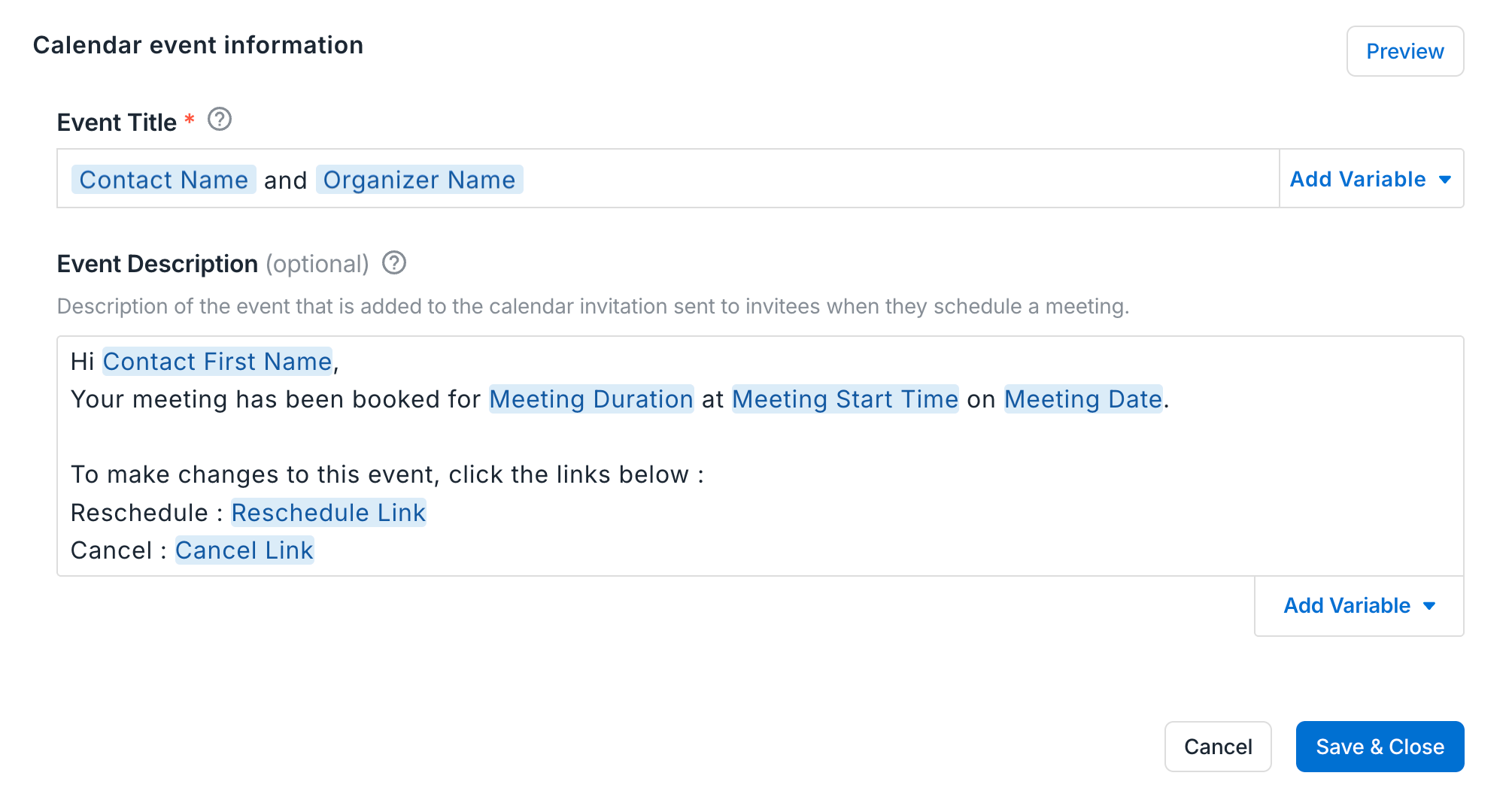
You can customize the event title using variables such as organizer name, contact name, or company name. Every booking made through that link comes in with the right format already in place. No one has to remember to type it right at the moment of booking.
Build the template with your company name first, the meeting type next, and the customer company name variable last. Every booking through that link then follows the same order automatically, instead of depending on whoever is filling out the invite that day.
The same link lets you set a meeting purpose. That selection applies the matching note-taking template the moment the meeting happens, so the notes structure lines up with the meeting type before the call even starts.
Our own scheduling links are built this way, so a discovery call invite looks identical whether it's booked by our newest AE or our VP of Sales.
A clear title is one piece of a larger habit. For more on why the same thoughtfulness should extend to how you send the invite itself, see our guide to thoughtful meeting scheduling habits.
How to add new meeting types without breaking your naming convention
Sometimes a real, recurring meeting doesn't fit any type on this list. That's a signal to add a new type, not a reason to default back to something vague.
Whoever owns your meeting-type list in the CRM or your meeting tool, often RevOps or a sales or CS lead, should be the one who adds it. That keeps the taxonomy in one place instead of drifting into a different version per rep.
If you're on Avoma, Managed Pages covers this exact problem. An admin builds one scheduling page per meeting type, locks the sections that should stay standard (including the title format), and assigns it to the reps or CSMs who run that meeting. Each person gets their own copy of the page, but the locked sections stay tied to whatever the admin sets, so the standard holds even as the team grows or people change roles.
Why standardized meeting titles matter for sales and customer success
A clear meeting title takes less time to write than a vague one. It's a small habit with an outsized effect on how prepared your customers feel and how reliable your CRM data stays.
We standardized this across our own sales and customer success teams: a defined list of meeting types for every stage, from first discovery call through renewal, with the expectation that the title alone tells the customer what's coming. It's the kind of basic that has to be locked in before a team can focus on anything more advanced.
If you're already using consistent, type-based titles across your CRM or your meeting intelligence tool, that habit does more than keep your calendar tidy. A title that names the meeting type is what makes stage-by-stage pipeline reporting possible in the first place: how many discovery calls happened, how long deals sit in trial review, how a renewal conversation compares to the one before it. None of that reporting works if half your meetings are still titled "Sync."
Start by pulling up your own calendar from the last two weeks. Count how many invites would fail the standard in this guide. That number is the best argument for fixing it.
If typing the same format into every invite is the part that keeps slipping, that's exactly what Avoma's scheduling tool is built to handle. Set the title format once at the link level, and every meeting booked through it comes in named correctly from the start.
Frequently Asked Questions
Avoma lets teams build the meeting title and description using variables, such as organizer name, contact name, and company name, when creating a scheduling page. Sales and customer success teams can use the same variable-based format across both functions, or each team can set up its own, since the format is configured per scheduling page rather than enforced company-wide. This gives teams the flexibility to standardize within a team while still allowing different formats between teams if needed. Whichever format a team chooses, leading with the vendor's own name and placing the company name last keeps it clear who the customer is meeting with.
Avoma uses the real company name, not an account ID. Company name is one of the built-in title variables available when creating a scheduling page, pulled from the invitee's company field, alongside variables for organizer name and contact name.
In Avoma, meeting purpose tagging is generally set as one type per meeting. A call that touches on both pricing and contract terms, for example, would typically be logged under whichever topic represents its primary purpose, such as Pricing Review or Contract Review, rather than tagged with both. That single tag is what keeps reporting and note-taking templates aligned to one meeting type instead of split across two.
Avoma's Managed Pages let an admin build a scheduling page once, lock the title format and other sections, and assign it to the reps or CSMs who run that meeting type. Every booking made through that page inherits the locked format, so the standard does not depend on each person remembering to apply it, and it stays enforced even as the team grows or people change roles.
Vague or inconsistent meeting titles create problems on both sides of the call. For the customer or prospect, an invite titled "Sync" or "Quick call" gives no sense of what to expect, which can leave them unprepared or skeptical about showing up. Internally, titles that don't map to a defined meeting type break CRM reporting, since a question like "how many discovery calls did we run this month" turns into a manual audit instead of a query. Inconsistent formats across a team also make it harder to tell whose meeting it is, or which stage of the sales or customer success cycle it belongs to.


Dive into Our Latest
Avoma Insights.


What's stopping you from turning every conversation into actionable insights?


