
3 AI workflows Customer Success teams can build with Avoma MCP

Table of Contents:
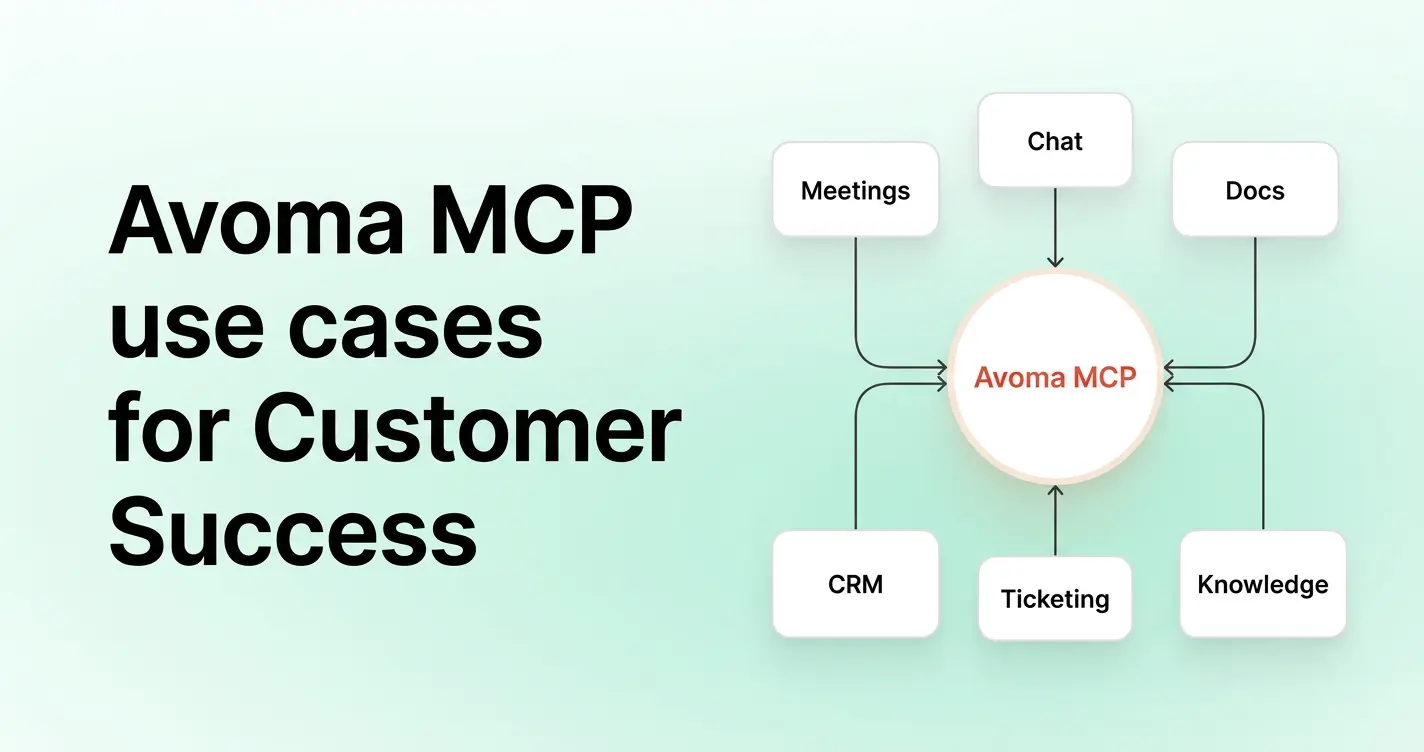
Building AI workflows for Customer Success starts with a familiar problem: renewal briefs, executive business reviews, and expansion signals all live in different tools.
A Customer Success manager preparing a renewal brief today pulls usage data from the product tool, deal terms from the CRM, and call context from Avoma, then combines all three by hand. Avoma MCP removes that manual assembly. It lets an AI assistant reason across Avoma's meeting data and your connected tools in a single query, instead of five open tabs.
This post walks through three AI workflows Customer Success teams can build with Avoma MCP: renewal risk briefs, executive business reviews, and expansion signal detection.
TL;DR
- Avoma MCP lets an AI assistant pull answers from Avoma's meeting data and your CRM, product, and communication tools in one query.
- Your native integrations sync data between systems on a schedule. Avoma MCP does not sync data. It answers a question on demand by pulling from multiple connected sources at once, which lets it power workflows your integrations alone cannot support.
- These workflows use tools most Customer Success teams already have connected: Salesforce, HubSpot, Amplitude, Slack, and Notion. None require a new purchase to start.
- Connect Avoma MCP via Claude and ChatGPT and unlock powerful AI workflows across teams
What does Avoma MCP add beyond your existing integrations?
Avoma offers bi-directonal syncing of call notes and meeting data to Salesforce and HubSpot.That sync moves information one way, from Avoma into your CRM. It does not let an AI assistant ask a question across both systems at the same time.
The MCP Server adds a different layer. It gives an AI assistant a live connection to Avoma's meeting data and any other tool you connect, so one query can pull call context from Avoma, usage trends from your product tool, and deal stage from your CRM together. Integrations move data between two fixed points. MCP lets an assistant query several sources at once, structured around whatever question you ask.
If your team already uses Claude for other revenue workflows, here's Claude skill RevOps use cases beyond Customer Success.
3 AI workflows Customer Success teams can build with Avoma MCP
The three workflows below use tools most Customer Success teams already have connected: Salesforce, HubSpot, Amplitude, Slack, and Notion. These workflows replace a manual, multi-tab task with a single AI query.
Prompt tip: How to structure MCP prompts for Customer Success
Strong MCP prompts should include the customer name, time period, source systems, Slack channels, analysis criteria, output format, and destination.
This helps AI produce a workflow-ready output instead of a broad account summary.
Use this structure:
Create [output] for [customer] for [time period].

Use:
- [Meeting source]
- [CRM source]
- [Slack channels]
- [Documentation source]
- [Product analytics source, if relevant]

Analyze:
- [Risks]
- [Commitments]
- [Stakeholder changes]
- [Product feedback]
- [Usage trends]
- [Expansion signals]

For each key insight, include:
- Source system
- Supporting context
- Owner, if available
- Recommended next action

Format the output as [destination-ready format].
1. How to build a renewal risk brief with Avoma MCP
Goal: Give account owners a single brief that flags renewal risk before the renewal date arrives.
Trigger: A renewal date falls within a set window, for example 60 days out.
Inputs: Call notes and sentiment from recent calls with the account, plus deal stage and renewal date from the CRM.
Destination: The brief posts to Slack or drops into Notion, wherever the account owner tracks renewal prep today.
Prompt template:
Create a renewal brief for [Customer] and save it to [Notion account page].

Use:
- Avoma meetings from the last [30/60/90] days
- Salesforce or HubSpot account and opportunity records
- Slack messages from:
  - #[customer-success]
  - #[renewals]
  - #[enterprise-accounts]
  - #[support-escalations]
  - #[customer-name-account]
- Notion success plan, implementation notes, and customer documentation

Analyze:
- Renewal date, ARR, contract status, and open opportunities
- Customer goals mentioned in meetings
- Progress against the current success plan
- Open commitments from Avoma action items
- Renewal risks or blockers mentioned by the customer or account team
- Stakeholder changes, including champions, executive sponsors, and disengaged contacts
- Product feedback, feature requests, and unresolved support themes
- Expansion signals, including new teams, use cases, budget mentions, or rollout plans

For each risk, commitment, and expansion signal, include:
- Source system
- Supporting context
- Owner, if available
- Recommended next action

End with:
- Recommended renewal meeting agenda
- Three questions the CSM should ask
- Suggested next steps for the account team

Format the output as a Notion-ready renewal brief with clear sections and bullets.
2. How to build an Executive Business Review with Avoma MCP
Goal: Assemble the data and narrative for a quarterly business review in one query instead of a half day of manual prep.
Trigger: The team schedules the EBR one to two weeks before the meeting date.
Inputs: Call history and key moments from Avoma, usage data from the product analytics tool, and contract details from the CRM.
Destination: The CS manager receives a draft doc in Notion or Google Docs to edit before the meeting, or a Slack summary for internal review first.
Prompt template:
Create a QBR draft for [Customer] for [Quarter].

Use:
- Avoma meetings from the last [quarter/time period]
- Amplitude product usage and feature adoption data
- Salesforce or HubSpot account history, renewal timeline, and open opportunities
- Notion success plan, customer goals, and milestone documentation

Analyze:
- Customer goals discussed in meetings
- Progress against success plan milestones
- Product adoption trends from Amplitude
- Features with increased usage
- Features with declining usage
- Business outcomes the customer mentioned
- Product feedback and feature requests
- Open risks, blockers, or unresolved commitments
- Stakeholder engagement and executive participation

For each major insight, include:
- Source system
- Supporting context
- Why it matters for the QBR

End with:
- Recommended QBR agenda
- Slide-by-slide outline
- Customer-facing talking points
- Follow-up actions for the CSM and account team

Format the output as a QBR-ready outline with slide titles, bullets, and data points to include.
3. How to detect expansion signals with Avoma MCP
Goal: Surface accounts showing both usage growth and buying intent on calls before the account team notices on its own.
Trigger: Runs weekly or biweekly across the full active account list, not per account.
Inputs: Usage trend data from the product analytics tool and mentions of new use cases, teams, or budget on Avoma calls.
Destination: A flagged list posts to Slack for the account team to review, or the account team creates a task in the CRM.
Prompt template:
Review [Customer] for expansion signals and create an opportunity report for the account team.

Use:
- Avoma meetings from the last [30/60/90] days
- Amplitude product usage, active users, and feature adoption data
- Salesforce or HubSpot account records, current plan, and open opportunities

Look for:
- Mentions of new teams, regions, or departments
- New use cases discussed in customer meetings
- Budget, procurement, or timing conversations
- Increased active users or product usage in Amplitude
- Increased adoption of features tied to higher-value plans
- Stakeholders asking about functionality outside the current plan
- Existing opportunities or past expansion discussions in Salesforce or HubSpot

For each expansion signal, include:
- Signal type
- Supporting meeting insight from Avoma
- Relevant usage trend from Amplitude
- CRM context from Salesforce or HubSpot
- Confidence level: high, medium, or low
- Recommended next action

End with:
- Suggested account team follow-up
- CRM update recommendation
- Questions the CSM should ask in the next customer conversation

Format the output as an expansion opportunity report for the CSM and account executive.
Final thoughts
Customer Success teams already have the signals they need. They just live across meetings, CRM records, product analytics, Slack channels, and customer documentation.
Avoma MCP helps AI assistants bring meeting intelligence into the workflows CSMs run before renewals, QBRs, and expansion conversations.
Start with one workflow. Make the prompt specific. Name the tools. Define the output. Then let AI handle the research while your CS team owns the customer strategy.
To see how this works with your meeting data, sign up for a free demo with Avoma.
Frequently Asked Questions
No. Integrations move data into your CRM on a schedule. Avoma MCP lets an AI assistant query that data alongside Avoma's meeting data and other connected tools in a single question, something integrations alone cannot do.
No. Setup uses OAuth for each connected tool and takes a few minutes. No custom code or developer support is required.


Dive into Our Latest
Avoma Insights.

What's stopping you from turning every conversation into actionable insights?


