
I built a RevOps Intelligence Claude skill you can download and use

Table of Contents:
RevOps lives and dies by the quality of its analysis.
When you walk into a forecast call, you want numbers you can defend, not a best-guess built on rep updates and CRM fields nobody's touched in two weeks.
Building that analysis takes time, though.
Cross-referencing call data against CRM stages, checking email engagement on Commit deals, flagging what's actually at risk, it's the right work, but it's slow enough that it gets cut short or skipped entirely.
Thats why I thought of building a RevOps Intelligence skill to automate it.
It connects Avoma and your CRM, runs the cross-reference, and returns a report you can stand behind: named deals, named signals, prioritized next steps.
You can install it and run your first analysis in about 2 minutes.
Most of this analysis can be done directly in Avoma. The skill simply brings those workflows into Claude for teams that prefer to run analysis and decision-making from a single workspace.
What the RevOps Intelligence skill does
The skill runs structured analysis across Avoma (call transcripts, tracked emails, AI notes, meeting data) and your CRM (HubSpot or Salesforce). For each task, it pulls data from available sources, applies a specific analysis framework, and delivers a structured output with a summary and prioritized recommendations.
Every output names the deal, the owner, the signal, and the recommended action with a timeframe. "Some deals may be at risk" is not useful. This is built to produce the specific.
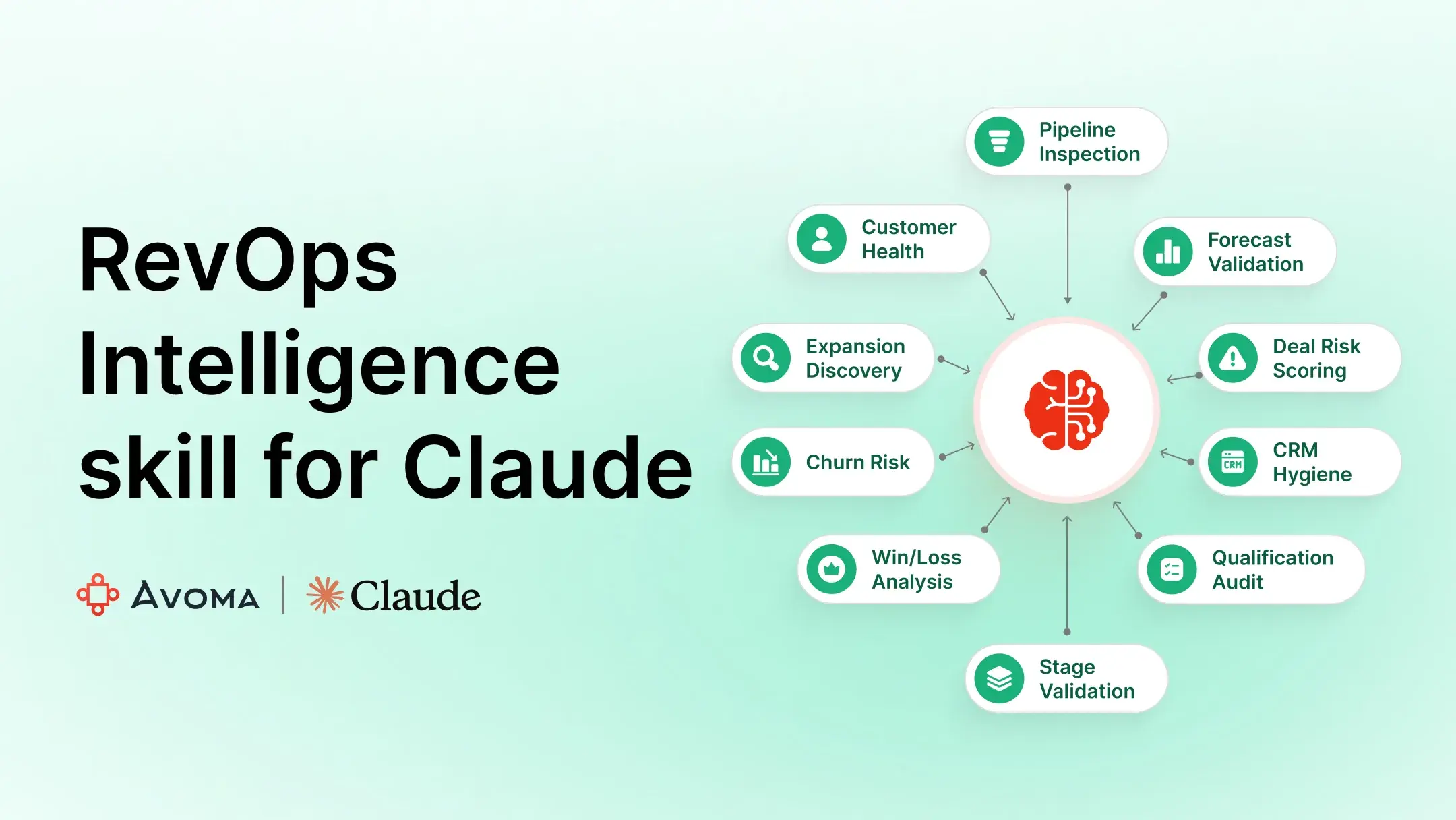
The skill covers 12 analyses across two clusters.
Pipeline and forecast
1. Pipeline inspection
Pulls all open deals, flags dark deals (no Avoma activity in 14+ days and no CRM activity in 7+ days), surfaces close dates that have passed, identifies stage concentration risk, and cross-references CRM stage against actual call evidence.
2. Forecast validation
Checks every Commit and Best Case deal for supporting evidence: was there a call in the last 14 days, did the buyer confirm a next step, are there unresolved blockers in the transcript? It separates supported forecast from at-risk forecast with dollar amounts.
3. Deal risk
Scores each open deal on 5 signals: dark deal, competitor mentioned, unresolved objection, stakeholder drop-off, and close date slip. Deals scoring 3 or more get flagged high risk.
4. CRM hygiene
Runs 6 checks per deal: close date set, amount populated, contact linked, next step field populated, stage updated in the last 30 days, and Avoma action items reflected in CRM. Scores overall hygiene and surfaces the worst offenders.
5. Next-step compliance
Checks whether next steps agreed on Avoma calls made it into CRM, whether next step fields are blank or stale, and whether calls ended without a confirmed follow-up. Produces a rep-level compliance rate.
6. Qualification audit
Scores active deals against MEDDICC, MEDDPICC, or BANT by pulling evidence from call transcripts. The most commonly missing component across your pipeline comes out in the summary.
7. Stage validation
Checks whether deals are in the right CRM stage based on what actually happened in calls and emails. Flags where evidence doesn't match the stage and estimates how much pipeline may be overstated.
8. Win/loss analysis
Looks across all closed deals in a period to surface what correlates with wins and losses: champion presence, economic buyer engagement, how competitors were handled, where deals died in the stage sequence.
CS and customer
9. Churn risk
Scores each account on 6 signals (renewal timing, sentiment decline, champion departure, executive disengagement, email silence, and support spikes) to flag at-risk accounts before renewal.
10. Expansion discovery
surfaces accounts where call transcripts show unmet use cases, feature requests, or growth signals.
11. Customer health
Produces a per-account scorecard across 5 dimensions: engagement, sentiment, executive sponsorship, action item follow-through, and renewal signal.
12. Executive report
Synthesizes pipeline health, forecast confidence, key risks, and top opportunities into a single output built for a leadership review or QBR insert.
What the output looks like
Here's an example from a churn risk detection skill:

How to run the RevOps Intelligence skill
Step 1: Connect Avoma MCP
The skill requires the Avoma MCP connector to be active in Claude. If you haven't set it up yet, follow the Avoma MCP connector setup guide. It walks through the full configuration.
Step 2: Connect your CRM MCP (optional but recommended)
HubSpot and Salesforce both improve the depth of every analysis. Connect whichever your team uses:
If your CRM isn't connected, the skill will note what's missing and run on Avoma data alone.
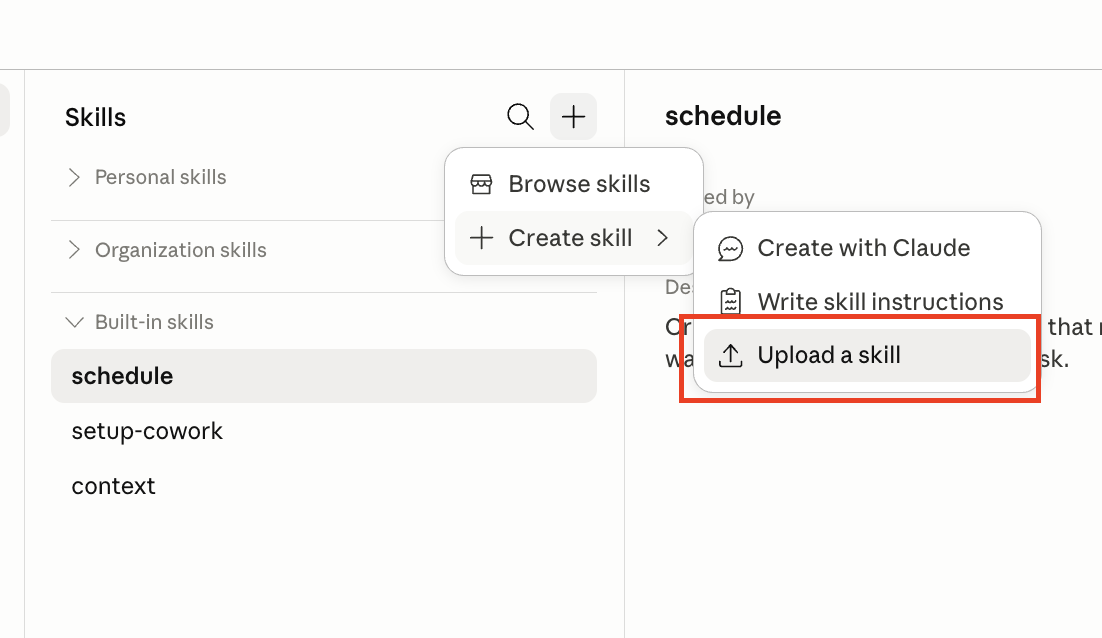
Step 3: Download and install the skill
Download the RevOps Intelligence skill and install it in Claude.
In your Claude Desktop app, go to Customize > Skills > Create Skill and upload the skill file.
The skill file installs in one click.
Step 4: Run your first analysis
Open Claude and type any of the phrases below. The skill will ask for a date range, then pull and cross-reference your data automatically.
Plain language works too. "Where are my deals stalling," "which deals are at risk," "how clean is our CRM." These all trigger the right task.
The only required input is a date range. The skill defaults to completed calls over 5 minutes and runs across all reps unless you say otherwise. Download the skill here.
The design decision that took the longest
I spent more time defining evidence than writing the analysis logic.
Take pipeline inspection.
A deal sitting in Verbal Commit in Salesforce tells you a rep moved it to Verbal Commit.
That wasn't enough.
I wanted the skill to go looking for receipts.
- Did the buyer actually commit on a recorded call?
- Did anyone besides the champion show up?
- Did the last transcript contain an objection that never got resolved?
- Did the email thread stay active after the meeting or did it go quiet?
Getting all of that working meant cross-checking CRM stages against Avoma transcripts and tracked emails. Most of the iteration happened there.
The same thing showed up in forecast validation.
I kept finding deals that looked healthy in the CRM and questionable everywhere else.
- The stage said Commit.
- The latest transcript contained an unresolved pricing objection.
- The CRM next step hadn't changed in 15 days.
- Nobody had replied to an email in weeks.
You can explain away any one of those signals. Seeing all of them on the same deal is a different story.
And I kept coming back to the output.
I don't think anyone gets much value from: Several deals may need attention.
The details are what matter.
Something like this is far more useful:
Northline SaaS is in Verbal Commit. CFO approval is still pending. The last customer call was June 1. The $112K forecast is probably overstated.
Now you know where to look.
You know what's missing.
You know why the number is questionable.
A surprising amount of time went into sanding the output down until it consistently produced that level of specificity.
Where to go from here
If you're on Avoma, your meeting data is already connected. Download the skill, open Claude, make sure your connectors are active, and type run pipeline inspection.
If you want to understand what Avoma's revenue intelligence looks like at the platform level before going further, this is a good place to start.
Frequently Asked Questions
The RevOps Intelligence Claude skill requires the Avoma connector to analyze meeting transcripts, call recordings, AI notes, and scorecards. HubSpot or Salesforce can add CRM fields such as deal stage, amount, owner, close date, contacts, and next steps. Gmail, Google Calendar, Slack, and Teams can improve coverage when available, but the skill is designed to run with available connected sources and note any missing data.
If HubSpot or Salesforce is not connected, the skill can still use Avoma data where available, but CRM-based checks will be limited. Analyses such as CRM hygiene, close date validation, stage validation, forecast category review, and owner-level pipeline reporting require CRM data to be complete. The output should state which sources were available and explain how missing CRM access affects coverage.
The skill identifies dark deals by checking for lack of recent Avoma and CRM activity. In pipeline inspection, a deal is flagged when there is no Avoma activity in the last 14 days and no CRM activity in the last 7 days. In deal risk scoring, a dark deal signal is triggered when there is no Avoma call and no CRM activity in 14 or more days.
The skill validates Commit and Best Case deals by comparing CRM forecast categories with recent buyer evidence. For Commit deals, it checks for an Avoma call in the last 14 days, a buyer-confirmed next step, and no unresolved blocker in the most recent call transcript. For Best Case deals, it looks for a recent Avoma call and buyer email engagement. Deals without supporting evidence are flagged as forecast risk.
The skill scores open deals using five risk signals: dark deal, competitor mentioned, unresolved objection, stakeholder drop-off, and close date slip. Each signal adds one point. Deals with three or more signals are marked High Risk, while deals with two signals are marked Medium Risk. The output includes deal name, owner, amount, triggered signals, last activity, and total at-risk pipeline value.
Yes. The CRM hygiene task checks whether CRM records contain key fields and whether Avoma action items are reflected in the CRM. The audit reviews items such as close date, amount, linked contacts, next step fields, recent stage updates, and Avoma-to-CRM action item coverage. This helps identify where missing or stale CRM data may reduce forecast accuracy.
Yes. The skill includes customer-focused tasks for churn risk, expansion discovery, customer health, and executive reporting. These tasks use Avoma CS calls, CRM account data, renewal timing, stakeholder engagement, sentiment trends, email activity, and support-related signals where available. The goal is to surface account risk, expansion opportunities, and customer health patterns from connected revenue data.
Users should check that the Avoma connector is active and that CRM access is available if the analysis depends on deal, forecast, or account fields. For broader coverage, HubSpot or Salesforce, Gmail, Google Calendar, and communication tools can be connected when relevant. The skill should still run with partial data, but the output should clearly note unavailable sources and any resulting limitations.



What's stopping you from turning every conversation into actionable insights?


