
Autonomous CRM guide: What it is, how it works, and how to build one

Table of Contents:
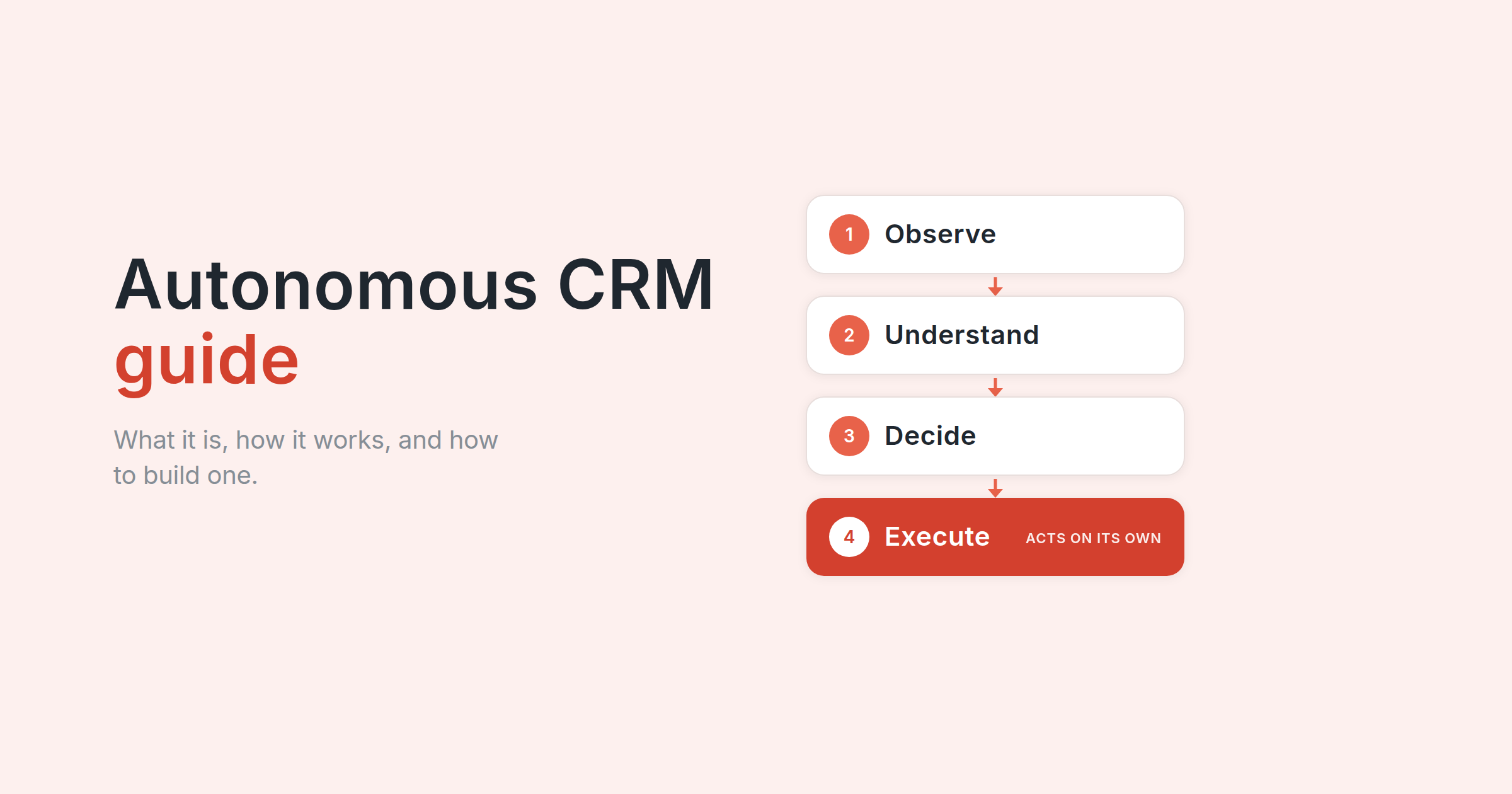
Autonomous CRM helps revenue teams keep CRM data current as customer and deal context changes.
A blocker can surface in a call, a stakeholder can join the evaluation, or a next step can change before anyone updates the opportunity record. AI agents can use that context to update the CRM or trigger approved work.
The key decision is how much authority to give the system. Updating meeting notes carries less risk than changing a forecast category or sending a sensitive customer message.
This guide explains how autonomous CRM works, how it differs from CRM automation and agentic CRM, where human control belongs, and how to evaluate, implement, and measure it.
TL;DR
- Autonomous CRM goes beyond recommendations. It can understand customer context, determine the next best action, and execute permitted work within set controls.
- Autonomy belongs at the workflow level. CRM updates may need limited review, while forecast changes and sensitive customer actions need stronger human control.
- Agentic CRM and autonomous CRM answer different questions. Agentic CRM explains how agents reason and act. Autonomy describes how much authority a workflow gives them.
- An autonomous CRM workflow needs context, authority, controls, and human escalation. The system needs enough information to decide, permission to act, and a clear handoff when an action falls outside its scope.
- The guide gives you a practical path to implementation. It covers readiness, vendor evaluation, where Avoma agents fit, rollout, and the metrics that show whether a workflow is working.
What is autonomous CRM?
An autonomous CRM uses AI to understand customer context, determine the next best action, and execute approved actions within set permissions and controls.
CRM automation follows predefined rules and triggers. Autonomous CRM can interpret changing context before deciding which action fits the situation.
That context may come from CRM records, customer conversations, email, calendar activity, support interactions, or other connected systems.
The level of autonomy depends on the workflow. Meeting notes or approved CRM fields may require limited oversight, while forecast changes and sensitive customer actions may need human approval.
Autonomous capabilities can live inside the CRM or come from software connected to it. The workflow and the authority granted to the system determine how much autonomy it has.
What makes a CRM autonomous?
A CRM needs more than AI features to become autonomous. The system needs enough context and authority to move work forward.
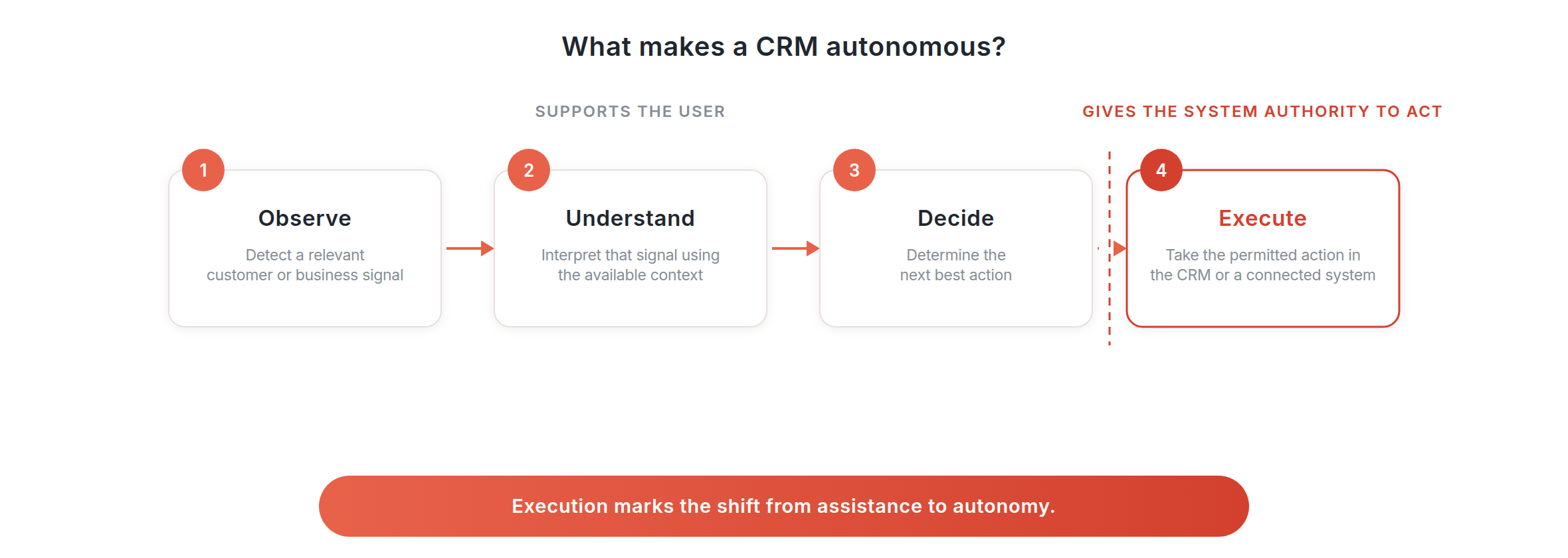
Four capabilities define that shift:
Observe. Detect a relevant customer or business signal.
Understand. Interpret that signal using the context available to the workflow.
Decide. Determine the next best action.
Execute. Take the permitted action in the CRM or a connected system.
Execution marks the shift from assistance toward greater autonomy. Summarizing an account or recommending a next step supports the user, while updating a record, creating a task, or routing work gives the system authority to act.
The amount of authority can vary. Gartner classifies AI agent autonomy into four levels: Observe, Advise, Act with Approval, and Act Autonomously. Its governance requirements increase as agents receive more autonomy and broader access.
We use those levels as a governance lens in this guide. They help answer a practical question: what can this workflow do, and when does a person need to approve or take over?
Autonomous CRM vs. Traditional CRM vs. AI CRM vs. Agentic CRM
These categories give software different roles in the CRM workflow.
Salesforce describes agentic CRM as a model where people and autonomous AI agents work with the CRM. Agents can interpret context and take action within preset guardrails, with human escalation where needed.
Is agentic CRM the same as autonomous CRM?
Agentic CRM describes how AI agents reason, plan, and act toward a goal. Autonomy describes how much authority those agents receive within a workflow.
An agent can analyze a stalled opportunity and recommend a follow-up, while a more autonomous workflow can create the task after detecting the problem.
During evaluation, ask what the agent can read, decide, and change without approval.
Avoma's guide to agentic AI for sales goes deeper into how agents reason and act across sales workflows.
Why CRM is becoming autonomous
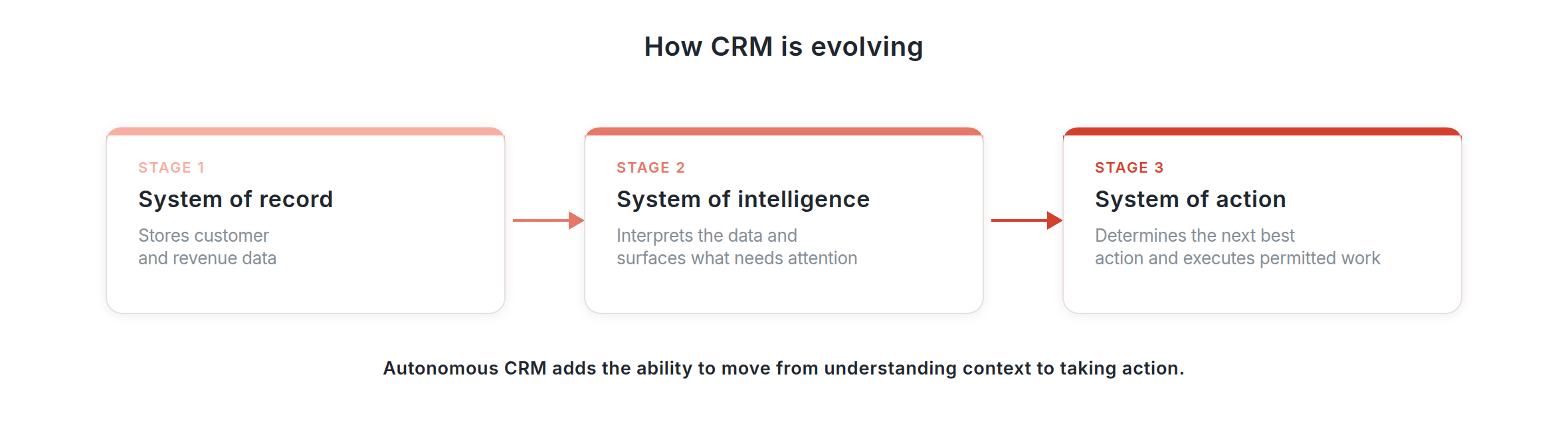
CRM started as a system of record. It stores the customer, account, contact, activity, and opportunity data that revenue teams rely on.
AI added a system of intelligence. It analyzes that data alongside information from customer conversations and other sources. This helps teams understand deal risk, customer needs, engagement, and what may need attention.
Autonomous CRM adds a system of action. It uses that context to determine the next best action and can execute approved work in the CRM or a connected system.
The progression looks like this: system of record, then system of intelligence, then system of action.
System of record stores customer and revenue data.
System of intelligence interprets the data and surfaces what it means.
System of action determines what should happen next and executes permitted actions.
The shift toward autonomous CRM happens when the system can move from storing and interpreting information to taking action on it.
CRM data quality affects how well that progression works. Validity found that 76% of respondents said less than half of their organization's CRM data was accurate and complete.
How does autonomous CRM work?
An autonomous CRM workflow needs three foundations: context, authority, and controls.
Context gives the system the information required to understand the situation. Authority defines the actions available to it. Controls determine what it may change and where human review enters the workflow.
The operating flow moves from customer context, to understanding it, to the next best action, to a permission check, to acting. If the selected action needs approval, the workflow sends it to the person responsible for the decision.
1. Capture the relevant context. The workflow starts with information that may require action. A blocker may surface during a call, a next step may change, or activity on an opportunity may decline. Signals can come from CRM activity, customer conversations, email, calendar events, product data, or support systems.
2. Understand what changed. One signal rarely provides enough information for a useful decision. The workflow may need the deal stage, prior conversations, stakeholders, open tasks, recent activity, forecast category, and customer history before it can interpret the change.
3. Determine the next best action. The system combines the new information with the workflow goal and available context. The next best action may involve updating a field, creating a task, surfacing risk, routing work, preparing a response, or requesting approval.
4. Check permissions. The workflow checks whether it has authority to take the selected action. An agent may have permission to create an internal task, while a forecast change may require manager approval.
5. Execute the action. The system performs the action after the permission check. That may mean updating the CRM, assigning work, changing an approved field, or triggering another workflow.
6. Write the outcome back. The resulting action returns to the CRM or another system of record. Writeback keeps customer and deal data aligned with the work that has taken place.
7. Monitor and escalate. The workflow tracks the result and sends exceptions to the person responsible for the decision. Missing context, conflicting information, or actions outside the approved scope should trigger a handoff.
Where should humans remain in control?
Human control should increase with the consequence of a wrong action. A routine CRM update and a contractual commitment need different approval models.
Pricing and discount approval. AI can collect deal context, identify the relevant policy, and prepare an approval request. The person with commercial authority should make the final pricing decision.
Contractual commitments. Agents can gather information and coordinate workflow steps around a contract. Legal and other authorized owners should approve changes that create contractual obligations.
Security and compliance commitments. Customer conversations may include questions about security, privacy, data handling, or compliance. AI can retrieve approved information, while Security, Privacy, or Legal teams retain authority over commitments outside approved responses.
High-impact forecast decisions. AI can analyze deal signals and recommend a forecast category. Managers should retain control over decisions that materially affect company planning or revenue commitments.
Sensitive customer communication. AI can prepare context or draft a response. Escalations, commercial disputes, security incidents, legal issues, and damaged customer relationships require human judgment before the message goes out.
Ambiguous customer signals. Some conversations contain conflicting statements or incomplete information. The workflow should route those cases to the person who owns the account or decision.
Give the system more authority when the workflow has clear boundaries and a low cost of correction. Increase human control as the consequence of an error rises.
Benefits of autonomous CRM
The value of autonomous CRM comes from the work it changes.
Less CRM administration. Activity logging, meeting notes, supported field updates, and task creation can move away from manual entry. This reduces the work reps need to complete after customer conversations and gives RevOps less missing information to chase.
More complete CRM data. Customer context can enter the CRM closer to the source interaction. This reduces dependence on reps remembering what changed and finding time to update the record later.
Faster follow-through. An autonomous workflow can move from a customer signal to an internal action without waiting for the next CRM review. A commitment from a meeting can become a task, while a new blocker can reach the right person sooner.
Better pipeline visibility. Current opportunity fields, activity, and customer signals give managers stronger information during pipeline inspection. The benefit comes from keeping the stored record closer to the current state of the deal.
More reliable forecasting inputs. Forecasting depends on the quality and freshness of opportunity data. Autonomous CRM workflows can keep more of that context current and surface changes that deserve review before a forecast submission.
Risks and limitations of autonomous CRM
Greater authority raises the cost of weak data, loose permissions, and poor decisions.
Gartner recommends governance based on both agent autonomy and access scope. At its highest autonomy level, Gartner calls for controls such as continuous monitoring, enforced guardrails, rapid rollback mechanisms, and clear ownership.
Poor source data. An agent can make a poor decision when the information available to it is incomplete or outdated. Teams need to address critical data gaps and connect the sources required by the workflow before granting more authority.
Unsupported AI output. AI can misinterpret a conversation, infer information the customer did not confirm, or produce an unsupported answer. The workflow needs output-quality checks and a route to human review when the available context does not support the decision.
Excessive permissions. Broad access increases the impact of an error. Limit permissions to the CRM objects, fields, tools, and actions required for the workflow.
Actions that are hard to reverse. A CRM field can be corrected with limited impact, while a customer commitment can create a larger problem. Approval requirements should reflect the cost of reversing the action.
Customer-facing communication. Messages can create commitments that extend beyond the CRM record. Pricing, legal language, security issues, escalations, and sensitive account situations need stronger approval controls.
Security and privacy. Agents may use conversations, emails, CRM records, and other sensitive company data. Organizations need controls for authentication, data access, retention, consent, AI data use, and administrator permissions.
Poor auditability. Teams need a record of what changed, which workflow performed the action, and what information supported the decision. Audit history helps teams investigate errors and improve the workflow.
Weak escalation. An autonomous workflow needs a named human owner. Cases that exceed system authority, contain conflicting context, or carry greater risk should move to that person.
Is your team ready for more CRM autonomy?
Start with the workflow you want to change. A workflow becomes a stronger candidate for autonomy when the team can define the job, provide the required context, limit system access, and measure the result.
A weak answer identifies what the team needs to fix before increasing autonomy.
How to evaluate autonomous CRM technology
Evaluate the product against the workflow you want to improve. A vendor demo should show what the system can understand, decide, execute, and hand back to a person.
Check the context the system can use. Ask which data sources the system can access. CRM fields may describe the opportunity state, while conversations, email, support interactions, calendar activity, or product data can explain why that state changed. Then ask whether the system can combine those sources during a decision.
Separate reasoning from rules. Ask the vendor to show a workflow where the action changes based on context. A fixed trigger works well when predictable conditions can solve the job. AI reasoning becomes useful when the decision changes with the situation.
Understand the authority given to the agent. Gartner's autonomy levels provide a useful evaluation lens: Observe, Advise, Act with Approval, and Act Autonomously. Ask which actions sit at which level in your workflow. This exposes the difference between software that generates recommendations and software that can change the CRM.
Review permissions. Check whether admins can control access by CRM object, field, workflow, role, or action. Ask who can change those permissions and how the platform records those changes.
Test approvals and escalation. Ask what happens when an action requires human approval. Then test a case with conflicting information or missing context. The workflow should send the decision to the right person when the action falls outside its scope.
Check auditability and rollback. Inspect a completed workflow. Can you see what changed, what information supported the decision, and which agent or workflow performed the action? Then check whether a user can correct or reverse the result.
Check writeback. The CRM should reflect what happened after an action. Ask where the outcome gets stored and whether information remains trapped in another system.
Understand total cost. Look beyond the advertised seat price. Include agent usage, consumption credits, integrations, services, administration, and software the workflow may replace.
Test the product with your data. Run a controlled pilot using a defined workflow and your CRM context. Compare the results with the baseline you established before the pilot.
How to make your CRM more autonomous with Avoma
Making a CRM more autonomous starts with giving AI access to the customer context behind the record, then allowing agents to take on defined parts of the workflow.
Avoma connects customer conversations with CRM data and uses revenue AI agents across several parts of the revenue process.
Note-taking Agent. The Note-taking Agent captures customer conversations and creates structured meeting notes. Avoma can send AI-generated meeting and call summaries to related HubSpot records based on the organization's configuration.
CRM Entry Agent. The CRM Entry Agent moves supported conversation data into the CRM. Avoma supports two-way sync for supported HubSpot properties across Deals, Contacts, and Companies. Supported conversation insights can also map into configured CRM properties.
Follow-up Agent. The Follow-up Agent turns commitments and action items from conversations into follow-up work. Avoma can create HubSpot tasks when meeting notes contain action items or configured conversation topics.
Coaching Agent. The Coaching Agent analyzes customer-facing conversations against configured scorecards and surfaces coaching opportunities. AI-generated scoring helps managers review performance across a larger set of calls without relying only on manual call reviews.
Forecasting Agent. The Forecasting Agent adds conversation and deal context to forecast decisions. Avoma combines conversation intelligence, CRM activity, buyer engagement, and pipeline changes to surface deal health, qualification, and forecast context for reps and managers.
These agents support different parts of the revenue workflow. Some can perform routine CRM work, while others prepare context or recommendations for a person to review. The goal is to give the right workflow the right level of autonomy while keeping higher-impact decisions with the people responsible for them.
How to implement autonomous CRM
Building autonomy into a CRM does not require broad agent control from day one. Start with one workflow and increase authority as the results support it.
1. Choose one workflow. Start with a job that has clear inputs, a defined outcome, and a manageable cost if the system makes a mistake. CRM data entry, meeting capture, or internal task creation are easier starting points than pricing decisions or customer-facing commitments.
2. Define context, permissions, and human handoff. Identify the information the workflow needs and the actions the system can take. Then define where the workflow must stop and send the decision to a person.
3. Start with approval when judgment is involved. A workflow that requires interpretation can begin by recommending or preparing the action. Compare those decisions with human decisions before allowing the system to execute them without approval.
4. Increase autonomy based on performance. Track action accuracy, overrides, exceptions, and the business outcome tied to the workflow. Give the system more authority when the workflow meets the quality standard your team has set.
How to measure autonomous CRM performance
Measure the workflow against the job it was designed to improve. Four areas give you enough information to judge whether greater autonomy is helping.
Action accuracy. Track whether the system selected and executed the correct action. Also monitor how often people need to change or reverse the result.
Human intervention. Measure how often the workflow requires approval, escalation, or correction. A high intervention rate can indicate weak context or too much autonomy.
Workflow speed. Track the time between a customer signal and the required CRM update, task, or action. For administrative workflows, measure the manual time removed as well.
Business outcome. Use a metric tied to the job. CRM data entry may use completeness or freshness. Follow-up workflows may use response time. Forecasting may use forecast variance.
Final thoughts
Autonomous CRM gives software more responsibility for the work that happens around customer and deal data.
The right level of autonomy depends on the workflow. Routine CRM work can support more system execution, while pricing, contractual commitments, sensitive communication, and high-impact forecast decisions need stronger human control.
Start with a defined job. Give the system the context it needs, limit its permissions, set the right authority level, and measure what happens after launch. The goal is a CRM workflow that can move work forward while people retain control over decisions that carry greater business or customer risk.
See how Avoma helps revenue teams make CRM workflows more autonomous with customer context and revenue AI agents.
Frequently Asked Questions
No. Agentic AI describes AI systems that can reason, plan, use tools, and take actions toward a goal. A system of intelligence is the broader layer that brings together data, context, and AI to determine what is happening and what should happen next.
Agentic AI can operate within a system of intelligence to recommend or execute actions.
No. The CRM can remain the system of record. A system of intelligence uses CRM data alongside information from customer conversations and other connected systems to build context, surface what needs attention, and support decisions.
Relevant information or outcomes can then be written back to the CRM.
Business intelligence helps teams analyze historical and current data through reports, dashboards, and metrics.
A system of intelligence combines data from multiple sources, interprets the context around it, and helps determine what should happen next. It moves beyond reporting what happened to supporting decisions and actions.
Humans stay responsible for decisions that require judgment, accountability, or approval. The system can gather context, identify what changed, recommend a next step, and handle routine actions.
People step in when information is incomplete, signals conflict, or a decision affects pricing, contracts, forecasts, security, or customer commitments.
No. The need depends more on workflow complexity and fragmented context than company size.
A smaller team can benefit when important decisions depend on information spread across the CRM, customer conversations, email, support systems, or other tools. The value increases when gathering and interpreting that context manually starts slowing the team down.





What's stopping you from turning every conversation into actionable insights?


