
AI agents for CRM: What they do, how they work, and where they fall short

Table of Contents:
Every CRM vendor now sells something called an AI agent. Ask five of them what that means and you'll get five different answers, because the term covers everything from a chatbot bolted onto a contact record to software that can research an account, flag a stalled deal, and update the CRM without anyone touching a form.
If you run revenue operations, lead a sales team, or admin a CRM, that ambiguity has a real cost. You need to know what these agents can actually do before you build a rollout plan, pick a vendor, or explain to your CRO why "agentic AI" isn't just this year's word for automation.
This guide breaks down what a CRM AI agent actually is, how it works, and, more importantly, which CRM work you should actually hand over to one and which decisions should stay under human control. It also gives you a five-part test for deciding whether your team is ready to deploy one. CRM agents are one slice of the bigger picture covered in our guide to agentic AI for sales.
In this guide:
- The real decision is what to hand off to an agent, and what stays under human review.
- Every real CRM agent runs the same loop, signal → context → reasoning → action → verification, worked through in the CRM-vs-buyer example.
- Salesforce, HubSpot, Microsoft, and Zoho all ship native agents now.
- Before you deploy one, run it through the readiness test: Context, freshness, reasoning, permission, verification.
What is an AI agent for CRM?
An AI agent for CRM is software that reasons over CRM data and other available context, decides what should happen next, and takes or recommends an action, then updates the CRM with the result. Unlike a fixed automation rule, it adjusts its behavior based on what the context actually shows.
That loop, data in, reasoning applied, action out, is what separates an agent from a chatbot or a workflow. A chatbot answers a question. A workflow fires the same action every time its trigger condition is met. An agent looks at the situation, decides what matters, and picks the response that fits it.
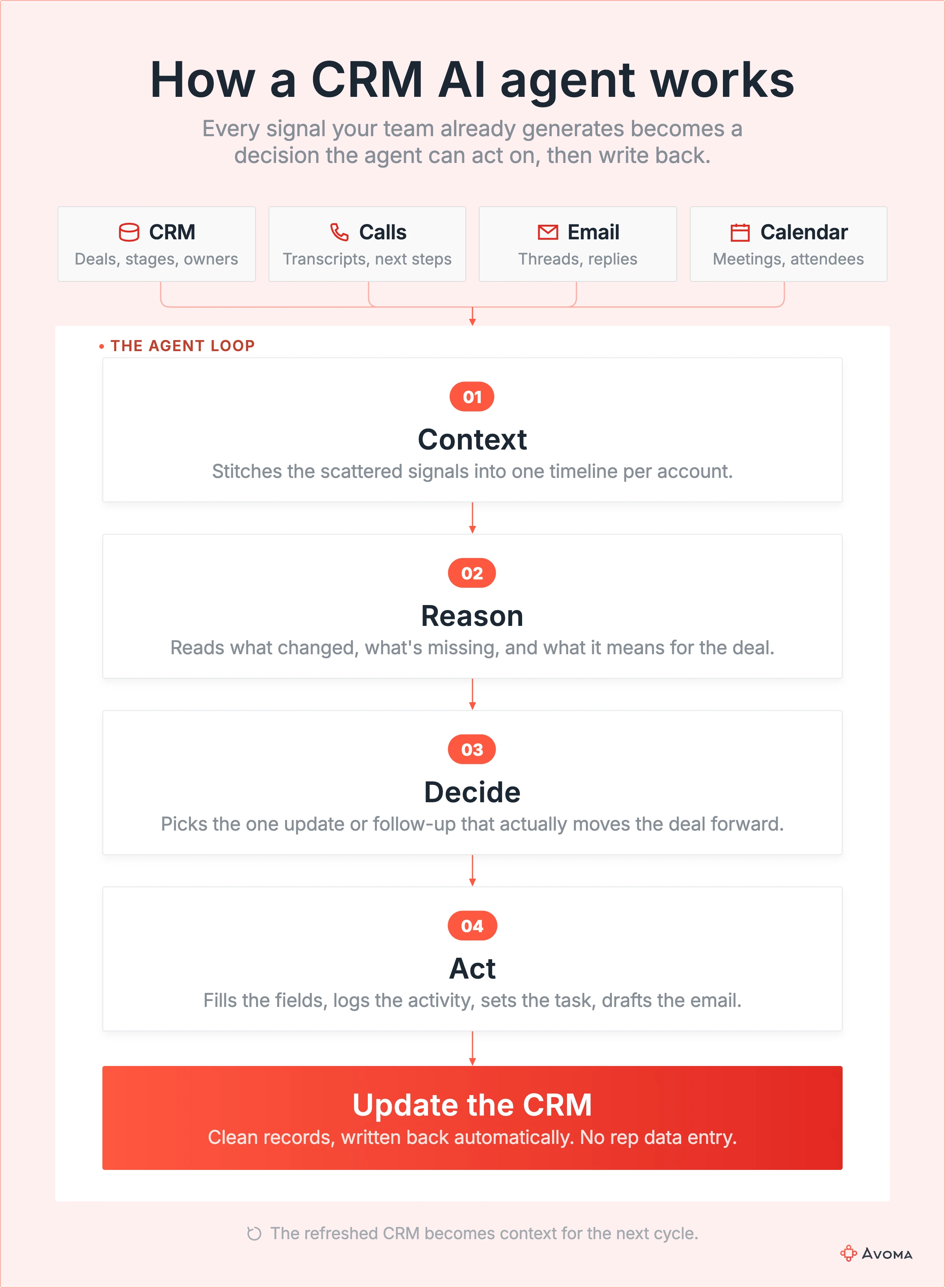
The signals an agent draws on rarely live in one place. A deal's CRM fields say what stage it's in. The call from Tuesday says what's actually holding it up. An agent that only reads the CRM is reasoning with half the picture, which is exactly the gap the rest of this guide keeps coming back to.
CRM AI agents vs AI assistants vs CRM automation
| Capability | CRM automation | AI assistant or copilot | AI agent |
|---|---|---|---|
| Follows fixed rules | Yes | Sometimes | Sometimes |
| Understands context | Limited | Yes | Yes |
| Makes decisions | No | Limited | Yes |
| Takes actions | Predetermined only | Usually user-led | Yes |
| Handles multi-step tasks | Fixed sequence | Limited | Yes |
| Works toward a goal | No | Usually not | Yes |
These terms get confused because vendors have an incentive to blur them. "AI-powered" sells better than "if-then rule," so a workflow builder with an AI-generated email subject line gets called an agent in the pricing page copy.
Key Takeaway: If a tool only responds when asked and stops after one action, it's an assistant. If it reasons across several signals, decides what to do, and carries out more than one step toward an outcome, it's functioning as an agent.
Why CRM agents are emerging now
CRM software has moved through four stages, and each one changed what "the CRM does something for you" actually means:
- Store. CRM systems originally just stored information. A rep typed in what happened, and the record sat there until someone looked at it again.
- Automate. RevOps could write a rule:
IF stage = Closed Won → notify CS. The system still didn't understand anything, it just executed a fixed condition someone had already decided. - Assist. Copilots added a layer of understanding on top of that stored data:
Ask AI to summarize this opportunity. Useful, but it still waits for a person to ask. - Act. Agents go a step further: Continuously inspect this opportunity, determine whether something needs attention, and take the appropriate permitted action, without waiting for a rule to fire or a person to ask.
That raises a fair, skeptical question before you invest in any of this: Is this actually new, or did the vendors just rename workflows? Automation and agents solve different problems. Automation is fast and predictable but blind to anything outside its trigger condition. An agent can reason about a situation that doesn't match any rule anyone thought to write, which is exactly why deal risk and stale records keep slipping through automation-only setups.
Key Takeaway: The shift from automation to agents is a shift from "the system does what we told it to" to "the system decides what needs to happen." That's a meaningfully different capability, not a rebrand.
Here's what that shift looks like against work your team already recognizes, row by row.
| Today | With an AI agent |
|---|---|
| Rep updates opportunity after call | Agent extracts changes and updates fields |
| SDR researches account before outreach | Agent assembles account context |
| RevOps builds lead-routing rules | Agent evaluates context and determines route |
| Manager finds stalled deals during pipeline review | Agent continuously flags stalled deals |
| AE remembers to send follow-up | Agent drafts follow-up and creates next task |
| Manager checks MEDDPICC fields | Agent identifies missing qualification evidence |
| RevOps cleans stale records | Agent continuously identifies inconsistencies |
What work can AI agents take off your revenue team?
The useful question is which work your team still does manually that an agent could reliably take over, not what features sit on an agent's spec sheet. Here are eight places to look, alongside the broader set of jobs covered in our guide to AI sales agents.
1. Keep CRM records current
A rep finishes five calls and updates Salesforce later from memory, if they get to it at all.
An agent can capture what changed during the conversation and update the relevant records. If a new stakeholder joins a call, for example, it can identify their role and associate them with the opportunity.
Keep a human involved: Require approval for changes to stage, amount, close date, and other high-impact fields.
2. Research leads and accounts
Instead of a rep spending fifteen minutes assembling context from CRM records, past conversations, and company pages, an agent can prepare that research before they need it. A rep opening tomorrow's meeting could find a brief covering:
- The last three touchpoints
- Open questions and objections
- Recent account activity
- Relevant company developments
The rep decides what's relevant. The agent removes the research work.
3. Qualify and route leads
Static scoring struggles when qualification depends on several signals at once. An agent can evaluate fit, intent, company attributes, and engagement together:
Pricing visits + ICP fit + territory → prioritize lead → route to the right rep
That removes the need for RevOps to build a rule for every possible combination.
Watch: Audit these decisions periodically as your GTM strategy and qualification criteria change.
4. Prepare reps for meetings
Three weeks have passed since the last customer conversation. What did the buyer care about? What was left unresolved? An agent can surface that context before the next meeting:
- Pricing objection raised on the last call
- Security review still outstanding
- Economic buyer hasn't joined a meeting
- Next step promised but not completed
There's little reason for an approval step here. The agent surfaces the evidence. The rep decides what to do with it.
5. Follow up after conversations
An AE ends a call with three commitments. Instead of relying on memory, an agent can identify them, draft the follow-up, and create the necessary tasks.
The buyer says "send me updated pricing." The agent turns that into:
Commitment detected → email drafted → follow-up task created
Keep a human involved: Review customer-facing communication before it goes out, particularly when pricing or sensitive account issues are involved.
6. Catch deal risk earlier
The CRM says the deal is healthy. The conversation says otherwise. An agent can look for discrepancies such as:
- Economic buyer marked as identified but absent from recent conversations
- Close date approaching with no next meeting
- Pricing objection raised but never resolved
- Buyer timeline no longer matching the CRM close date
It shouldn't silently change the forecast off those signals. Surface the evidence first, and let the revenue team make the consequential decision. These gaps show up most often in complex, multi-stakeholder deals, covered in our guide to enterprise sales.
7. Inspect pipeline continuously
Most pipeline inspection happens on a cadence. Every Tuesday, someone asks:
- Which deals slipped?
- Which haven't moved?
- Which have no next meeting?
- Which close dates no longer make sense?
- Which stages don't match what's actually happening?
An agent can run those checks continuously. If a deal is supposed to close in ten days but there's no next meeting and the buyer has gone quiet, the team doesn't need to wait until Tuesday to find out.
Pipeline inspection becomes event-driven instead of meeting-driven. The agent finds the exception. The manager decides whether to intervene.
8. Find missing CRM information and trigger action
Sometimes the useful signal is the absence of one. An agent can continuously find gaps such as:
- A $200K late-stage opportunity with no economic buyer
- An opportunity with no next meeting scheduled
- Decision criteria entered in the CRM but unsupported by recent conversations
- A deal sitting in the same stage beyond the expected timeframe
Finding the problem isn't enough on its own. The agent can also trigger the appropriate next step:
Missing economic buyer → flag deal → notify AE → create task
The boundary: Let the agent identify the gap and initiate low-risk workflows. Don't let it invent the missing information.
How do AI agents work with CRM data?
At a basic level, most CRM agents follow the same operating loop:
Observe → Reason → Decide → Act → Verify
That's the same pattern as signal → context → reasoning → action → verification used throughout this guide, just described from the agent's point of view.
The context an agent uses can be broadly divided into two types:
Structured context
This is the data already stored in CRM fields:
- Deal stage
- Amount
- Owner
- Close date
- Contact role
It's clean and easy for an agent to query. But it's often incomplete because it only reflects what someone remembered to enter or update.
Unstructured context
This is the information that lives around those CRM fields:
- What a prospect said on a call
- What they wrote in an email
- An objection raised during a meeting
- A concern that never made it into the CRM
It's messier, but it's often where the most current information about a deal lives.
Expert Insight: In Avoma's experience working with revenue teams, the deals that surprise a forecast call almost never surprise the transcript. The risk was often already sitting in a conversation from a week or two earlier, unflagged, because structured CRM fields don't update themselves.
An agent limited to structured CRM context can still be useful. But it can't act on information the CRM hasn't captured yet.
The example below shows what that limitation looks like on a real deal.
CRM-native agents vs CRM-connected agents
Not every CRM agent lives inside the CRM, and that distinction matters more than which vendor built it.
CRM-native agents
Built directly into the platform, like Salesforce's Agentforce or HubSpot's Breeze agents. They already have permissions, objects, and workflows configured, so there's no separate integration to maintain.
CRM-connected agents
Agents or AI systems that reason across the CRM and other systems where relevant context actually lives: Call recordings, email, support tickets, product usage.
CRM-native doesn't mean the CRM contains everything the agent needs. A native agent is still limited to what's stored in that system, and a lot of the signal that predicts deal risk, buyer sentiment, or account health starts somewhere else entirely.
Best Practice: Start with the native agent when the context and the action both live inside the CRM. Reach for a connected agent when the decision depends on something the CRM record can't see yet, the exact scenario the next example walks through.
Example: CRM says one thing, buyer says another
| Source | What it shows |
|---|---|
| CRM record | Stage: Negotiation. Close date: September 30. Amount: $120K. |
| Customer call | "Procurement won't review this until next month." |
The CRM isn't wrong here. It's just current as of whenever a rep last touched it, and a lot can happen in a deal between updates.
A connected agent working this deal would run the full loop: Detect the conflict between the close date and what procurement said, compare it against the CRM record, flag the deal as at risk, recommend pushing the close date, notify the rep, and update the CRM once someone confirms the change. That's the signal → context → reasoning → action → verification pattern doing real work on a real deal. A native agent limited to CRM fields alone would have no way to catch this until the close date came and went.
Which CRMs have AI agents?
Most major CRMs now ship native agent capability, though what "agent" means still varies by vendor and changes quickly enough that it's worth checking current documentation before you commit to a rollout.
Salesforce's Agentforce includes named agents like an SDR Agent that engages prospects and books meetings, and a Sales Coach Agent that runs practice sessions grounded in a rep's real deals, reasoning over Salesforce CRM data and connected external data. Our guide to Salesforce AI agents covers what it can realistically do in more depth.
HubSpot's Breeze agents, managed through Agent Hub and built in Agent Builder, include a Data Agent for CRM enrichment, a Prospecting Agent for account research and outreach, and a Deal Progression Agent that recommends how to move a deal forward. Our guide to HubSpot AI agents breaks down what each one automates.
Microsoft's Copilot agents inside Dynamics 365 work similarly, reasoning over CRM records and Microsoft 365 data to draft content and surface recommendations. Zoho's Zia adds comparable capability for teams on that platform.
This guide won't turn into a vendor roundup. Before rolling any of them out, run the workflow through the readiness test below.
What to automate first
Prioritize agent rollouts by five traits:
- Frequent
- Repetitive
- Context-rich
- Reversible
- Easy to verify
CRM updates, account research, meeting prep, missing-field identification, and follow-up drafting all score well here. They happen constantly, the context needed is usually available, and a wrong output is easy to catch and correct.
Be more cautious with pricing changes, contract decisions, and forecast overrides. Those fail the reversibility test: Getting one wrong costs more than the time an agent would have saved.
The CRM agent readiness test
Before deploying any CRM agent, run it through five questions.
- Context. Does the agent have the information it needs to make this specific decision, not just access to the CRM in general?
- Freshness. Is that information current, or is it working from a CRM field nobody has touched in three weeks?
- Reasoning. Can it actually determine what should happen next, or is it just summarizing what already exists?
- Permission. Does it have permission to take the action it's recommending, and is that permission scoped to what it should actually be allowed to touch?
- Verification. Can someone check what it did or recommended, and is there a record of why it made that call?
Context → Freshness → Reasoning → Permission → Action → Verification
Common Mistake: Deploying an agent because it passed a demo, not because it passed this test on your actual CRM data. A demo runs on clean, curated records. Your pipeline probably doesn't look like that.
Once a workflow passes, deploy it deliberately instead of turning it loose everywhere at once.
How to deploy your first CRM agent
Passing the readiness test tells you an agent could work. It doesn't tell you where to start. Keep the first deployment narrow enough to actually learn from.
Don't start with "Which agent should we buy?" Start with: Which revenue workflow should no longer require a person to manually inspect, decide, and update the CRM?
- Pick one repetitive workflow, rather than trying to cover several at once.
- Identify the signals required to make that decision.
- Identify where those signals live, CRM fields, call recordings, email, or somewhere else.
- Define what decisions the agent can make on its own.
- Define what actions it can take once it makes that decision.
- Decide which actions require approval before they execute.
- Log every action and reason, so a wrong call is traceable, not just visible after the fact.
- Measure the result before expanding scope, using the metrics below.
Pro Tip: A narrow, well-instrumented pilot on one workflow teaches you more about whether agents work for your team than a platform-wide rollout ever will, and it's far easier to unwind if it doesn't.
Where CRM AI agents still fall short
Every limitation below traces back to one of the five readiness questions above, not to AI in the abstract.
- Incomplete data. An agent reasoning over incomplete CRM data inherits the gap.
- Stale data. An agent can confidently act on something that stopped being true weeks ago.
- Hallucinated details. Still happen, especially when an agent is asked to fill in a gap rather than report what it actually found.
- Ambiguous intent. "We're not ready yet" can mean budget, timing, or a polite no, and an agent that guesses wrong can misroute a real opportunity.
- Permission and access gaps. Show up the moment an agent needs data it was never granted, or write access nobody scoped correctly.
- High-risk actions. Changing pricing or sending a customer-facing email still deserves a human checkpoint regardless of how confident the agent sounds.
Pro Tip: The agents worth trusting fastest are the ones that say "I'm not sure" instead of guessing. Treat confident-sounding output on ambiguous input as a reason to check, not a reason to skip the check.
How to measure whether your CRM agent is working
Whether an agent is "working" isn't a single question. It breaks down into four measurable categories.
| Measure | Example |
|---|---|
| Work removed | Rep CRM admin time, manual research time |
| Data quality | Missing fields, stale close dates, contacts without roles |
| Speed | Lead response time, follow-up time, time to risk detection |
| Accuracy | Correct updates, false risk alerts, agent actions reversed by humans |
One metric in that last row deserves its own attention: Human override rate.
Data Point: If humans reverse 35% of an agent's CRM updates, the agent is generating cleanup work faster than it's saving time. Track override rate from the first week of deployment, not after the rollout is already being called a success.
A high override rate on a specific workflow is also a useful diagnostic on its own. It usually means that workflow failed one of the five readiness questions above, not that agents don't work in general.
Getting from readiness to results
The five-part test above turns "should we use AI agents" into a workflow-by-workflow decision instead of a single yes or no.
A CRM is a delayed representation of what's actually happening with buyers, current as of whenever someone last had time to update it. That's the core idea behind our breakdown of systems of action vs. systems of record. Every job this guide covered, CRM hygiene, deal risk, meeting prep, comes down to closing that delay: A buyer says something, the system understands it, the appropriate action happens, and the CRM reflects reality instead of lagging behind it. That only works when the agent can reach the context those decisions require, and a lot of that context starts in conversations, not CRM fields.
Give your CRM agents the conversation context your CRM misses. Avoma's conversation intelligence captures what happens on calls and emails, then writes the relevant signals back into Salesforce, HubSpot, and the CRM-native and third-party agents your team already runs. If you want to see what that looks like against your own pipeline, a demo walks through it.
Frequently Asked Questions
An AI agent for CRM is software that reasons over CRM data and other relevant context to decide what should happen next, then takes or recommends a sales or CS action. It differs from automation because it adjusts its behavior based on the specific context, rather than applying the same rule every time.
Common uses include updating records after a call, researching accounts before a meeting, qualifying and routing leads, drafting follow-ups, flagging deal risk, and finding missing information on open opportunities. Which jobs an agent can do well depends on whether it has the context those decisions require.
Yes, for lower-risk fields like contact details or activity logs, many teams let agents update records without review. Fields with more consequence, like deal stage, amount, or close date, usually route through a person for approval first, since a wrong automatic update can be harder to catch than a wrong recommendation.
A copilot typically responds when a person asks it something and stops after that response. An agent reasons across context on its own, decides what should happen, and can carry out multiple steps toward an outcome without a person prompting each one.
Yes. Salesforce's Agentforce platform includes named agents such as an SDR Agent and a Sales Coach Agent that reason over Salesforce CRM data. The Agentforce guide covers its capabilities and limits in more depth.
Yes. HubSpot's Breeze agents, managed through Agent Hub, include a Data Agent, a Prospecting Agent, and a Deal Progression Agent. The HubSpot agent guide breaks down what each one automates.
It depends on the action. Low-risk, reversible actions, like enriching a contact record, are reasonable to automate fully. Actions with real consequence, pricing, contracts, customer-facing messages, forecast changes, generally warrant human approval before execution.
Most CRM agents draw on structured CRM fields (stage, amount, owner, close date) and, increasingly, unstructured context from calls, emails, and other conversations. An agent limited to structured fields alone can only act on what's already been entered, which is often behind what's actually happening in the deal.


Dive into Our Latest
Avoma Insights.



What's stopping you from turning every conversation into actionable insights?


