
HubSpot AI agents: What they can do and where they help most

Table of Contents:
You're looking into HubSpot AI agents because there's work happening in and around HubSpot that you don't want your team doing by hand anymore: Researching accounts, qualifying prospects, updating deal records after a call, turning a buyer's commitment into a task, watching a pipeline for risk nobody has time to review deal by deal.
Not every one of those tasks needs an AI agent. Some just need a rule. And not every task that does need reasoning should run without a human checking the output.
This guide answers 3 questions, in order: What work you should delegate, what context an agent needs to do that work well, and how much autonomy to give it once it can. A 5-question test near the end narrows all 3 down to your first move.
TL;DR
- Start with the job you want to delegate, then evaluate whether an agent can do it well. Whether HubSpot can help depends on the specific work, not on how advanced the agent sounds.
- Run any workflow through the Signal, Context, Reasoning, Action, Verification framework: What starts the work, what the agent needs to understand it, what judgment it takes, what action follows, and whether that action needs a person to verify it.
- Full access to HubSpot doesn't mean an agent has enough context to do a job well. Conversation data usually fills the gap CRM fields leave behind.
- Match autonomy to the decision, not to how confident an agent sounds, using the autonomy ladder below.
- Start with frequent, low-risk, checkable work. Save deal stages, forecasts, and customer-facing actions for later.
What are HubSpot AI agents?
HubSpot AI agents are AI systems that take on a defined piece of work inside or around your HubSpot CRM, using CRM data (and sometimes information from outside it) to research, qualify, draft, or update records with less manual input from your team. They're HubSpot's implementation of a broader category: CRM AI agents, alongside similar work happening in Salesforce, covered in our guide to Salesforce AI agents.
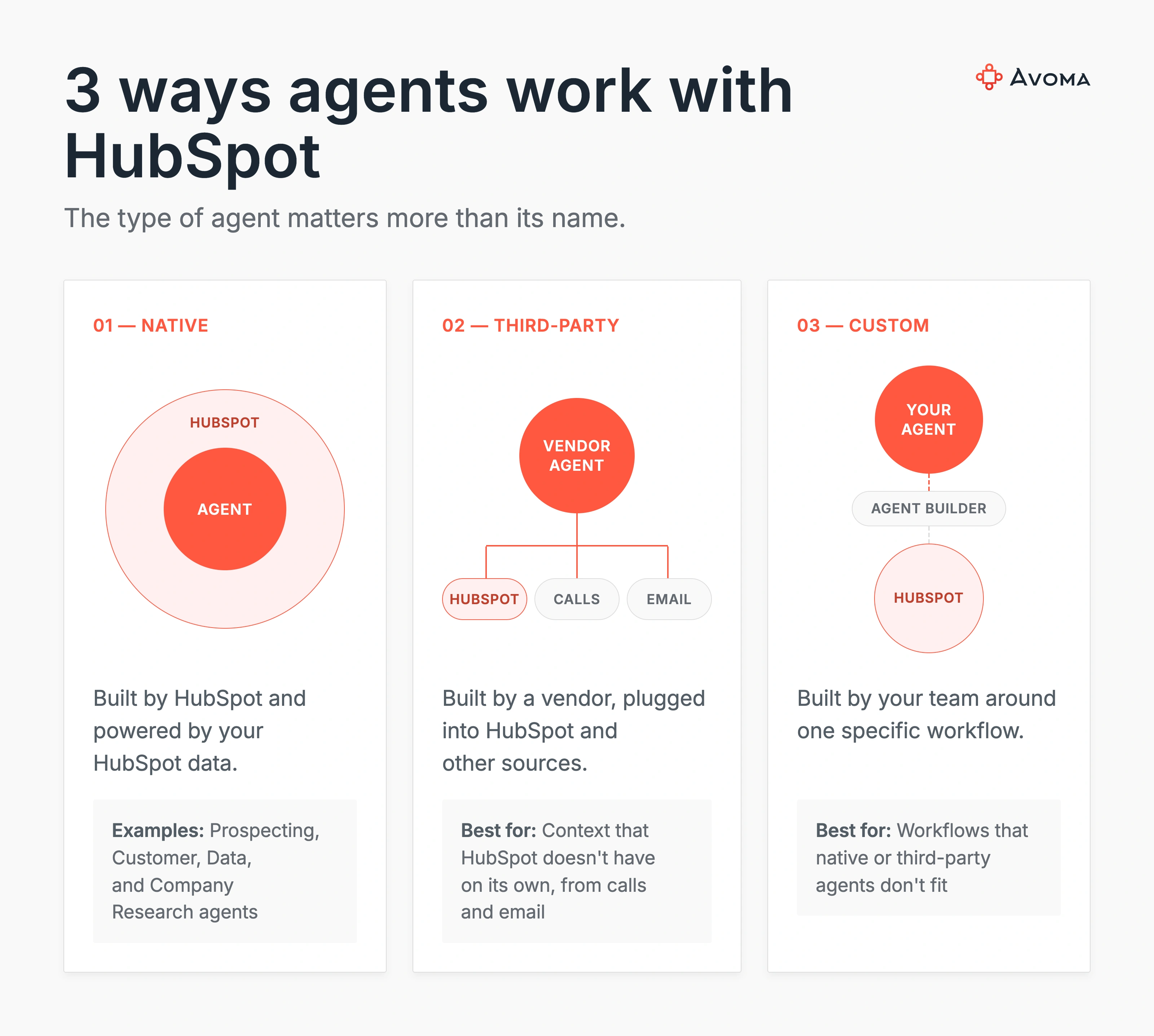
The term covers 3 different approaches, and knowing which one you're dealing with matters more than knowing every agent's name.
- Native HubSpot agents. Built by HubSpot and included in its Breeze and Agent Hub ecosystem, purpose-built for specific jobs: Researching a company, working sales leads, resolving support tickets, cleaning up CRM properties. HubSpot's Prospecting Agent, Customer Agent, Data Agent, and Company Research Agent fall into this category. They run on HubSpot data by default and are the fastest path to trying agent-driven work if your workflow already lives inside HubSpot.
- Third-party agents that work with HubSpot. Agents built by other vendors that connect to HubSpot as one data source among several, often combining it with call recordings, email, or external research. These agents can bring context HubSpot doesn't have on its own.
- Custom agents. Agents your team configures around a specific internal workflow, built with HubSpot's Agent Builder or a similar tool, when neither the native nor third-party options match how your team works.
Each of these can do the same job with a different level of fit, and choosing between them gets easier once you know how much autonomy to give one.
What work can AI agents take off your HubSpot users?
The work below shows up on most RevOps and sales teams in some form, and overlaps with the wider set of jobs AI sales agents now cover across the revenue cycle. For each one, the real question is whether the agent has what it needs to do it well, and where a person still needs to check the output.
1. Research leads and accounts
Reps lose real selling time pulling together account history, funding news, and tech stack details before a first call or a renewal conversation.
An agent's job is to gather public information (news, funding signals, tech stack) and CRM history, then summarize it into something a rep can read in 2 minutes instead of researching for 20. HubSpot's Company Research Agent works this way, pulling from public sources and your CRM to build a company overview on demand.
That's a usable starting point, but it misses anything that only came up in a recent call: A budget freeze, a champion who left.
2. Qualify and prioritize leads
Reps typically have more prospects than they can meaningfully investigate in a day. An agent's job is to combine the signals available, firmographic data, engagement history, buying intent, past conversations, into a judgment about which prospects are worth attention right now.
If qualification is really just a rule (company size over 500 and industry equals SaaS), a workflow rule handles that fine. No agent required.
Agents earn their place when qualification depends on reading several ambiguous signals at once: A prospect who's gone quiet on email but keeps returning to the pricing page, or a champion who's engaged but hasn't looped in anyone with budget authority. That's judgment, not a lookup, and it's where HubSpot's Prospecting Agent, which reads engagement signals like page views, email opens, and meetings, earns its place over a static rule.
3. Keep HubSpot records updated
Reps finish a call and update HubSpot later, from memory, if they update it at all. An agent's job is to spot what changed in a conversation and turn it into structured CRM information: A new stakeholder, a shifted timeline, a budget detail nobody typed in.
Say a new stakeholder joins a call and explains their role. A well-built agent identifies who they are, associates them with the right account and deal, and adds that context where it belongs.
Be more careful with stage, amount, close date, and other properties a forecast depends on. A wrong stakeholder is a mildly confused CRM record. A wrong close date costs the forecast credibility, and that's worth a human glance before it saves.
Common Mistake: Treating deal-level fields like stage, amount, and forecast category with the same confidence as a contact's job title. Those aren't the same risk, and mixing them up is how CRM data quality erodes quietly.
4. Turn customer conversations into actions
A buyer agrees to a next step, but somebody still has to turn that conversation into CRM work. An agent's job is to identify commitments made in a conversation and initiate the right follow-up: Extract the next step, create a task, associate it with the right opportunity, and prepare a draft.
Say a buyer asks for security documentation and agrees to reconnect Thursday. A good agent extracts "send security docs, reconnect Thursday," creates the task, and drafts the follow-up for a rep to review before it goes out.
That's the difference between an agent understanding something happened and having permission to act on it. Understanding the commitment is a reasoning problem. Sending something to a customer without a person reading it first is a different kind of decision.
5. Monitor deals and surface risk
Managers can't inspect every opportunity by hand once a pipeline gets past a few dozen active deals. An agent's job is to spot meaningful changes: Missing next steps, a stakeholder who's gone quiet, an objection that hasn't been addressed, a mismatch between what the CRM says and what's happening in recent calls.
An agent that flags "no economic buyer on a call in 45 days" is doing something useful. An agent that predicts a deal will close is making a claim it usually can't back up. Keep the job scoped to surfacing evidence, not predicting outcomes. Deals like these get harder to track as more stakeholders get involved, which our guide to enterprise sales covers in more depth.
Knowing which jobs to hand off is only half the decision. The other half is whether the agent has what it needs, which comes down to how it works with HubSpot data in the first place.
How do AI agents work with HubSpot data?
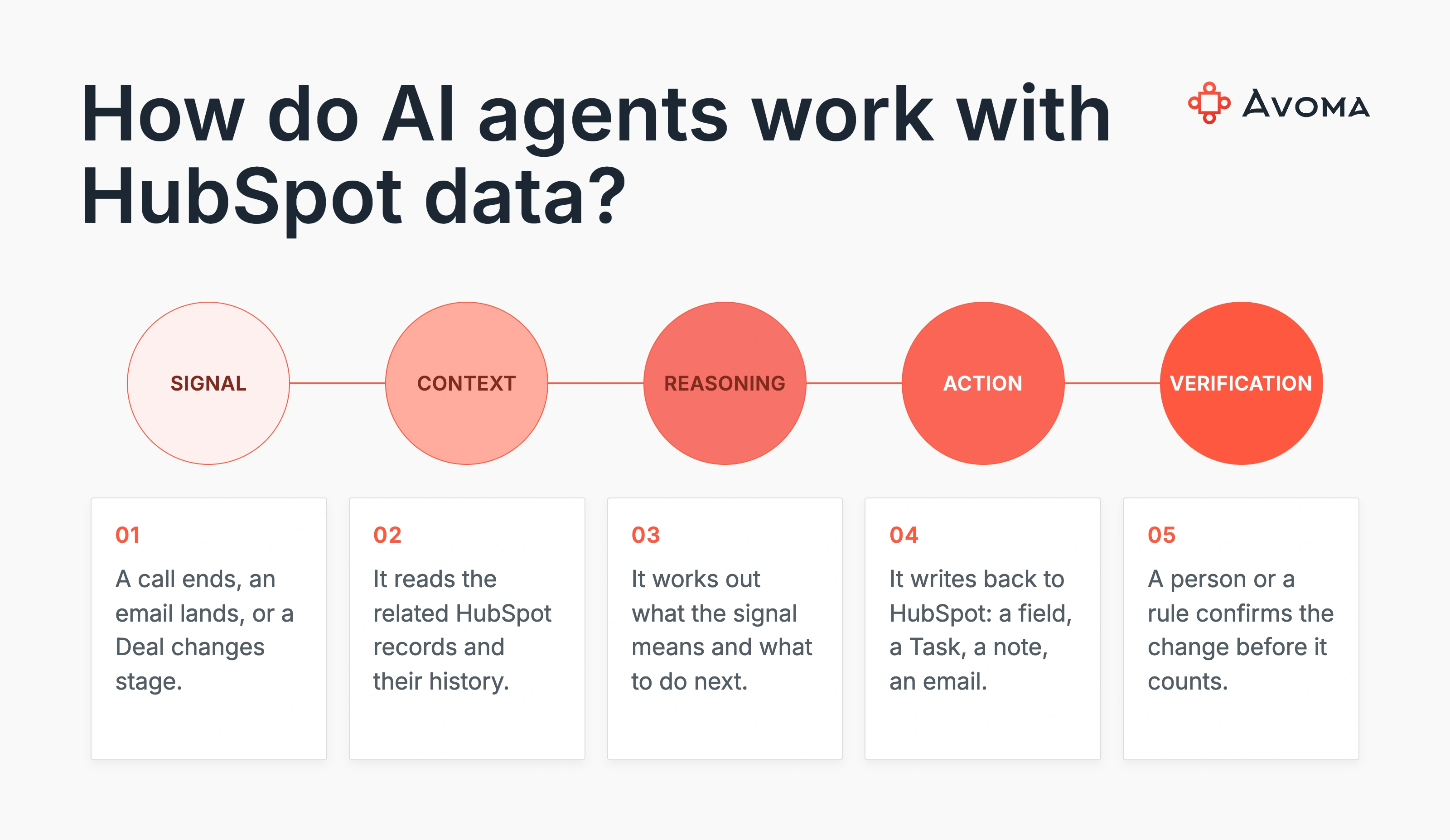
Whether an agent can do a specific job well depends on 5 things: What tells it there's work to do, what it needs to understand the situation, what judgment the job requires, what it should do, and whether that action needs a person to confirm it first.
| Component | What to ask |
|---|---|
| Signal | What tells the agent there's work to do? |
| Context | What information does it need to understand the situation? |
| Reasoning | What judgment does the job require? |
| Action | What should the agent do? |
| Verification | Can it act on its own, or should someone approve it first? |
Here's how that plays out on a real deal.
- Signal: A new customer conversation just happened.
- Context: HubSpot's deal record says negotiation stage, $120,000, closing September 30, champion identified. The conversation reveals a procurement objection, a legal blocker nobody logged, no economic buyer on the call, and no next meeting booked.
- Reasoning: Does this change the state of the deal enough to matter? Given a stalled legal review and a missing economic buyer, most likely yes.
- Action: The agent could capture the objection, create a follow-up task, flag the opportunity for review, or recommend pushing the close date.
- Verification: Flagging the opportunity and capturing the objection can happen on their own. Changing the close date on a $120,000 forecasted deal should go to a person first.
CRM data tells the agent what's been recorded. Customer interactions tell it what's happening. An agent with full HubSpot access but no visibility into the conversation only ever sees half the deal, and it's usually the stale half.
HubSpot's CRM is the system of record. A HubSpot AI agent earns its place by closing the loop as a system of action, writing what it finds back into the record instead of leaving that step to a person.
Expert Insight: In conversations with RevOps and CS teams running HubSpot's native agents, the same pattern shows up repeatedly: Agent output tracks with how complete the HubSpot data is. When conversation details never make it into the CRM, the agent has nothing to reason over.
The quality of any agent's action depends on the context that specific job requires, not on how much CRM access it's been granted. If your team is already hitting that gap with HubSpot's native agents, that's the problem Avoma is built to solve: Turning what gets said on a call into structured HubSpot context, before an agent, HubSpot's or anyone else's, has to guess.
With context covered, the remaining question is how much room to give an agent to act on what it finds.
How much autonomy should you give a HubSpot AI agent?
Once an agent has the right context for a job, the next question is how much you let it do without a person in the loop.
| Level | Agent role | Example |
|---|---|---|
| Read | Retrieve information | Find opportunities without a next step |
| Recommend | Suggest an action | Flag a deal for review |
| Draft | Prepare work | Draft a follow-up email |
| Write | Modify the system | Update a CRM property |
| Execute | Complete an action | Send a customer communication |
Match autonomy to confidence, business impact, and reversibility. An internal note is low consequence and reverses cleanly. Changing the forecast category on a $500,000 deal doesn't.
3 failure modes show up repeatedly:
- Incomplete context. The agent acts on stale CRM information because nobody fed it the conversation that would have changed the answer.
- Ambiguous context. A buyer says "September might be difficult," and that gets read as a confirmed slip, when the buyer hasn't committed to a new date at all.
- Excessive permission. The agent reads the situation correctly and still takes an action it shouldn't have been authorized to take on its own.
That's what teams already running agents inside HubSpot ask about most: the ability to turn specific actions on or off, per user or per object, so a Write-level action doesn't happen with Execute-level trust by default.
Too little, and the agent is just a research tool nobody acts on faster. Too much, and you're cleaning up bad CRM data instead of avoiding it. Which kind of agent gives you that level of control is the next question.
Should you use a native HubSpot agent, third-party agent, or custom agent?
Once you know the job and the autonomy it needs, the question becomes which kind of agent can deliver it.
| Need | Native HubSpot | Third-party | Custom |
|---|---|---|---|
| Primarily HubSpot workflow | Strong fit | Varies | Strong |
| Context outside HubSpot | Varies | Often useful | Configurable |
| Setup complexity | Lower | Medium | Higher |
| Specialized workflow | Depends on the agent | Often strong | Strong |
| Custom business logic | Varies | Varies | Highest |
- Native HubSpot agents are the fastest path when the job lives entirely inside HubSpot and the native agent's capability already covers it.
- Third-party agents earn their place when the job needs context HubSpot doesn't have on its own: Call recordings, transcripts, email threads, or signals from other GTM tools. Often this means feeding a native agent better data instead of replacing it.
- Custom agents, built through HubSpot's Agent Builder or Breeze Studio, make sense when the workflow is specific enough to your business that neither option above matches it out of the box.
There's no universal winner here. Start with the job. Identify the context, reasoning, and actions it requires, then choose the agent capable of completing that loop.
How to choose your first HubSpot AI agent workflow
The job to be done behind all of this comes down to one thing: Figure out what work you can hand off safely.
Good first workflows tend to share 5 traits: Frequent, time-consuming, low-risk, backed by context the agent can reach, and straightforward to verify. Account research, meeting prep, missing-CRM-information detection, internal summaries, and follow-up drafting all fit that description. A RevOps team piloting agent-driven work usually starts with account research or meeting prep, where the risk is low and the context is already reliably available.
Use more caution with deal stage changes, forecast changes, pricing decisions, record deletion, and anything customer-facing. Those mistakes compound fast.
Before deploying any agent, ask these 5 questions:
- What job are we trying to remove from someone's workload?
- What context does the agent need to do that job?
- Can it reliably access that context today, not in theory?
- What actions should it be allowed to take on its own?
- What's the cost if its reasoning is wrong?
If a workflow scores poorly on questions 3 and 5, whether it can get the context and what happens if it's wrong, start somewhere else first. There will be a next workflow. Getting the first one right is what earns the team's trust in the ones after it.
Summary
Identify the work your team shouldn't be doing by hand, then check whether an agent has the context, the reasoning ability, and the right amount of permission to take it over safely. That's the operating principle this guide has been building toward: The job comes first, the agent second. HubSpot agents are one expression of that wider shift, covered fully in our guide to agentic AI for sales.
Most of the context that decision depends on lives in conversations, not CRM fields. Avoma turns customer conversations into structured HubSpot context your agents, native or otherwise, can act on, before you hand them more control.
Schedule a demo to see how it works with your own HubSpot instance.
Frequently Asked Questions
Yes. HubSpot offers native AI agents inside its Breeze and Agent Hub ecosystem, including agents for prospecting, customer support, CRM data management, and company research. These run on HubSpot's own CRM data and, for some agents, public information sources.
As of 2026, HubSpot's named agents include the Prospecting Agent, Customer Agent, Data Agent, and Company Research Agent, plus Content, Campaign, Nurture, and Revenue agents for marketing and finance work. HubSpot also offers Agent Builder for creating custom agents from CRM data and business logic.
Yes, within limits the user sets. HubSpot's Data Agent can populate custom properties through Smart Properties and workflow actions, and its Prospecting Agent can be set to draft outreach for review or send it without review. Write access depends on how each agent is configured.
Yes. Third-party agents connect to HubSpot through its API and integrations, reading and writing CRM data alongside other sources like call recordings, email, or external research tools, depending on what the vendor supports.
Yes. HubSpot's Agent Builder, accessed through Breeze Studio, lets Super Admins and users with Agent Builder permission create custom agents from CRM data and business logic without writing code, for workflows the native agents don't cover.


Dive into Our Latest
Avoma Insights.



What's stopping you from turning every conversation into actionable insights?


