
The 6 best sales workflow automation tools (and who they're best for)

Table of Contents:
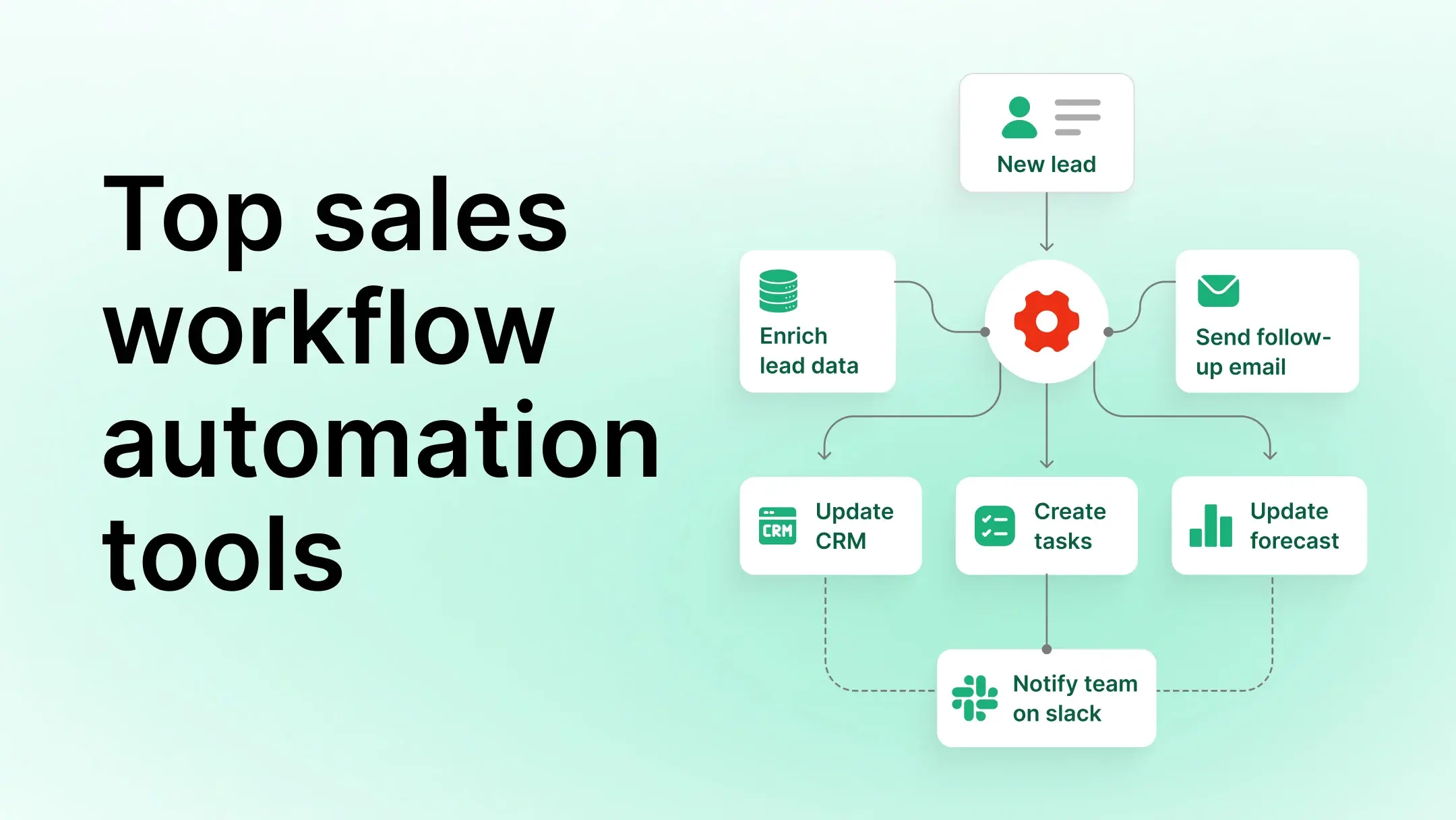
Sales workflow automation tools connect the steps most revenue teams still handle manually. After a customer meeting, a workflow can generate notes, extract action items, assign tasks, update the CRM, and notify stakeholders as one coordinated sequence. Sales workflow automation connects multiple actions into a process that runs based on predefined triggers and rules. Instead of automating a single task, it automates the full sequence across people, systems, and stages of the sales cycle.
This guide covers six sales workflow automation tools, from CRM-native workflows to AI-powered intelligence pipelines.
Key takeaways
- Sales workflow automation connects repeatable sales tasks into a coordinated process with multiple tools and connectors.
- CRM-native: Salesforce Flow for Salesforce teams, HubSpot Workflows for HubSpot teams. Start here before adding external tools.
- Cross-functional and multi-department workflows: Workato handles complex approvals and handoffs across teams.
- Cross-application integrations: Zapier and Make both handle multi-step workflows. Make supports more conditional logic for complex scenarios.
- AI-driven signal routing: Gumloop analyzes unstructured inputs and routes insights based on AI classification.
- Conversation data layer: Avoma captures meeting conversations and feeds structured outputs to workflow tools, so automation responds to deal reality rather than CRM fields.
What is the difference between sales automation and sales workflow automation?
Sales automation and sales workflow automation are related but serve different purposes. Sales automation handles individual tasks: generating meeting notes, sending follow-up emails, or updating a CRM field. Sales workflow automation connects those tasks into an end-to-end process that moves a deal or customer from one stage to the next.
The distinction matters when selecting tools. A sales automation tool handles a task. A workflow automation platform handles the process that task belongs to, including who owns the next step, which systems need to update, and when to escalate.
How we evaluated these tools
The six sales workflow automation tools in this guide were selected because they cover distinct parts of the sales workflow, from CRM-native processes to AI-driven signal routing. No two solve the same problem, which means the right choice depends on how your team is structured, which systems you already use, and where manual work creates the most friction.
The five criteria below reflect what most teams underweight when evaluating workflow automation tools.
Workflow coverage
Can the tool automate common sales workflows such as lead routing, opportunity management, follow-ups, approvals, and customer handoffs?
Integration ecosystem
How well does it connect with CRMs, communication platforms, project management tools, and other business systems?
Automation flexibility
Does it support simple automations, complex multi-step workflows, or both?
AI capabilities
Does the platform support AI-powered workflow creation, decision-making, or intelligent automation?
Ease of adoption
How easy is it for sales and revenue teams to implement and maintain workflows?
1. Salesforce Flow

Salesforce Flow is Salesforce's native workflow automation platform. It lets teams build automated processes directly inside the CRM, covering lead management, opportunity progression, approvals, notifications, and record updates without relying on external tools.
Because it operates within Salesforce, it accesses CRM data without a middleware layer. It fits organizations that manage most of their pipeline management inside the Salesforce ecosystem.
Best for: CRM and opportunity workflows
Key sales workflows:
- Lead assignment and routing
- Opportunity stage management
- Approval processes
- Forecast workflows
- Account management workflows
Workflow example: Opportunity stage automation
When a rep updates an opportunity to "Proposal sent," Salesforce Flow creates a follow-up task for the rep and notifies the sales manager. The stage change triggers the entire sequence without the rep coordinating next steps.
Pricing: Salesforce includes Flow with all plans. Automation capabilities depend on your edition. Enterprise, Performance, and Unlimited editions include unlimited Flow automation. Professional edition supports a limited number of flows.
2. HubSpot Workflows
HubSpot Workflows helps sales and marketing teams automate processes across the customer lifecycle. Built into HubSpot, it handles lead nurturing, lifecycle stage updates, follow-ups, and internal notifications.
Its native CRM integration and visual workflow builder make it a practical option for growing sales teams that want workflow automation without significant implementation effort.
Best for: Lead lifecycle and follow-up workflows
Key sales workflows:
- Lead qualification and routing
- Lead nurturing sequences
- Lifecycle stage management
- Follow-up automation
- Internal notifications
Workflow example: Lead qualification and routing workflow
When a lead submits a demo request, HubSpot scores the lead, assigns ownership based on territory or defined criteria, and creates follow-up tasks for the assigned rep. The rep receives a qualified lead with a task ready for action.
Pricing: HubSpot offers automation workflows on Professional and Enterprise plans.
3. Workato

Workato handles workflows that cross departmental lines. Rather than focusing on CRM automation, it connects sales processes with finance, legal, security, customer success, and operations teams. This makes it well suited for complex sales engagement motions that require multi-stakeholder approvals or cross-system handoffs.
Best for: Revenue operations and cross-functional sales workflows
Key sales workflows:
- Security review workflows
- Legal approval routing
- Deal desk processes
- Customer handoffs
- Revenue operations workflows
Workflow example: Security review request workflow
A prospect requests a security review before moving forward with a purchase. Workato creates a security review ticket, notifies the security team, creates follow-up tasks for the account executive, and tracks progress across systems until the review closes. The sales rep handles no manual coordination between teams during this process.
Pricing: Custom, usage-based pricing.
4. Zapier
Zapier connects thousands of applications and lets sales teams automate workflows without writing code. It fits teams that need to connect CRM, documentation, communication, and project management tools that don't have native integrations with each other. Its broad integration library makes it one of the most accessible workflow automation platforms for revenue teams.
Best for: Cross-application sales workflows
Key sales workflows:
- Meeting documentation
- Action item management
- CRM updates
- Sales notifications
- Task creation across tools
Meeting documentation workflow with Avoma
Customer meeting ends → Avoma generates meeting summary, notes, and key decisions → Zapier creates a Notion page or Google Doc → Documentation is shared with the team.
This workflow eliminates manual note transfer and ensures customer conversations are documented in the systems teams already use for knowledge management and collaboration. Teams that want CRM automation alongside documentation can connect both through Zapier, so the same trigger that documents the meeting also updates the relevant CRM fields.
Action item management workflow with Avoma
Customer meeting → Avoma extracts action items and owners → Zapier creates tasks in Asana or Notion→ Owners receive assignments.
This workflow ensures next steps discussed during meetings become trackable tasks without rep involvement.
Pricing: Free plan includes 100 tasks/month. Paid plans start at $19.99/month (billed annually).
5. Make

Make is a visual workflow automation platform for building multi-step processes across applications. Its visual builder gives teams flexibility for workflows that require branching conditions, data transformations, or coordinated actions across several systems at once.
Best for: Multi-step and conditional sales process workflows
Key sales workflows:
- Opportunity management workflows
- Lead enrichment workflows
- Customer onboarding workflows
- Multi-system sales processes
- Notification and escalation workflows
Workflow example: Customer onboarding handoff workflow
When an opportunity is marked closed-won, Make creates onboarding records, assigns a customer success manager, schedules kickoff tasks, and updates customer information across connected systems. The handoff from sales to customer success completes without the rep touching those steps one by one.
Pricing: Free plan includes 1,000 credits/month. Paid plans start at $9/month.
6. Gumloop
Gumloop is an AI-powered workflow automation platform built for workflows that need to analyze information, make decisions, and trigger actions using AI. Unlike traditional automation tools that move data between applications, Gumloop focuses on AI-driven workflow execution. This makes it a fit for sales teams that want to automate research, signal extraction, classification, and insight routing.
Best for: AI-powered sales workflows
Key sales workflows:
- AI-powered research workflows
- Lead enrichment
- Signal extraction and classification
- Workflow decision-making
- Insight routing to internal teams
Sales call intelligence workflow with Avoma
Customer meeting → Avoma extracts product feedback, competitor mentions, and customer requests → Gumloop categorizes and routes the insights → Product, sales, and marketing teams receive relevant Slack notifications.
This workflow turns customer conversations into actionable insights, helping teams respond faster to market feedback and competitive trends without reviewing meeting recordings one by one. Teams using sales intelligence platforms benefit from this combination because it moves captured insights into action.
Pricing: Free plan available. Paid plans start at $37/month.
Quick comparison: which tool fits your use case
Why conversation data makes sales workflows more effective
Sales workflow automation is reactive by design. It waits for a signal that already exists in your systems: a deal stage changes, a form is submitted, a task is marked complete. The process executes correctly, but it can only act on what has already been recorded.
The most valuable sales signals do not start in a CRM. A prospect's objection, a competitor mention, a budget confirmation, a change in the buying committee — these surface in conversations. By the time they reach a system, they are delayed, incomplete, or filtered through a rep's interpretation of what happened.
This means most automation stacks are working from a version of the deal that is already out of date.
Avoma captures signals at the source by recording, transcribing, and analyzing sales calls, then pushing structured outputs such as notes, action items, and CRM fields to connected systems. Automation can then respond to what a buyer said in the meeting, not what a rep remembered to log afterward
Book a demo with Avoma to see how it fits into your existing automation stack.
Frequently Asked Questions
Sales workflow automation connects individual sales tasks, such as CRM updates, task assignment, and follow-up sequences, into a coordinated process that runs based on predefined triggers and rules. It manages the full sequence of steps that move a deal from one stage to the next, not just a single task in isolation.
Common examples include: a deal stage change that triggers a follow-up task and notifies the sales manager; a closed-won opportunity that creates an onboarding record and assigns a customer success manager; a customer meeting that generates notes, extracts action items, updates the CRM, and creates tasks in a project management tool — all without rep involvement.
Avoma records, transcribes, and analyzes sales calls, then pushes structured outputs such as meeting notes, action items, and CRM fields to connected systems. Zapier can use those outputs to create tasks and update documentation. Gumloop can classify signals like competitor mentions and route them to the right teams. Avoma integrates natively with both Salesforce and HubSpot.




What's stopping you from turning every conversation into actionable insights?


